Meilisearch on a Hugo-based website
Some years ago I added a basic search to my website. It was rather crude and even primitive, but it was better than nothing. I did want to use a proper search engine already back then, but the variety of available solutions wasn’t overwhelming, and none looked attractive enough to invest some effort into. As years passed by, more search engines became available, and out of the new ones I’ve now settled with Meilisearch.
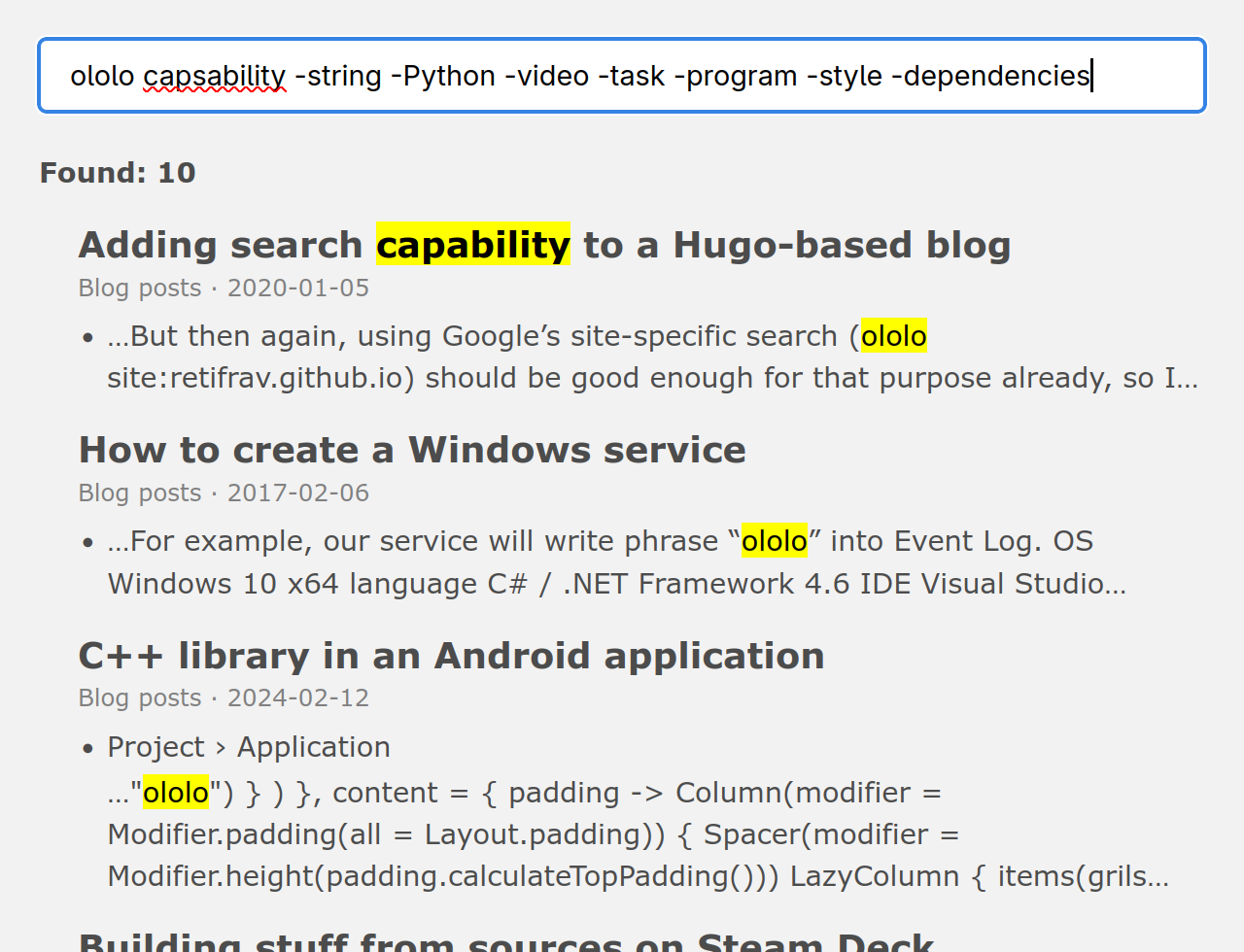
It extended the search functionality on my website with very useful features such as actually searching the entire contents, ranking the results, ability to exclude certain keywords and some more. At the same time, I did not get rid of the previous search implementation either, it is still available and works as a fallback.
Why basic search isn’t enough
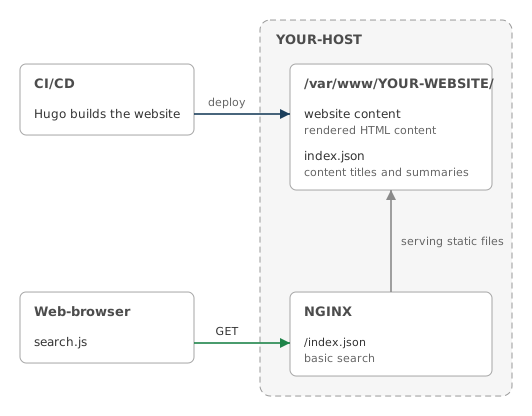
The disadvantages of my current (now previous) implementation were very clear from the start:
- can only find what’s inside
index.json, meaning that the entire website contents need to be there, and the more content you have, the biggerindex.jsonis (and it is fetched on every search requests), which is why I had to reduce it to just summaries of pages, which naturally meant that nothing else was searchable; - no ranking/ordering of the search results, so any match has the same “weight” as others;
- if the search query contains more than one keyword, it will only find places where those words are placed strictly next to each other (with no other words between them).
What does Meilisearch have
Being a proper search engine, Meilisearch works with indexed content, and for me that alone was already the biggest win (as my summaries-only search was borderline useless). But there is more:
- full-text search by keywords but also semantic search or a combination of the two (haven’t tried that yet);
- prefix search (or partial matches, which I kinda had already), exact matches, negative search, stop words and dictionaries;
- ranking, which is configurable too;
- typo tolerance, also configurable;
- embedders or so-called vector-search;
- MCP integration for LLM agents;
- some more features that I have not read about yet.
Alternatives
There are several other search engines available, out of which I was also considering the following:
- Typesense - seems to be the next best thing after Meilisearch, or maybe even a better one, but apparently it keeps everything in RAM, of which I don’t have a lot on the VPS where my website is hosted, so that sounded concerning. Also, by the looks of it, the setup/configuration appeared to be more involved;
- Elasticsearch/OpenSearch - fucking Java again, and right from the start it requires more than 1 GB of RAM (recommended 8 GB!), so hell no. Other than that, Elasticsearch is actually what I was looking at already all those years ago;
- Pagefind - this one looks like a (much) better alternative to my current basic search, and as I understand it might be possible to use it “offline” too (self-contained bundles / documentation packages).
If you are brave enough to try cloud-based solutions without self-hosting options, then there are even more alternatives out there, but I didn’t look at those at all.
A bit of drama
It’s nothing serious and probably not even worth bringing up, but it jumped out at me a bit the way Meilisearch people (although it could be just some random unaffiliated users) push their product for example in this thread:
I hate the way typesense are doing their « hybrid search » […] I tried to explain them in an issue that in this state it was pretty much useless […] ton a justification instead of just admitting that this strategy is bad
But guess what, meilisearch may need some fine-tuning around your model etc, but in the end it gives you the tool to make a proper hybrid search
You should try Meilisearch then, you’ll be astonished by the quality of the results and the ease of setup
You know that Meilisearch is the way to go, right?
One of those comments was a direct reply to someone simply saying that he liked Typesense (which is one of the alternatives):
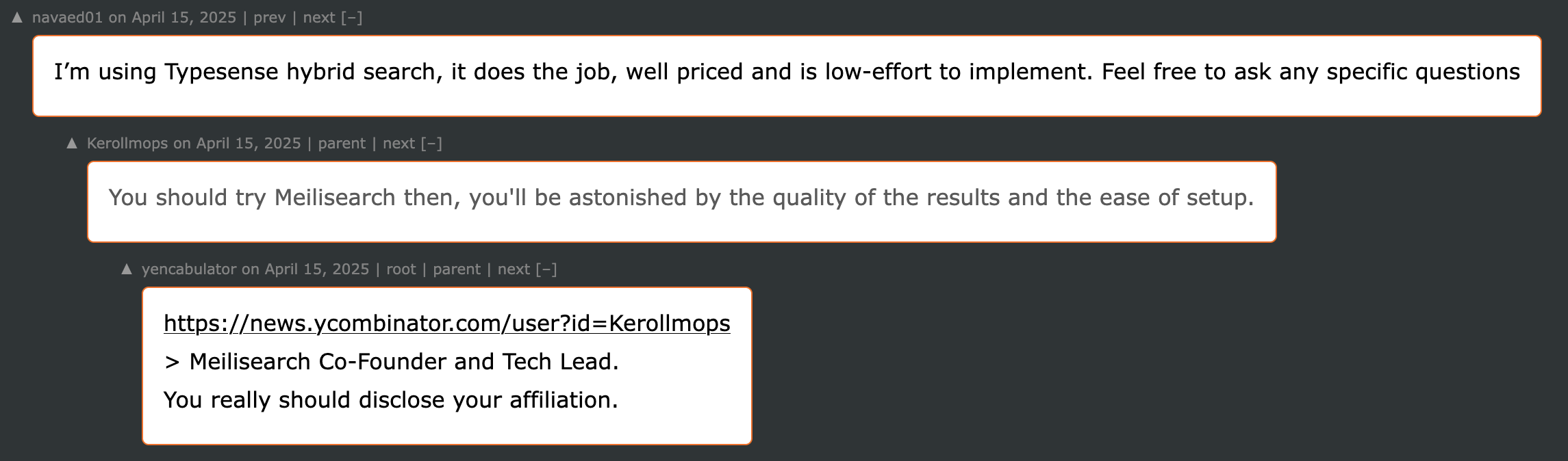
To be fair, this is the only such thread that I have stumbled upon so far. And regardless, I did like Meilisearch myself, it really is a great product, so their promotional strategies don’t bother me all that much.
Meilisearch as the main search
Architecture
To reiterate, this is how the so-to-say “architecture” of my basic search looked like up until now:
In order to add a search engine into that, specifically Meilisearch, one would need to do the following:
- Set up the Meilisearch instance to run somewhere, probably on the same server where the website is hosted;
- Index the website content in the format that Meilisearch understands and save it in Meilisearch database;
- Hugo can help with that via custom output format/layout, but you will still need to create a special indexing script for creating search index records out of that output;
- Both Hugo and the indexing script need to be executed somewhere by someone, which implies having CI/CD (already present in my current setup) for running those tasks (unless you hate yourself and do all that manually);
- Implement the searching functionality on your website - sending requests to the Meilisearch instance and showing results to the user;
- Everything can be done with JavaScript, so there is still no need to involve a backend, and your website remains to be a collection of static HTML pages generated by Hugo;
- Optionally implement a simpler fallback search (conveniently, that I already have with my basic search).
- Since it isn’t a good idea to expose Meilisearch port to the wild internet (especially that there will be an API key involved), you should probably reverse-proxy search requests with your current web-server (the very same NGINX that serves the website itself).
So then the architecture diagram changes accordingly:
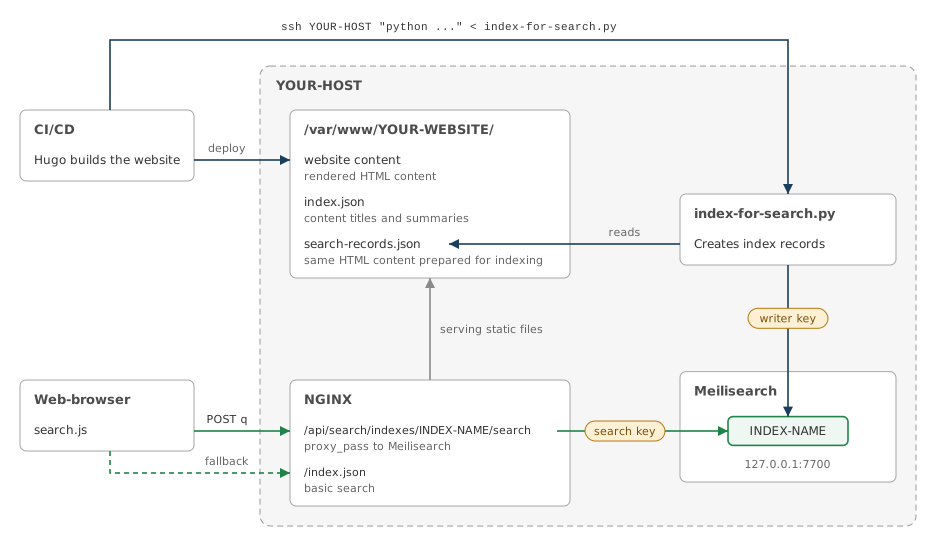
And as far as my understanding goes, replacing Meilisearch with a different engine shouldn’t cause me a lot of troubles, because they all(?) likely share the same general idea. Of course, the indexing script will require certain engine-specific adjustments, but other than that it does not feel like I am getting myself vendor-locked to Meilisearch.
Installation and configuration
Meilisearch itself is a single self-contained executable, and there is also a pre-made Docker image for running it in a container, so the installation procedure is rather uncomplicated.
Docker container
The container will be running from a non-root ubuntu user with a rootless Docker, so check whether that user has lingering enabled:
$ loginctl show-user ubuntu -p Linger
Linger=yes
The compose file is in /home/ubuntu/meili/compose.yaml:
name: meilisearch

services:
  meilisearch:
    image: getmeili/meilisearch:v1.54.3
    container_name: meilisearch
    restart: unless-stopped
    ports: ["127.0.0.1:7700:7700"]
    env_file: ./meili.env
    environment:
      MEILI_ENV: production
      MEILI_NO_ANALYTICS: "true"
    volumes: ["meili_data:/meili_data"]

volumes:
  meili_data:
The /home/ubuntu/meili/meili.env (chmod 600) contains MEILI_MASTER_KEY - a random secret value:
MEILI_MASTER_KEY=ANY-RANDOM-16-SYMBOLS-STRING-HERE-OR-LONGER
Next thing to note is that I decided to use a named volume for the data persistence, but it should also work fine with a bind mount. Also there is no need to set the timezone for container, as the image has no tzdata out of the box and operates in UTC.
As for analytics/telemetry, in general I wouldn’t mind sharing anonymized data, especially for a product that I got to use free of charge, but Meilisearch collects a tremendous amount of data with no option to select what to share (like how it is done in Home Assistant), so I disabled it.
The 7700 port is not exposed to the internet (binds to localhost), as only the web-server (NGINX) needs to communicate with it (reverse-proxy the search requests).
Creating a container is the usual:
# if you are root now, use the non-root user shell
$ machinectl shell ubuntu@

# that should expand to /home/ubuntu/meili/
$ cd ~/meili/
$ docker compose up -d
And for updating the container image, pin the new version in ./compose.yaml and then:
$ docker compose pull && docker compose up -d
To verify that everything was set up correctly:
# a helper variable
$ M=http://127.0.0.1:7700

$ curl -s "$M/health" -w "\n"
{"status":"available"}

# this should return 401, which means that authentication is enforced
$ curl -s -o /dev/null -w '%{http_code}\n' "$M/keys"
401

# the port should only be available from localhost
$ ss -ltn | grep 7700
LISTEN 0      4096       127.0.0.1:7700      0.0.0.0:*

$ docker compose logs meilisearch | grep -i -E 'environment|telemetry'
meilisearch  | Environment:        "production"
meilisearch  | Anonymous telemetry:    "Disabled"
API keys
Using Meilisearch API requires certain API keys to be created, a minimum set of two:
- Indexing/writing key - for creating search indexes;
- Searching/reading key - for performing the actual search.
Actually, once the master key is set, Meilisearch seems to create some default keys itself, but I still prefer to issue my own keys with an explicit scope. I should probably delete the defaults ones too.
The keys are created by sending requests to Meilisearch API using MEILI_MASTER_KEY (the one from /home/ubuntu/meili/meili.env). Aside from those minimally required two keys, later you might need to create some more, so here’s a convenience function for issuing a new key:
# assuming you are still in that non-root user shell
$ cd ~/meili/

# load MEILI_MASTER_KEY without typing it, so it won't get saved in commands history
$ set -a; . ./meili.env; set +a

# that helper variable again
$ M=http://127.0.0.1:7700

# a convenience function for issuing API keys
$ mkkey() { curl -s -X POST "$M/keys" \
    -H "Authorization: Bearer $MEILI_MASTER_KEY" \
    -H 'Content-Type: application/json' --data "$1" \
    | python -c 'import json,sys; r=json.load(sys.stdin); print(r.get("key") or r)'
}

# check that it is a function
$ type mkkey
mkkey is a function
Indexing key
First is the index writing key:
$ mkkey '{"name":"YOUR-WEBSITE-indexer","description":"Indexing/writing key for the indexing step over SSH","actions":["indexes.create","indexes.delete","indexes.get","indexes.swap","settings.update","documents.add","tasks.get"],"indexes":["*"],"expiresAt":null}'
ISSUED-API-KEY-FOR-INDEXING
This key is meant to be used for creating index records in Meilisearch with the indexing script, and in my setup that script is run via SSH by a CI/CD build agent, for which I have a separate user account on the server where the website is hosted. So I put that key into /home/buildbot/YOUR-WEBSITE-index-writer.key file:
$ echo 'ISSUED-API-KEY-FOR-INDEXING' \
    | sudo -u buildbot tee /home/buildbot/YOUR-WEBSITE-index-writer.key > /dev/null
$ sudo chmod 600 /home/buildbot/YOUR-WEBSITE-index-writer.key
…although you should probably do this differently for the same reason of keeping the key out of commands history.
Searching key
Second is the search-only reading key:
$ mkkey '{"name":"YOUR-WEBSITE-search","description":"Searching/reading key for querying /api/search","actions":["search"],"indexes":["*"],"expiresAt":null}'
ISSUED-API-KEY-FOR-SEARCHING
This key goes into NGINX config for the website, something like /etc/nginx/sites-enabled/YOUR-WEBSITE:
# ...

location = /api/search/indexes/INDEX-NAME/search {
    limit_except POST { deny all; }

    # up to 20 requests above the rate are let through right away
    # (instead of being delayed, which would make search-as-you-type lag),
    # anything more gets 429
    #limit_req zone=YOUR-WEBSITE_search burst=20 nodelay;
    #limit_req_status 429;

    client_max_body_size 4k;
    proxy_pass http://127.0.0.1:7700/indexes/INDEX-NAME/search;
    proxy_set_header Authorization "Bearer ISSUED-API-KEY-FOR-SEARCHING";
}
location /api/search/ {
    return 404;
}

location / {
    try_files $uri $uri/ =404;
}

# ...
For the rate limiting to work you will also need to add the following inside http { ... } block in the main /etc/nginx/nginx.conf:
# rate limiting
limit_req_zone $binary_remote_addr zone=YOUR-WEBSITE_search:10m rate=10r/s;
…and then uncomment the limit_req lines in the website config.
Either way, once NGINX is restarted, you should be able to test the requests proxying by running this from any other host:
$ curl -s -X POST https://YOUR-WEBSITE/api/search/indexes/INDEX-NAME/search \
    -H 'Content-Type: application/json' \
    --data '{"q":"ololo"}' -w "\n" \
    | jq
{
  "message": "Index `INDEX-NAME` not found.",
  "code": "index_not_found",
  "type": "invalid_request",
  "link": "https://docs.meilisearch.com/errors#index_not_found"
}
The index not being found is an expected result, since nothing has been indexed yet, so this only verifies that Meilisearch endpoint is reachable and that NGINX does the proxying. And if the API key for searching was incorrect, then the response would be this instead:
{
  "message": "The provided API key is invalid.",
  "code": "invalid_api_key",
  "type": "auth",
  "link": "https://docs.meilisearch.com/errors#invalid_api_key"
}
The keys UIDs
The API keys are identified by UIDs, which are random version-4 UUID values generated during the key creation. You can generate a UID beforehand yourself (with uuidgen -r) and pass it to mkkey function as a part of the JSON payload (there will be an example a bit later), but it is probably better/easier to just get the auto-generated values after the keys have been created/issued:
$ curl -s "$M/keys" -H "Authorization: Bearer $MEILI_MASTER_KEY" \
    | jq '.results[] | {name, uid, actions, indexes}'
{
  "name": "YOUR-WEBSITE-indexer",
  "uid": "INDEXER-KEY-UID-HERE",
  "actions": [
    "indexes.create",
    "indexes.delete",
    "indexes.get",
    "indexes.swap",
    "settings.update",
    "documents.add",
    "tasks.get"
  ],
  "indexes": [
    "*"
  ]
}
{
  "name": "YOUR-WEBSITE-search",
  "uid": "SEARCH-KEY-UID-HERE",
  "actions": [
    "search"
  ],
  "indexes": [
    "*"
  ]
}
{
  "...": "..."
}
It is not very important to know/save those UIDs, but it does matter for reproducibility. An API key value is derived from UID and master key (MEILI_MASTER_KEY), and the same master key and the same UID will produce the same API key value. This means that you will be able to recreate the exact same API keys after losing/deleting the Meilisearch database, so you won’t need to update the keys saved in /home/buildbot/YOUR-WEBSITE-index-writer.key, or in the NGINX config, or in your LLM agent or wherever else you might be calling the Meilisearch API from.
When/if it will come to a point of re-creating an existing API key in a fresh Meilisearch instance, you’ll just need to add the UID value to the issuing command:
$ mkkey '{"uid":"SEARCH-KEY-UID-HERE","name":"YOUR-WEBSITE-search","...":"..."}'
ISSUED-API-KEY-FOR-SEARCHING
and it will produce the same API key value as the one you already have in your configs or wherever.
So, aside from saving the MEILI_MASTER_KEY in a password manager / secrets storage, it is also recommended to save the keys UIDs. Those are less secret, and you can probably even store them in plain text somewhere (documentation, wiki, etc).
Hugo integration
New custom output and updated layout
Hugo can help with the indexing task via a custom output - same idea as how it is done with index.json, but more advanced now. The output format will be described in .../layouts/_default/index.searchrecords.json:
{{- /*
    Source for the Meilisearch index. Covers every listed page with content (pages with
    `build: list: never` are not in `site.Pages`).
*/ -}}
{{- if not site.Params.search.index -}}
    {{- errorf "The SearchRecords output format is enabled, but params.search.index (the Meilisearch index uid) is not set" -}}
{{- end -}}
{{- $pages := slice -}}
{{- range where site.Pages "Kind" "in" (slice "home" "section" "page") -}}
    {{- $content := .Content -}}
    {{- if strings.TrimSpace (plainify $content) -}}
        {{- $breadcrumbs := slice -}}
        {{- range .Ancestors.Reverse -}}
            {{- if not .IsHome -}}
                {{- $breadcrumbs = $breadcrumbs | append .Title -}}
            {{- end -}}
        {{- end -}}
        {{- $pages = $pages | append (dict
            "path" .RelPermalink
            "title" .Title
            "section" .Section
            "date" (cond .Date.IsZero "" (.Date.Format "2006-01-02"))
            "breadcrumbs" $breadcrumbs
            "tags" (.Params.tags | default .Params.newstags | default slice)
            "content" $content
        ) -}}
    {{- end -}}
{{- end -}}
{{- jsonify (dict "noHTMLEscape" true) (dict
    "format" 1
    "index" (string site.Params.search.index)
    "pages" $pages
) -}}
As you can see, it takes the .Content part, which is the rendered HTML body without layout parts around it (navigation, header, footer, etc). I do realize that it might seem counter-intuitive to index the rendered HTML instead of the original Markdown files, but actually the rendered content is a more reliable source for building a search index:
- HTML parsing is a more or less common task with existing standard implementations (such as html.parser in Python), but processing Markdown the same way as Hugo does it would mean reimplementing Hugo’s renderer (with shortcodes too) to produce the matching output;
- code listings might originate from Markdown fences (three backticks) or from highlight shortcode, and a non-Hugo parser could process a
#comment line inside ahighlightblock as a<h1>heading; - search results link to the sections on pages via anchors that Hugo assigned to the headings, so an indexer working with raw Markdown files would need to know how Hugo does it in order to produce matching IDs;
- there are likely more caveats like this, no point in listing all of them;
- code listings might originate from Markdown fences (three backticks) or from highlight shortcode, and a non-Hugo parser could process a
- unparsed/unprocessed Markdown would bring its own syntax into the index (and so into the search results) - the bold/italic/etc markup, bracketed links, front matter, shortcodes (which would not get evaluated, by the way, as noted in the first point) and so on - all that would need to be converted into the plain text;
- I have raw HTML inclusions in my Markdown sources (some tables and other custom-styled things), and that HTML needs to get stripped before indexing, so I would still need to do some pre-processing for my raw Markdown files anyway.
To enable the new output, config.toml gets this:
[params.search]
    # where the search requests go (NGINX forwards this to Meilisearch),
    # and an empty value here means using only the basic index.json search
    endpoint = "/api/search/"
    # Meilisearch index name
    index = "INDEX-NAME"

# ...

[outputs]
    # - `HTML` - the actual website contents
    # - `RSS` - RSS feeds, duh
    # - `JSON` - basic/fallback search (index.json)
    # - `SearchRecords` - Meilisearch index source (search-records.json)
    home = ["HTML", "RSS", "JSON", "SearchRecords"]

[outputFormats.SearchRecords]
    mediaType = "application/json"
    baseName = "search-records"
    isPlainText = true
    notAlternative = true
and .../layouts/_default/baseof.html gets the following:
{{- with .Site.Params.search.endpoint }}
    <!-- using Meilisearch (with a fallback to basic index.json search without these) -->
    <meta name="searchEndpoint" content="{{ . }}">
    <meta name="searchIndex" content="{{ $.Site.Params.search.index }}">
{{- end }}
Getting a bit more advanced, the INDEX-NAME might not be a forever static value. In my simple case it is indeed a static value because I have only one revision of my website contents - the latest. But for scenarios where you might need to have an index per content revision (such as for documentation in different versions of your SDK/library/etc) the index name might have a dynamic format like SDK_DOCUMENTATION_123, so it would get updated on every new published revision (SDK_DOCUMENTATION_124, SDK_DOCUMENTATION_125 and so on), and every indexing run would create a new Meilisearch index (while in my case I just swap old with new, so there is only ever one). In such a case of several live indexes, trying to search for things within v1.2.4 documentation will get you results from the index that was created for this exact version and not from v1.2.3 or v1.2.5 - and that is mainly the point of stating the index name in the searchIndex meta tag.
Updated search.js
My crude search function has changed quite a lot, but in short what it does now is first it tries to send a query to Meilisearch, and if that fails, then it fallbacks to the basic search (which got some small improvements too).
There are several interesting implementation details in the updated script, such as utilizing AbortController for cancelled search queries and using search “generations” to drop no longer relevant (superseded) results, but it is probably better if you inspect the full script yourself instead of me posting 300+ lines here. The version that I had when I was writing this article is saved separately here, but you can also get the latest version directly from the live website.
Indexing script
So yes, there needs to be something that would index your website content, as Meilisearch itself does not fetch or crawl anything (unless you are using their cloud variant), so data will get into Meilisearch instance only when a script or some other executable will call the API to create an index. Moreover, Meilisearch operates with asynchronous tasks, and to know their status one would also need to poll the API. But even before calling the API, search-records.json file needs to be split into documents, while also splitting long articles into chunks and trying not to tear code blocks into unrelated pieces.
I figured that all of that can be done by a Python script, which I named simply index-for-search.py. Same as with the search.js, I won’t post the entire 600+ lines of it in the article - you can get the full script from here. Also, not gonna lie, I didn’t exactly write it myself, if you know what I mean.
The script is meant to be run by CI/CD build agent over SSH right after the website content (Hugo output) is deployed to server:
$ ssh -o BatchMode=yes -o StrictHostKeyChecking=accept-new buildbot@YOUR-HOST \
    "python - --records /var/www/YOUR-WEBSITE/search-records.json --key-file /home/buildbot/YOUR-WEBSITE-index-writer.key && rm /var/www/YOUR-WEBSITE/search-records.json" \
    < ./scripts/index-for-search.py
If you are going to use TeamCity for that, it would need to be a regular Command Line step (not SSH Exec), and it will also require adding SSH agent build feature with the SSH key for buildbot@YOUR-HOST.
Deleting search-records.json after indexing is optional, and you might even prefer to keep it in case you’ll ever need to re-build the index without running the entire CI/CD chain, but you should be aware that this file is likely to end up being publicly available at https://YOUR-WEBSITE/search-records.json.
Once the script runs and creates the very first index in your Meilisearch instance (on your next updated website deployment), you can check whether it worked or not by sending the same request that was failing with index_not_found earlier:
$ curl -s -X POST https://YOUR-WEBSITE/api/search/indexes/INDEX-NAME/search \
    -H 'Content-Type: application/json' \
    --data '{"q":"ololo"}' -w "\n" \
    | jq
{
  "hits": [
    {
      "url": "/blog/2019/05/26/sdl-imgui/#concatenate-a-string",
      "page_title": "SDL and Dear ImGui, C++ GUI without Qt",
      "hierarchy": [
        "Dealing with C++ without Qt",
        "Concatenate a string"
      ],
      "breadcrumbs": [
        "Blog posts"
      ],
      "content": "In Qt you can form a string like this:\n#include <QString>\n// ...\nQString someString = QString(\"ololo, %1 with %2 words (actually, it's more)\")\n.arg(\"this is a string\")\n.arg(4);\nThere are several ways to do that in C++ without Qt, and I liked the one with ostringstream the most:\n#include <sstream>\n// ...\nstd::ostringstream someStream;\nsomeStream << \"ololo, \" << \"this is a string\" << \" with \" << 4 << \" words (actually, it's more)\";\nstd::string someString = someStream.str();",
      "section": "blog",
      "date": "2019-05-26",
      "tags": [
        "cpp",
        "cmake"
      ],
      "chunk": 0
    },
    {
        "...": "..."
    }
  ],
  "query": "ololo",
  "processingTimeMs": 46,
  "limit": 20,
  "offset": 0,
  "estimatedTotalHits": 43,
  "requestUid": "01a144e8-7973-72d1-b483-969c7869c434"
}
And using the search input field on your website pages should now return results from Meilisearch.
Basic search as a fallback
As I mentioned, the basic search didn’t go anywhere, and it now serves as a fallback when the main search becomes unavailable for some reason (Meilisearch instance is down, NGINX rate-limiting kicked in, etc).
The implementation is in the same search.js, and even though it got some small improvements (mostly fixes for old problems, such as escaping regular expressions, so these no longer work), it doesn’t do anything new - still a very unintelligent match() for titles and summaries of the articles, so about 95% of the website content is unsearchable, as I have already explained over there.
It does print a warning into web-browser console when the fallback happens:
Meilisearch search is not available (404, no details), falling back to the basic search
but I should probably also show some indication of that in the search results.
Other features
Meilisearch has several additional experimental features, all of which are disabled by default. You can check the current state with this query:
$ curl -s "$M/experimental-features/" \
    -H "Authorization: Bearer $MEILI_MASTER_KEY" \
    -H 'Content-Type: application/json' \
    -w "\n" | jq
{
  "metrics": false,
  "logsRoute": false,
  "tasksStreamingRoute": false,
  "editDocumentsByFunction": false,
  "containsFilter": false,
  "dynamicSearchRules": false,
  "network": false,
  "getTaskDocumentsRoute": false,
  "taskQueueCompactionRoute": false,
  "compositeEmbedders": false,
  "chatCompletions": false,
  "multimodal": false,
  "foreignKeys": false,
  "disableDocumentsFetchQueue": false,
  "legacySearch": false,
  "renderRoute": false,
  "mcpRoute": false
}
My output if from Meilisearch version 1.54.3, and it is likely to change in newer versions.
Prometheus metrics
Conveniently, Meilisearch instance supports publishing Prometheus metrics. First you need to enable it:
$ curl -s -X PATCH "$M/experimental-features/" \
    -H "Authorization: Bearer $MEILI_MASTER_KEY" \
    -H 'Content-Type: application/json' \
    --data '{"metrics": true}' \
    -w "\n" | jq
and then issue a new API key for querying the metrics:
$ mkkey '{"name":"prometheus","description":"Prometheus scraper, metrics only","actions":["metrics.get"],"indexes":["*"],"expiresAt":null}'
ISSUED-API-KEY-FOR-PROMETHEUS
That key goes to your prometheus.yml:
scrape_configs:
  # ...

  - job_name: meilisearch
    scheme: https
    metrics_path: /api/search/metrics
    authorization:
      type: Bearer
      credentials: ISSUED-API-KEY-FOR-PROMETHEUS
    static_configs:
      - targets: ['YOUR-WEBSITE:443']
And then on the host with Meilisearch add this new location to NGINX config (the same config where you have the searching key):
# Meilisearch metrics (Prometheus)
location = /api/search/metrics {
    # you might want to restrict the allowed IPs to your home ISP
    # or wherever your Prometheus will be sending scraping requests from
    #allow 2.32.0.0/12;
    #allow 103.37.6.0/23;
    #deny all;

    limit_except GET { deny all; }
    # if you want to apply rate limiting here too, then `nginx.conf` should get
    # `limit_req_zone $binary_remote_addr zone=YOUR-WEBSITE_prometheus:1m rate=1r/s;`
    #limit_req zone=YOUR-WEBSITE_prometheus burst=5 nodelay;
    #limit_req_status 429;

    # this time NGINX isn't setting the `Authorization` header here,
    # as it is expected to be provided by a client
    proxy_pass http://127.0.0.1:7700/metrics;
}
To check that the Meilisearch metrics endpoint is reachable (after restarting NGINX), try sending requests to it from a different host:
$ curl -s "https://YOUR-WEBSITE/api/search/metrics" \
    -w "\n"
{"message":"The Authorization header is missing. It must use the bearer authorization method.","code":"missing_authorization_header","type":"auth","link":"https://docs.meilisearch.com/errors#missing_authorization_header"}

$ curl -s "https://YOUR-WEBSITE/api/search/metrics" \
    -H "Authorization: Bearer WRONG-API-KEY" \
    -w "\n"
{"message":"The provided API key is invalid.","code":"invalid_api_key","type":"auth","link":"https://docs.meilisearch.com/errors#invalid_api_key"}

$ curl -s "https://YOUR-WEBSITE/api/search/metrics" \
    -H "Authorization: Bearer ISSUED-API-KEY-FOR-PROMETHEUS" \
    -w "\n" | head -6
# HELP meilisearch_db_size_bytes Meilisearch DB Size In Bytes
# TYPE meilisearch_db_size_bytes gauge
meilisearch_db_size_bytes 76771328
# HELP meilisearch_http_requests_total Meilisearch HTTP requests total
# TYPE meilisearch_http_requests_total counter
meilisearch_http_requests_total{method="GET",path="/experimental-features",status="200"} 4
If it’s all good, then your Prometheus scraping should be working too. And of course the collected metrics can be visualized in Grafana:
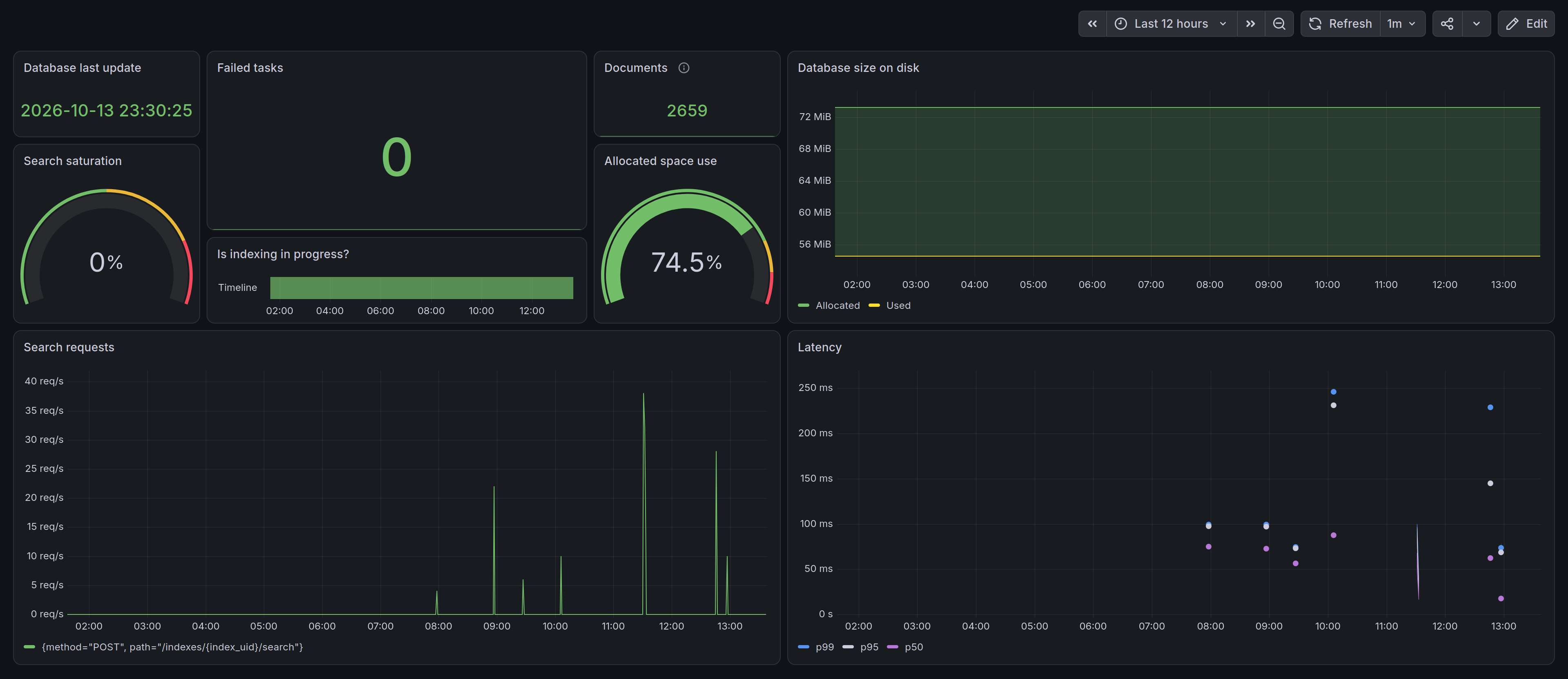
I don’t know yet which metrics are actually worth tracking, so for now I added a small set of what looked interesting to me. If you’d like to use this dashboard as a base for your own, here’s an exported JSON for it.
MCP server
Another nice feature of Meilisearch is an MCP server, which you can add to your LLM agent(s). This feature is also disabled by default, so you need to enable it first:
$ curl -s -X PATCH "$M/experimental-features/" \
    -H "Authorization: Bearer $MEILI_MASTER_KEY" \
    -H 'Content-Type: application/json' \
    --data '{"mcpRoute": true}' \
    -w "\n" | jq
And you will need to issue a yet another API key:
$ mkkey '{"name":"mcp","description":"MCP access for searching","actions":["search","indexes.get","documents.get"],"indexes":["*"],"expiresAt":null}'
ISSUED-API-KEY-FOR-MCP
And of course you’ll need a yet another reverse-proxy location in NGINX:
# Meilisearch MCP
location = /api/search/mcp {
    # same way you might want to restrict the allowed IPs to your home ISP
    # or wherever your LLM agents will be connecting to Meilisearch MCP from
    #allow 2.32.0.0/12;
    #allow 103.37.6.0/23;
    #deny all;

    proxy_pass http://127.0.0.1:7700/mcp;

    # none of these should be needed
    #proxy_set_header Host $host;
    #proxy_set_header X-Forwarded-For $proxy_add_x_forwarded_for;
    #proxy_set_header X-Forwarded-Proto $scheme;

    proxy_http_version 1.1;
    proxy_buffering off;
    proxy_read_timeout 300s;
}
To quickly check that it works you don’t even need an API key yet:
$ curl -sS -X POST "https://YOUR-WEBSITE/api/search/mcp" \
    -H 'Content-Type: application/json' \
    -H 'Accept: application/json, text/event-stream' \
    --data '{
      "jsonrpc": "2.0",
      "id": 1,
      "method": "server/discover",
      "params": {
        "_meta": {
          "io.modelcontextprotocol/protocolVersion": "2026-07-28",
          "io.modelcontextprotocol/clientInfo": { "name": "curl-test", "version": "1.0.0" }
        }
      }
    }' -w "\n" | jq
{
  "jsonrpc": "2.0",
  "id": 1,
  "result": {
    "resultType": "complete",
    "supportedVersions": [
      "2026-07-28"
    ],
    "_meta": {
      "io.modelcontextprotocol/serverInfo": {
        "name": "Meilisearch",
        "version": "1.54.3"
      }
    },
    "capabilities": {
      "tools": {}
    },
    "instructions": "Meilisearch is a prefix search engine that supports filtering, sorting, federated searching (mixing results from different indexes).Meilisearch support classic keyword search but may also support semantic search throught the use of the hybrid search parameter.\n                You can find more information about available embedders for a given index when describing an index.We recommend you to use the listIndexes, describeIndex, and searchInIndexes tools, in this order to fetch the right informations from the available indexes.",
    "ttlMs": 500000,
    "cacheScope": "private"
  }
}
But other queries such as tools/call do require a valid API key:
$ curl -sS -X POST "https://YOUR-WEBSITE/api/search/mcp" \
    -H "Authorization: Bearer ISSUED-API-KEY-FOR-MCP" \
    -H 'Content-Type: application/json' \
    -H 'Accept: application/json, text/event-stream' \
    --data '{
      "jsonrpc": "2.0",
      "id": 2,
      "method": "tools/call",
      "params": {
        "_meta": {
          "io.modelcontextprotocol/protocolVersion": "2026-07-28",
          "io.modelcontextprotocol/clientInfo": { "name": "curl-test", "version": "1.0.0" }
        },
        "name": "listIndexes",
        "arguments": {}
      }
    }' -w "\n" | jq
{
  "jsonrpc": "2.0",
  "id": 2,
  "result": {
    "resultType": "complete",
    "content": [
      {
        "type": "text",
        "text": "{\"results\":[{\"uid\":\"INDEX-NAME\",\"createdAt\":\"2026-10-13T21:30:12.86320767Z\",\"updatedAt\":\"2026-10-13T21:30:25.383947401Z\",\"primaryKey\":\"id\"}],\"offset\":0,\"limit\":20,\"total\":1}"
      }
    ],
    "structuredContent": {
      "results": [
        {
          "uid": "INDEX-NAME",
          "createdAt": "2026-10-13T21:30:12.86320767Z",
          "updatedAt": "2026-10-13T21:30:25.383947401Z",
          "primaryKey": "id"
        }
      ],
      "offset": 0,
      "limit": 20,
      "total": 1
    },
    "ttlMs": 500000,
    "cacheScope": "private"
  }
}
If you got a response like this, then MCP server is ready to be added to your agent. I’ll be using Claude Code in this example:
$ claude mcp add \
    --transport http YOUR-WEBSITE https://YOUR-WEBSITE/api/search/mcp \
    --header "Authorization: Bearer ISSUED-API-KEY-FOR-MCP"
Restart the agent and check if it can connect to the server:
❯ /mcp
Manage MCP servers
1 server

  Local MCPs (/home/claude/.claude.json [project: /workspace])
❯ ✔ YOUR-WEBSITE   4 tools
YOUR-WEBSITE MCP Server

Status:           ✔ connected
Auth:             ✔ authenticated
Protocol:         2026-07-28
URL:              https://YOUR-WEBSITE/api/search/mcp
Config location:  /home/claude/.claude.json [project: /workspace]
Capabilities: tools
Tools: 4 tools

❯ 1. View tools
  2. Clear authentication
  3. Reconnect
  4. Disable
Tools for YOUR-WEBSITE
4 tools

❯ searchInIndexes
  facetSearch
  listIndexes
  describeIndex
Large MCP responses
So it did connect, and also the tools worked when I tried some queries/prompts, but I noticed the following warning in the output:
Large MCP response (~10.4k tokens), this can fill up context quickly
When I asked Claude about that, he ran some tests and told me that the instructions text from that server/discover response is somewhat sub-optimal. Here are some of the issues he reported:
- There’s no way to fetch one chunk by ID. That pushes clients to request full text up front, and it’s why I needed a made-up query just to get the missing parts. A
get-documenttool, or making fields filterable, would fix that;- The server’s instructions to clients don’t mention keeping results small. They only say which tools to call in which order. One sentence recommending excerpts and small limits would steer every client toward lean queries;
describeIndexreturns only 5 sample hits, not the index settings. A client can’t tell which fields support filtering, or whether semantic search is available.
I don’t know why default Meilisearch MCP instructions for clients are so “not optimized” out of the box, maybe because they can’t account for all the ways people could be indexing their content? Besides, my indexing script is probably doing something “unconventional”, so that might have contributed too.
Either way, since there seems to be no way to configure the instructions text, what one can do is overwrite it in NGINX (with sub_filter), since we are already proxying the MCP requests:
# Meilisearch MCP
location = /api/search/mcp {
    # ...

    proxy_pass http://127.0.0.1:7700/mcp;

    proxy_http_version 1.1;
    proxy_buffering off;
    proxy_read_timeout 300s;

    proxy_set_header Accept-Encoding "";  # Meilisearch compresses with br/gzip when asked, and sub_filter cannot read compressed bodies
    sub_filter_types application/json;    # the default is text/html only
    sub_filter_once on;                   # each pattern occurs once per response

    # server/discover
    sub_filter '"instructions":"Meilisearch is a prefix search engine that supports filtering, sorting, federated searching (mixing results from different indexes).Meilisearch support classic keyword search but may also support semantic search throught the use of the hybrid search parameter.\\n                You can find more information about available embedders for a given index when describing an index.We recommend you to use the listIndexes, describeIndex, and searchInIndexes tools, in this order to fetch the right informations from the available indexes."'
               '"instructions":"Search over the YOUR-WEBSITE. It has one index, INDEX-NAME, so skip listIndexes; skip describeIndex as well, because it returns 5 full sample documents (about 6 KB) and no settings. Each document is one section of a page (a long section is split into several chunks): url (page path plus the #anchor of the section; a page intro has no anchor), page_title, hierarchy (heading path), breadcrumbs, section, date, tags, chunk and content. Searchable: content, hierarchy, page_title. Filterable: section (blog, news, etc, projects; the /about/ page has an empty section, which section IS EMPTY matches), tags (about 95, such as cpp, cmake, qt, linux, macos, windows, web, dotnet, home-automation, norway; facetSearch with facetName tags lists them all) and url (=, IN and STARTS WITH; CONTAINS is disabled). Sortable: chunk only. date can be neither filtered nor sorted, but an empty q returns documents newest first, and url STARTS WITH \'/blog/2022/\' or \'/news/2022/05/\' narrows by date. There are no embedders, so hybrid fails, and a search never returns more than 1000 hits. Content is in English and Russian: 88 of 234 blog posts (nearly all from 2014-2018, film reviews among them, so a Latin page_title does not mean English content), all 104 news posts (Russian translations of Norwegian news from 2022) and 17 of 29 etc pages are Russian, so for broad recall send an English and a Russian query in one federated request. Hits are large, so follow the size advice in the searchInIndexes description."';

    # tools/list - searchInIndexes, insert the INDEX-NAME recipe after the first sentence and keep the rest
    sub_filter '"description":"Run multiple search queries in a single API request.'
               '"description":"Run multiple search queries in a single API request. On INDEX-NAME a hit carries about 1200 characters of content on average and up to 7400, so the default limit of 20 returns about 30 KB. For a first pass set attributesToRetrieve to [url, page_title], attributesToCrop to [content], cropLength to 30 and limit to 10 or below (about 5 KB); do not also list content in attributesToRetrieve, or each hit carries it twice. With federation, put limit in federation instead of in the queries. Hits sharing a url are chunks of one section: get them in order with an empty q, filter url = \'<url>\' and sort chunk:asc. To read several sections in one call, use an empty q, filter url IN [\'<url1>\', \'<url2>\'] and no sort; sections of one page come back in reading order whatever the list order. For a whole page in reading order use an empty q, filter url STARTS WITH \'<page url without #anchor>\' and no sort, because sorting by chunk interleaves the sections; a page has up to 100 sections in 160 records and 300 KB, so list the outline first with attributesToRetrieve [url, hierarchy, chunk] and limit 200 (up to about 30 KB).';

    # tools/list - describeIndex, replace the misleading description
    sub_filter '"description":"Describes an index to understand what\'s stored inside and what\'s its purpose."'
               '"description":"Returns only 5 full sample documents (about 6 KB): no settings, no embedders, no field list. On INDEX-NAME skip it; the server instructions already list the fields and settings."';
}
One obvious shortcoming of these rewrites is that in newer Meilisearch versions the instructions text can be different, so the rewrites would need to be updated. They will also need to be updated if you’ll change your indexing procedure, for example you might start adding new documents incrementally instead of swapping the entire index, or maybe you will change the way splitting works, or something else. So it is fair to say that sub_filter approach is quite fragile, but I am yet to come up with a better alternative.
Anyway, you can verify whether the rewrites are working or not with a request like:
$ curl -s --compressed https://YOUR-WEBSITE/api/search/mcp \
    -H 'Accept-Encoding: gzip, br' \
    -H 'Authorization: Bearer ISSUED-API-KEY-FOR-MCP' \
    -H 'Content-Type: application/json' \
    -H 'MCP-Protocol-Version: 2026-07-28' \
    --data '{"jsonrpc":"2.0","id":1,"method":"server/discover","params":{}}' \
    -w "\n" | jq -r .result.instructions
Examples of using MCP in Claude Code
Let’s try to use our connected Meilisearch MCP in a live Claude Code session:
❯ Search on decovar.dev with its MCP to find whether author prefers Conan or vcpkg for resolving 3rd-party dependencies in a C++ project

● The Conan post (2022) takes up every hit. Next I'll search for vcpkg with that post filtered out:

● I found two relevant posts: one on Conan from 2022-02-06 and one on vcpkg from 2022-10-30. Now I'll check where the vcpkg post references Conan and look for any later posts
  comparing the two.

● I'll pull the full text of those comparison sections and check later posts to see if vcpkg usage continued.

● The author prefers vcpkg, and has kept using it for years. They tried Conan first, gave up on it, and wrote up the comparison.

  The evidence:

  - 2022-02-06, Conan and resolving dependencies in a C++ project (https://decovar.dev/blog/2022/02/06/cpp-dependencies-with-conan/): this was the first attempt, packaging
    pre-built binaries into Conan and hosting them in Artifactory.
  - 2022-10-30, Managing dependencies in a C++ project with vcpkg (https://decovar.dev/blog/2022/10/30/cpp-dependencies-with-vcpkg/): eight months later they switched. This
    post has sections on why, and two quotes sum it up:
    - "Why we didn't proceed with Conan": they only packed pre-built artifacts without build() recipes, which was "very (very) time-consuming". Other teams used compiler
      combinations nobody had pre-built. Mixing Conan Center with their own Artifactory went badly. And teammates disliked adding a Python/pip-based tool to the toolchain.
    - "Speed": "the research project that took about two weeks to implement with Conan, with vcpkg it barely took 3 days."
    - "Overall impression": "vcpkg is more straightforward, down-to-earth and just 'based'". The author also admits that Conan can probably do everything vcpkg does, and that
      they may have used it wrong.
    - Conan gets credit in two places: its documentation is better, and its dependency graph generation is better.
    - "An update after a second attempt", added years later: they redid it properly with --build missing on both Conan 1.x and 2.x. Their verdict: "this second attempt only
      highlighted how Conan is more confusing, less intuitive and in general is 'slower' than vcpkg."
  - Later posts all use vcpkg:
    - 2023, Steam Deck builds
    - 2024, C++ in Android
    - 2025, C++ in .NET ("of course it is resolved with vcpkg")
    - March 2025 updates to the SDL/Dear ImGui and Logstalgia posts
    - the author's own custom vcpkg registry, listed on /projects/

  Outside the Conan post itself, Conan only appears in a 2022 note on the GLFW/Dear ImGui post.

  How the MCP behaved: four searches, about 5–10 KB each. All followed the new recipe: skim with cropped content, then fetch the full text of the 5 relevant sections.

  - url IN [...] works: it fetches several sections in one call, which is handy.
  - Typo-tolerance noise: once the Conan post was excluded, a plain conan query drifted to unrelated "connect" posts, presumably through typo tolerance. That's expected
    Meilisearch behaviour, not a problem with the rewrites.

✻ Cooked for 53s
As the actual “author” from the prompt, I can confirm that these findings are absolutely correct.
I haven’t captured the MCP queries in that session, but here’s another one as a video:
If video doesn't play in your browser, you can download it here.
and also in plain text with the expanded queries this time:
❯ Based on information from decovar MCP, what can you say about the author's position about piracy?

● decovar - searchInIndexes (MCP)(queries: [{"indexUid":"decovar","q":"piracy","attributesToRetrieve":["url","page_title"],"attributesToCrop":["content"],"cropLength":30},{"indexUid":"decovar","q":"пиратство","attributesToRetrieve":["url","page_title"],"attributesToCrop":["content"],"cropLength":30},{"indexUid":"decovar","q":"пиратский торрент","attributesToRetrieve":["url","page_title"],"attributesToCrop":["content"],"cropLength":30},{"indexUid":"decovar","q":"pirated torrent","attributesToRetrieve":["url","page_title"],"attributesToCrop":["content"],"cropLength":30}],"federation":{"limit":15}})

● decovar - searchInIndexes (MCP)(queries: [{"indexUid":"decovar","q":"","filter":"tags = piracy","attributesToRetrieve":["url","page_title","date"],"limit":50}])

● decovar - searchInIndexes (MCP)(queries: [{"indexUid":"decovar","q":"","filter":"tags = piracy AND NOT url STARTS WITH
  '/blog/2023/04/10/steam-deck/'","attributesToRetrieve":["url","page_title","date","tags"],"limit":50}])

● decovar - searchInIndexes (MCP)(queries: [{"indexUid":"decovar","q":"","filter":"url IN ['/blog/2017/08/11/ulysses-switched-to-subscription/',
  '/blog/2018/08/23/tower-switched-to-subscription/', '/blog/2014/08/09/no-more-overlicensed/',
  '/blog/2014/11/25/yify-crap-releases/']","attributesToRetrieve":["url","chunk","content"],"limit":20}])

● Found nine posts tagged piracy from 2014–2023 and read the four opinion-focused ones. Now I'll pull the relevant sections from the remaining five (Steam Deck, Cineworld,
  seedbox, Apple TV, proxy).

● decovar - searchInIndexes (MCP)(queries: [{"indexUid":"decovar","q":"","filter":"url IN ['/blog/2023/04/10/steam-deck/#how-did-i-get-it',
  '/blog/2023/04/10/steam-deck/#games', '/blog/2023/04/10/steam-deck/#overall', '/blog/2017/10/26/cineworld-imax-london/', '/blog/2016/04/15/seedbox/',
  '/blog/2019/12/26/appletv-kodi-network-share/#the-fuck-then-would-you-buy-apple-tv-for',
  '/blog/2017/11/22/http-debugging-proxy-macos/#09062018--trial-version']","attributesToRetrieve":["url","chunk","content"],"limit":20}])

● The author of decovar.dev doesn't call piracy right or wrong as a rule. He decides case by case: he calls it stealing, prefers to pay, and pirates when he can't afford
  something or when the legal version is worse. Nine posts carry the site's piracy tag (2014–2023), and they're consistent on this.

  He calls it stealing and pays when he can
  - In the Ulysses post (2017) he says that for years everything on his computer was warez. He was a poor kid in a small Russian town in the 1990s, with no software shop
    and no proper internet. Once he had a developer salary in Moscow he bought Windows, Office and Total Commander. He says he's "ashamed" most about Total Commander,
    which he used cracked for 15+ years. He also bought old games like Doom and Wolfenstein on Steam, though he'd finished them long ago, because "back then they were
    'stolen', and now I'm paying back".
  - The seedbox post (2016, in Russian) is aimed at a "poor student" who will "certainly pay for what was stolen in the hungry years (if it's worth it)" once successful,
    but for now "can only steal". Its practical advice is how to avoid being identified by rights-holders.
  - He says he'll pay high prices for good software: "I'm fine to pay once (even if the price is high – if it's worth it, I'll pay)."

  Things he says justify pirating
  1. DRM and extra services. In 2014 he bought GTA IV: Episodes legally and couldn't play it, because it depended on Games for Windows LIVE, which had shut down. A pirated
     copy would have just run. His sarcastic conclusion: choosing between pirate and licensed for GTA V is "a very hard question". The 2023 Steam Deck post lists his
     usual reasons: DRM that hurts performance, extra launchers, third-party EULAs, forced accounts, needless always-online checks and DLC milking. He even gives a
     RuTracker ID for one game he'll "never pay a single cent for".
  2. Subscriptions. On Ulysses (2017): "you guys are promoting piracy yourselves." On Tower (2018): "Sometimes it feels like I should've just kept stealing it via
     torrent-trackers."
  3. A bad paid experience. After about 28 minutes of ads before a film at a London IMAX cinema (2017), he wrote that he has "no choice but the obvious one".

  What he actually did
  In the subscription cases he made threats but then left legally. Ulysses gave him a refund and a free period, and he later moved to iA Writer because it's a one-time
  purchase. He dropped Tower for the free SourceTree, even though his own Tower licence was still valid.

  His tone
  A 2014 post (in Russian) mocks people who download low-quality YIFY releases and recommends better release groups. It ends "stealing is bad, of course – if you liked the
  film, buy it on disc or iTunes", which, after a guide on which pirate releases to pick, reads at least partly tongue-in-cheek.

  In short: he treats piracy as a reasonable answer to being poor or to treatment he sees as hostile to customers (DRM, subscriptions, ads, DLC). He's happy to pay
  companies he thinks treat users fairly, and he praises Valve and the Steam Deck for openness.

  Sources are the decovar.dev blog posts: /blog/2017/08/11/ulysses-switched-to-subscription/, /blog/2018/08/23/tower-switched-to-subscription/,
  /blog/2014/08/09/no-more-overlicensed/, /blog/2016/04/15/seedbox/, /blog/2014/11/25/yify-crap-releases/, /blog/2017/10/26/cineworld-imax-london/ and
  /blog/2023/04/10/steam-deck/#games. I didn't read every section of the Apple TV/Kodi and HTTP-proxy posts, which also carry the tag, but the sections I checked don't add
  to this.

✻ Crunched for 1m 0s
Looking at the MCP queries, here’s how the search went:
- First it executed 4 searches for
piracy,пиратство,пиратский торрентandpirated torrentmulti-language keywords in one request and used federation to merge results from all of those searches into a single ranked list. The data it selected to fetch wasurl,page_titleand croppedcontent;- dunno why it decided to associate
torrent/торрентkeywords with piracy, no idea whatsoever;
- dunno why it decided to associate
- Then it sent requests with empty search query, just filtering by tags and URLs and without fetching the
contentat all; - And then it finally fetched the full uncropped
contentfrom the narrowed down 9 articles: first from the 4 that got classified as “opinion-focused” and then from the remaining 5, using just theurl INfilter for both queries.
Searching in more than one language (so both in english and russian), grouping several search queries in one request and merging the results, not fetching the full article/post/page content right away (so getting cropped content first) - all of that happened thanks to the updated instructions text, otherwise the agent likely would have spent a larger amount of tokens and probably would have missed some content too (especially the parts in russian).
I say, that is pretty cool, even on such a basic level of integration (I haven’t yet touched more advanced features such as semantic/hybrid search, conversations, embedders and so on).