Conan and resolving dependencies in a C++ project
Like many other teams, we have a fair amount of 3rd-party dependencies in our project (a C++-based SDK, that is). Like fewer other teams, we store those dependencies source code right in our project repository and we build them together with the project sources every time. This is of course a tremendous waste of time and CPU cycles, as it would be much more efficient to build dependencies just once (per version) and link to already pre-built binaries.

But where to store pre-built dependencies and how to fetch the correct variants for various platforms, toolchains and configurations? Our investigation on the matter led us to Conan package manager.
Why bother
Straight to the point, here’s a build of my simple application that has a few dependencies: glad, GLFW and Dear ImGui - everything is built from sources:
$ time cmake --build .
[29/29] Linking CXX executable glfw-imgui

real    0m13.472s

$ cat .ninja_log
# ninja log v5
2    344    1643144116191484343    CMakeFiles/glfw-imgui.dir/_dependencies/DearImGui/imgui_impl_glfw.cpp.o    538b240abc3a3bc4
3    386    1643144116228441376    CMakeFiles/glfw-imgui.dir/_dependencies/DearImGui/imgui_impl_opengl3.cpp.o    cb2977cd0cf0a02
1    838    1643144116674414843    CMakeFiles/glfw-imgui.dir/_dependencies/DearImGui/imgui_stdlib.cpp.o    72c8c50464634e52
4    1459    1643144117295845649    _dependencies/glfw/src/CMakeFiles/glfw.dir/init.c.o    ec7a84d90e09be1
1    1473    1643144117313538409    CMakeFiles/glfw-imgui.dir/functions.cpp.o    369a9f32cfe69e82
4    1600    1643144117436078293    _dependencies/glfw/src/CMakeFiles/glfw.dir/context.c.o    2ae159d1c31a5c3c
386    1707    1643144117535843892    _dependencies/glfw/src/CMakeFiles/glfw.dir/vulkan.c.o    e5f6409e22e990ab
345    1855    1643144117682858278    _dependencies/glfw/src/CMakeFiles/glfw.dir/monitor.c.o    aa0b3f727ad17763
5    1972    1643144117794902750    _dependencies/glfw/src/CMakeFiles/glfw.dir/input.c.o    556c75d1b24c1fec
0    2122    1643144117958231086    CMakeFiles/glfw-imgui.dir/main.cpp.o    3c409eca7f63548
841    2612    1643144118445759410    _dependencies/glfw/src/CMakeFiles/glfw.dir/window.c.o    4cd69de2cf698676
2    3040    1643144118878103647    CMakeFiles/glfw-imgui.dir/_dependencies/DearImGui/imgui_tables.cpp.o    d613d3d1e47520ee
1855    3420    1643144119254115013    _dependencies/glfw/src/CMakeFiles/glfw.dir/cocoa_time.c.o    8fe5aa7e55c4a4ee
1973    3522    1643144119337803512    _dependencies/glfw/src/CMakeFiles/glfw.dir/posix_thread.c.o    ca35990aafd46022
2613    4220    1643144120055526527    _dependencies/glfw/src/CMakeFiles/glfw.dir/egl_context.c.o    4a0f25900af8ffc7
3    4312    1643144120151590718    CMakeFiles/glfw-imgui.dir/_dependencies/DearImGui/imgui_demo.cpp.o    ad04f8180049818f
1474    4379    1643144120210864651    _dependencies/glfw/src/CMakeFiles/glfw.dir/cocoa_joystick.m.o    8f8a50953484faa7
1467    4428    1643144120252642979    _dependencies/glfw/src/CMakeFiles/glfw.dir/cocoa_init.m.o    ec5d33d5098b5c52
1600    4543    1643144120379829813    _dependencies/glfw/src/CMakeFiles/glfw.dir/cocoa_monitor.m.o    eb2653b5a4204ff1
3043    4578    1643144120418062550    _dependencies/glfw/src/CMakeFiles/glfw.dir/osmesa_context.c.o    7d802e40cc6041e4
2123    4695    1643144120536939362    _dependencies/glfw/src/CMakeFiles/glfw.dir/nsgl_context.m.o    787dd493c62ff124
1708    4810    1643144120650860676    _dependencies/glfw/src/CMakeFiles/glfw.dir/cocoa_window.m.o    5bd62d5af52211f1
4810    4863    1643144120718256000    _dependencies/glfw/src/libglfw3.a    39988b2ad15bd49d
3    5676    1643144121524078659    CMakeFiles/glad.dir/_dependencies/glad/src/glad.c.o    4875fb68b660e707
5676    5716    1643144121571422000    libglad.a    af027585fb9b185b
2    5824    1643144121672025107    CMakeFiles/glfw-imgui.dir/_dependencies/DearImGui/imgui_widgets.cpp.o    ce787c92a020884c
1    7045    1643144122892928204    CMakeFiles/glfw-imgui.dir/_dependencies/DearImGui/imgui.cpp.o    6d6193214989032
2    12906    1643144128754775483    CMakeFiles/glfw-imgui.dir/_dependencies/DearImGui/imgui_draw.cpp.o    ed7c0bc7c73c224b
12906    13075    1643144128921561250    glfw-imgui    c2d88c723185913b
So it is 29 items to build and 13.5 seconds of building time.
And here’s the same project building only the project sources, while all the dependencies are already pre-built:
$ time cmake --build .
[3/3] Linking CXX executable glfw-imgui

real    0m1.068s

$ cat .ninja_log
# ninja log v5
1    727    1643144024851560807    CMakeFiles/glfw-imgui.dir/functions.cpp.o    abc14ffe6cd16ea3
0    958    1643144025083386756    CMakeFiles/glfw-imgui.dir/main.cpp.o    49263edbd6a7bdab
958    1174    1643144025294166462    glfw-imgui    eb2bea70f24ef99e
Only 3 items to build and 1 second of building time - 13 times faster! Certainly worth the effort, intit? And for bigger projects the gain can be even greater.
For us this became especially important, as our project is re-built on every commit in our CI/CD to run all the QA tests, so the builds are run many times a day, wasting a lot of resources re-building non-changing dependencies over and over.
But pre-building dependencies is not enough, it isn’t even a half of the job. First of all, dependencies need to be built for several platforms and different toolchains. Then every dependency can (will) have different versions and also dependencies of its own. And finally, you need to store pre-built artifacts somewhere and fetch the right variant for the build.
To handle/manage all that you’ll need a combination of CI/CD builbots, an artifacts storage and a package manager.
Conan
First of all, I would suggest you to get familiar with Conan by reading its documentation and trying out their examples, as it is too much to cover in one article.
So, Conan is a package/dependency manager, mostly for C++ development. It has a good and easy enough integration with CMake (and seemingly other build systems too).
In short, Conan packages are regular bin/cmake/include/lib/etc folder structures packed into .tgz compressed archives, accompanied with various metadata. Conan client uses that metadata to determine correct packages for concrete platforms/toolchains/configurations, resolve dependencies, etc.
What might come as a shock for some is that Conan is written in Python. I’ve seen people looking down on it because of that and saying something like “how can this pitiful indent-based scripting language handle dependencies for our mighty C++”. I personally don’t mind the Python all that much, and it does the job, so it’s okay.
Out of all the functionality that Conan provides, at the moment we are using only packing pre-built binaries and of course installing dependencies.
Packages storage
There are several options for where the Conan packages can be hosted and fetched from.
conan_server
The default option is to use conan_server that comes out of the box. If you decide to use that one, as usual, I would recommend not to expose it to the internet directly but rather via a reverse-proxy, such as NGINX.
In short, this would be your server.conf:
[server]
ssl_enabled: False
port: 9300
host_name: your.host
...

[write_permissions]
*/*@*/*: ADMIN-USER

[read_permissions]
*/*@*/*: ?

[users]
ADMIN-USER: HERE-GOES-ADMIN-PASSWORD
# has nothing to do with the system user
packages: HERE-GOES-USER-PASSWORD
this is systemd service:
[Unit]
Description=Conan server

[Service]
# isn't really used, set just in case
WorkingDirectory=/var/www/conan-server/
ExecStart=/usr/local/bin/conan_server
Restart=always
RestartSec=10
SyslogIdentifier=conan_server
User=packages

[Install]
WantedBy=multi-user.target
and that’s NGINX config:
location /packages/conan/ {
    # Conan server has its own authentication
    #auth_basic           "restricted area";
    #auth_basic_user_file /etc/nginx/packages.htpasswd;
    proxy_pass http://127.0.0.1:9300/;
    # these might not be needed
    proxy_http_version 1.1;
    proxy_set_header Upgrade $http_upgrade;
    proxy_set_header Connection keep-alive;
    proxy_set_header Host $host;
    proxy_cache_bypass $http_upgrade;
    proxy_set_header X-Forwarded-For $proxy_add_x_forwarded_for;
    proxy_set_header X-Forwarded-Proto $scheme;
}
We started with conan_server, and it was working fine, but then we discovered that despite read_permissions is set to */*@*/*: ?, which means allowing access only for authenticated users(?), the server was still available to anonymous users too, so everyone could list and download our packages, which certainly was not the intention. I thought about reporting this in the Conan bugtracker, but when I had another question, along with the answer I got a recommendation to start using JFrog Artifactory, so I reckoned it won’t be worth wasting everyone’s time asking about conan_server any more.
Conan Center
Not much to say here - it’s a public Conan packages storage, a great source of lots of pre-built libraries.
But we are not using it. First of all, because of the same reasons listed below; and secondly, we’d like to ensure that both our project and all the dependencies are built in the same environment, on the same buildbots, and in general we prefer to build our dependencies ourselves.
JFrog Artifactory
JFrog Artifactory is a great piece of software for hosting packages, either in their cloud (no) or on your own server (yes). Probably that is what’s running behind the Conan Center too.
You can take the Community Edition, which is graciously available free of charge (and limited to Conan packages only). Trying to find it using the links from the referred documentation if futile, so here’s the downloads page.
As we need to distribute many other package formats beside Conan (deb, NuGet, npm, Maven, etc), it was grand time for us to get a full-featured Artifactory, which supports all these formats:
It is expensive (cheapest variant is 3200 USD per year!), but it saves a lot of trouble for maintaining several different storages/services - instead you only need to maintain one Artifactory. Also it nicely integrates with Azure AD SAML SSO, which helps a lot too.
Dependencies
Source code repositories
Now we have a place for storing pre-built dependencies in packages, but where to store their source code?
If you are your own evil twin (сам себе злой Буратино), then you can just fetch it from original repositories on GitHub, GitLab or wherever. If you really are an enemy to yourself, then you can also store your own project source code in an external repository too.
The main reason why this is not a great idea is that any external resource might suddenly become unavailable, and you can’t do anything about it, as that’s not your server and you have no control over it. Here are some examples of such unavailability:
- any service can go down anytime, including GitHub;
- Facebook can update its DNS records and bring the rest of the internet down;
- malicious/righteous person(s) can commit destructive changes into a repository;
- a repository can be blocked on whatever grounds;
- just as well users from certain sanctioned countries can be denied using a service;
- the entire country can lose internet completely, because authorities shut it down;
- fucking sharks can destroy internet cables.
A better idea would be to store copies (clones) of your dependencies source code in a self-hosted in-house repository. It can be the GitLab, Gitea, some other service or just bare Git repositories.
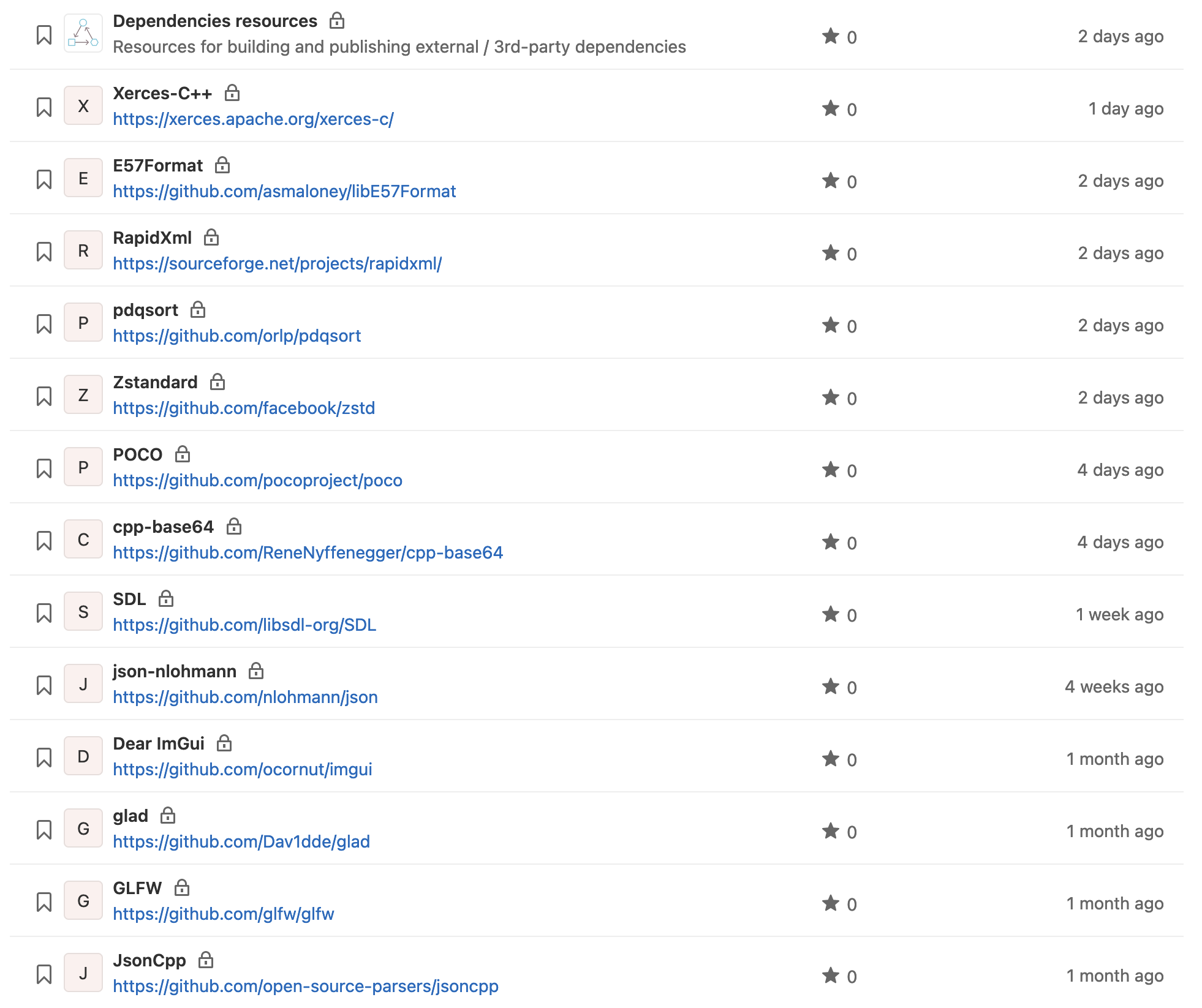
An even better idea would be to have those repositories not as mirrors, but as regular clones, so they are updated to the next version manually, once it is verified to be safe/stable to use. And that is what we started doing by gradually moving 3rd-party sources out from our main repository to their own repositories:
Project files
Almost always libraries sources already have project files for various build systems. Ideally that would be CMake, because that is our main build system.
If a library doesn’t have a project file, then it could be that author intended it to be built as a part of your project, for example Dear ImGui is like that. But you still might want to pre-build it separately, so creating a CMakeLists.txt for it will be on you.
Another scenario would be so-called “header-only” libraries, such as pdqsort, so there is nothing to build there. But even in that case you might want to consider making CMakeLists.txt for it with install instructions to generate CMake configs. Furthermore, some header-only libraries, for example json-nlohmann, do have CMakeLists.txt and sometimes even include a number of tests.
For storing those missing CMakeLists.txt’s, conanfiles, shared CMake modules and also patches for special cases we created a separate repository called “Dependencies resources”, which looks like this:
├── README.md
├── _cmake
│   ├── Config.cmake.in
│   └── Installing.cmake
├── _conan
│   └── functions.py
├── cpp-base64
│   ├── CMakeLists.txt
│   └── conanfile.py
├── dear-imgui
│   ├── CMakeLists.txt
│   └── conanfile.py
├── e57format
│   ├── conanfile.py
│   └── patches
│       └── 2.2.0
│           └── CMakeLists.txt.patch
├── glad
│   ├── CMakeLists.txt
│   └── conanfile.py
├── glfw
│   └── conanfile.py
├── json-nlohmann
│   └── conanfile.py
├── jsoncpp
│   └── conanfile.py
├── pdqsort
│   ├── CMakeLists.txt
│   └── conanfile.py
├── poco
│   └── conanfile.py
├── rapidxml
│   ├── CMakeLists.txt
│   └── conanfile.py
├── xerces-c
│   ├── conanfile.py
│   └── patches
│       └── 3.2.3
│           └── CMakeLists.txt.patch
└── zstandard
    └── conanfile.py
That way we don’t interfere with the original repositories/clones and keep all the dependencies-related resources in one place.
conanfile
The conanfile.py contains various information about the package and it is almost the same for all the dependencies:
from conans import ConanFile, tools


def normalizeVersion(rawVersion):
    if rawVersion.startswith("v"):
        rawVersion = rawVersion[1:]
    if rawVersion.count(".") < 2:
        rawVersion = f"{rawVersion}.0"
    return rawVersion


class DearImGuiConan(ConanFile):
    projectName = "DearImGui"
    name = projectName
    version = "0.0.0"
    user = "YOUR-PREFIX"
    channel = "public"
    settings = "os", "compiler", "build_type", "arch"
    description = "Bloat-free Graphical User interface for C++ with minimal dependencies"
    homepage = "https://github.com/ocornut/imgui"
    url = "https://github.com/ocornut/imgui"
    license = "https://github.com/ocornut/imgui/blob/master/LICENSE.txt"
    author = projectName

    def set_version(self):
        self.version = normalizeVersion(self.version)

    def package(self):
        self.copy("*")

    def package_info(self):
        self.cpp_info.libs = tools.collect_libs(self)
You will be right to assume that normalizeVersion function is redundantly duplicated across all of them. This is because sadly Conan does not support importing relative files/modules. There is Python requires functionality, but it looks too complex for such a purpose and also it is marked as experimental at the moment, so we haven’t tried it yet.
Why version is set to 0.0.0? At first we were setting it based in Git tags:
def getVersionFromGit():
    rawVersion = ""
    git = tools.Git(folder=self.recipe_folder)
    try:
        # rawVersion = git.run("describe --tags --abbrev=0")
        rawVersion = normalizeVersion(git.get_tag())
    except Exception as ex:
        print(f"Exception: {str(ex)}")
        # rawVersion = "0.0.0"
        raise SystemExit(
            "##teamcity[message text='Package version identification failed' "
            "errorDetails='Conan couldn't get the version tag from Git' "
            "status='ERROR']"
        )
    return rawVersion
But that is not very reliable (different tag formats, missing tags, etc), and so now we set it explicitly from CI/CD variable by replacing version = "0.0.0" pattern with sed:
sed -i 's/version = \"0\.0\.0\"$/version = \"%system.current-version%\"/' ./conanfile.pyIn addition, if you are checking out sources from different repositories into a common path, there might be no .git data available.
The name, version, user and channel properties comprise the package formula/reference, for example:
DearImGui/1.86.0@YOUR-PREFIX/publicYou might want to use channel property for organizing packages by platforms, but that would be redundant and rather confusing, as that is already taken care of by Conan via so-called profiles (there is an illustration for that on the last screenshot in the packing section).
What user and channel properties should be used for is identifying your package as yours to prevent possible collisions with other people packages. The user property here (YOUR-PREFIX) can be your company or team name, and channel can be whatever you’d like (public, experimental, customerspecific).
CI/CD
Projects and configurations
Hopefully your infrastructure already has dedicated buildbots for building, testing and packing your product, managed by a CI/CD system.
We use TeamCity, so instructions below will be mostly TeamCity-specific, but it’s rather trivial to apply them to whatever CI/CD you might have.
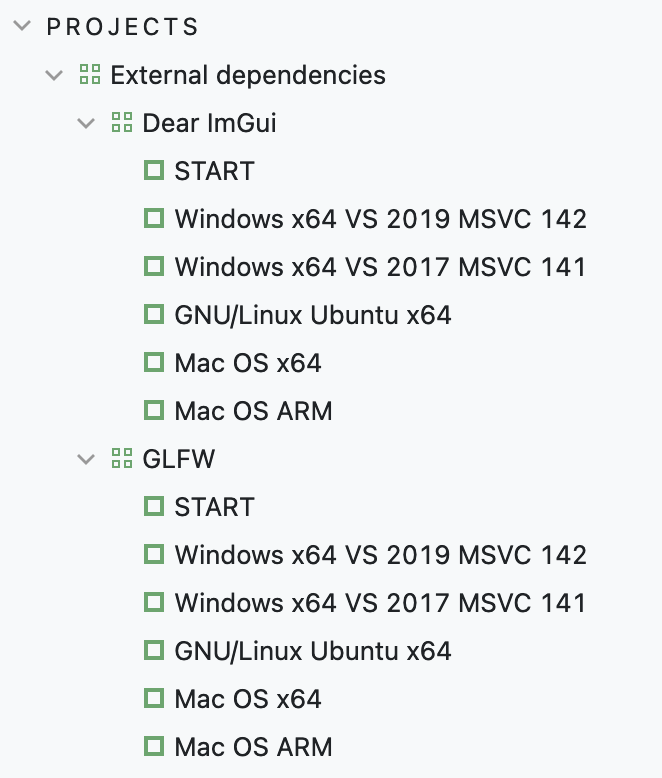
As we build and distribute our SDK for several platforms/toolchains, there is a configuration for every target:
Libraries have versions, and usually those are marked with Git tags, which can be used as branch specifications. We set a project parameter current-version for each dependency:
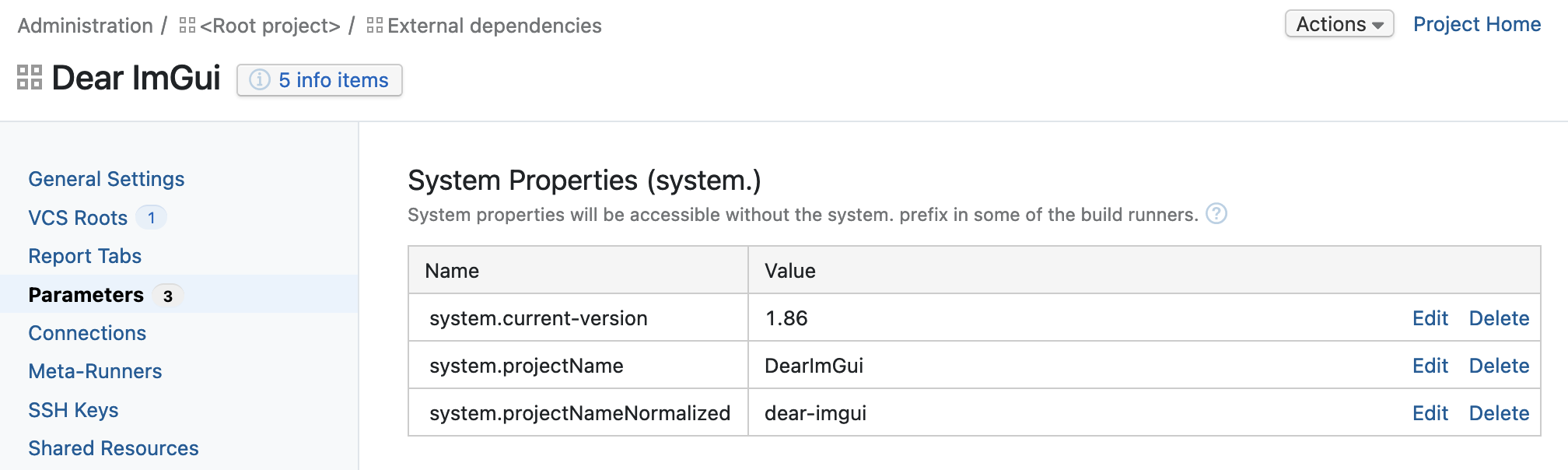
This parameter can be then used in VCS root default branch specification:
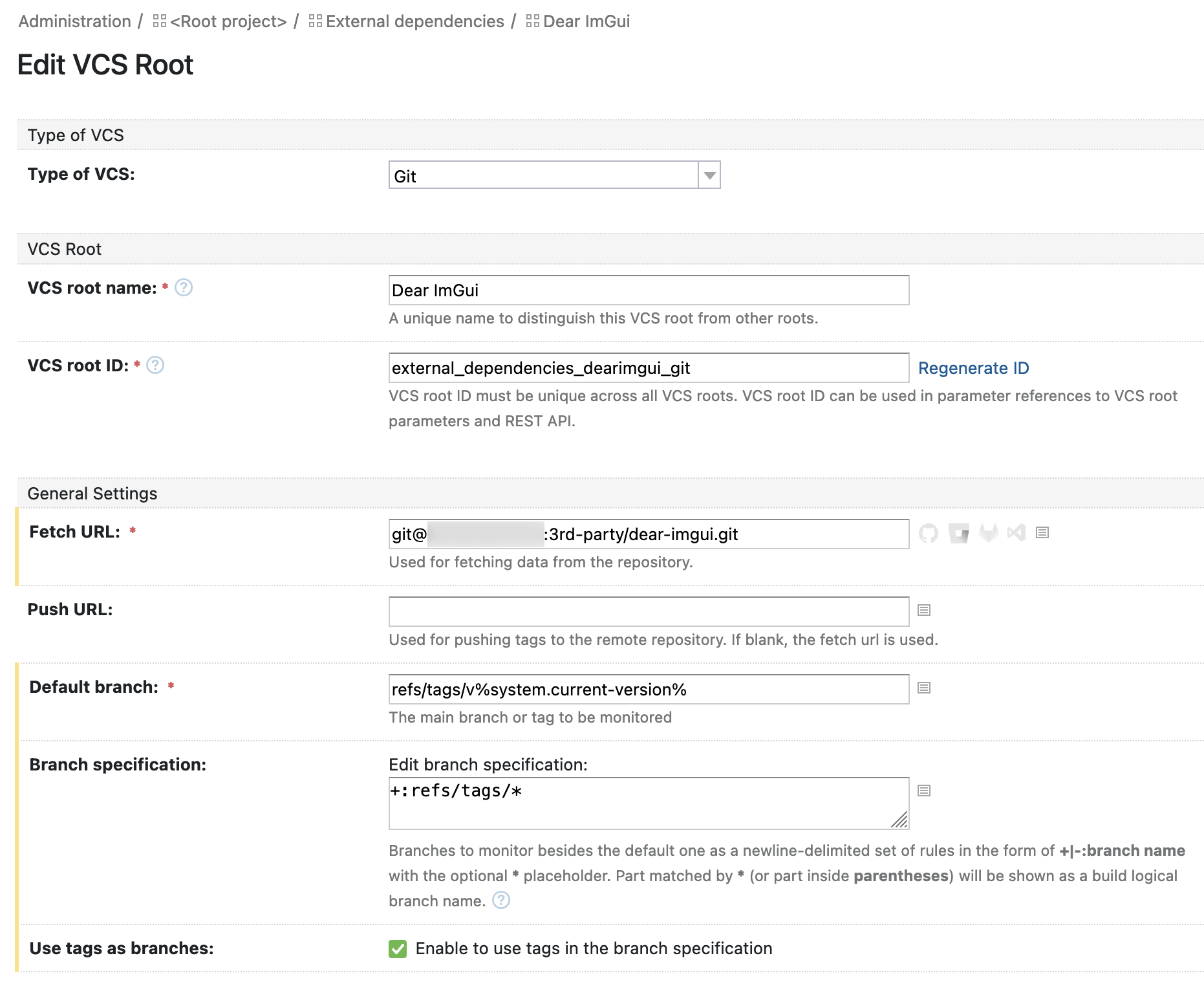
Note the v in refs/tags/v%system.current-version%. Different repositories have different naming schema for tags: some add v to the version number, some don’t and others do something else (like SDL or cpp-base64). So for consistency we have a “plain” version set as a system variable in SemVer format and then prefix it with necessary values. If the original tags format is absolutely horrible (or if they are no tags at all), then you’ll need to add the tags with versions yourself (it’s your clone, after all).
Once you set the VCS root like that, you’ll be able to build the specific version of a library, instead of looking for the commit of interest:
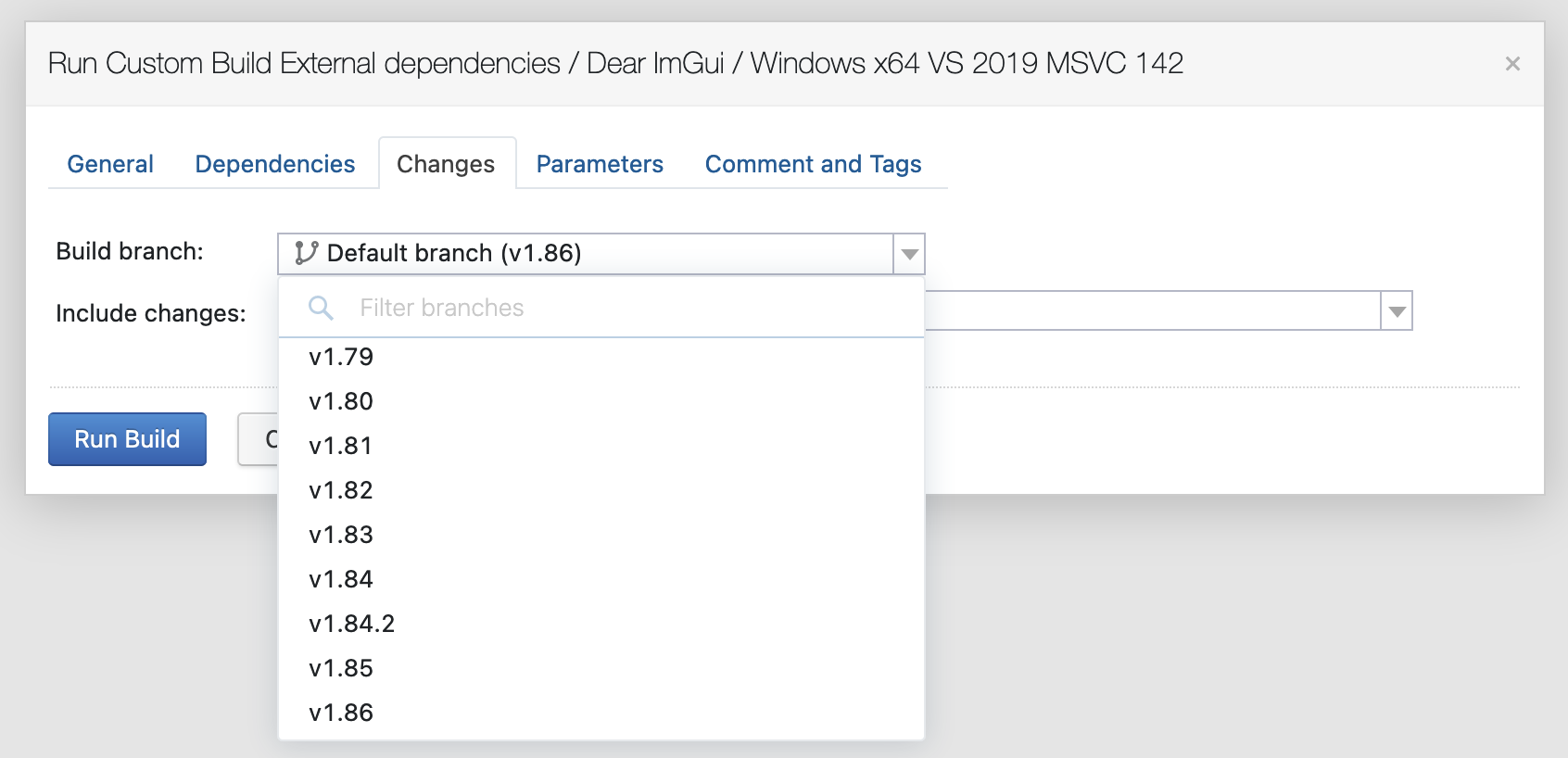
Quite handy, wouldn’t you say. And here’s how the builds will look like:
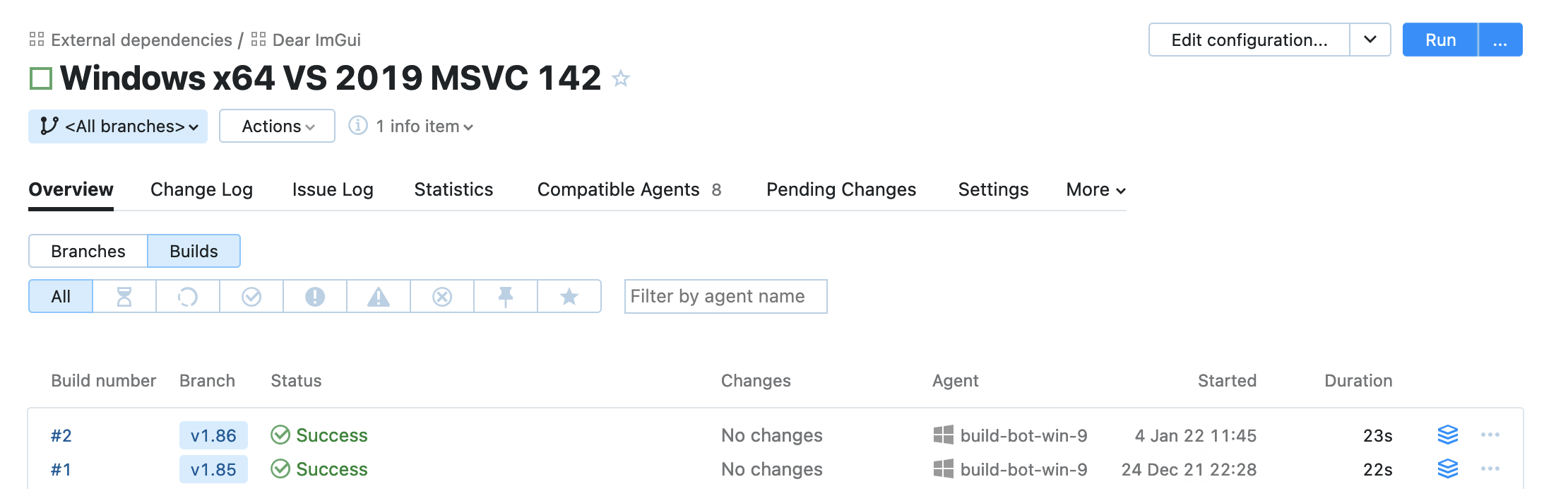
The START configuration generates a common build number (optional) and triggers the builds themselves:
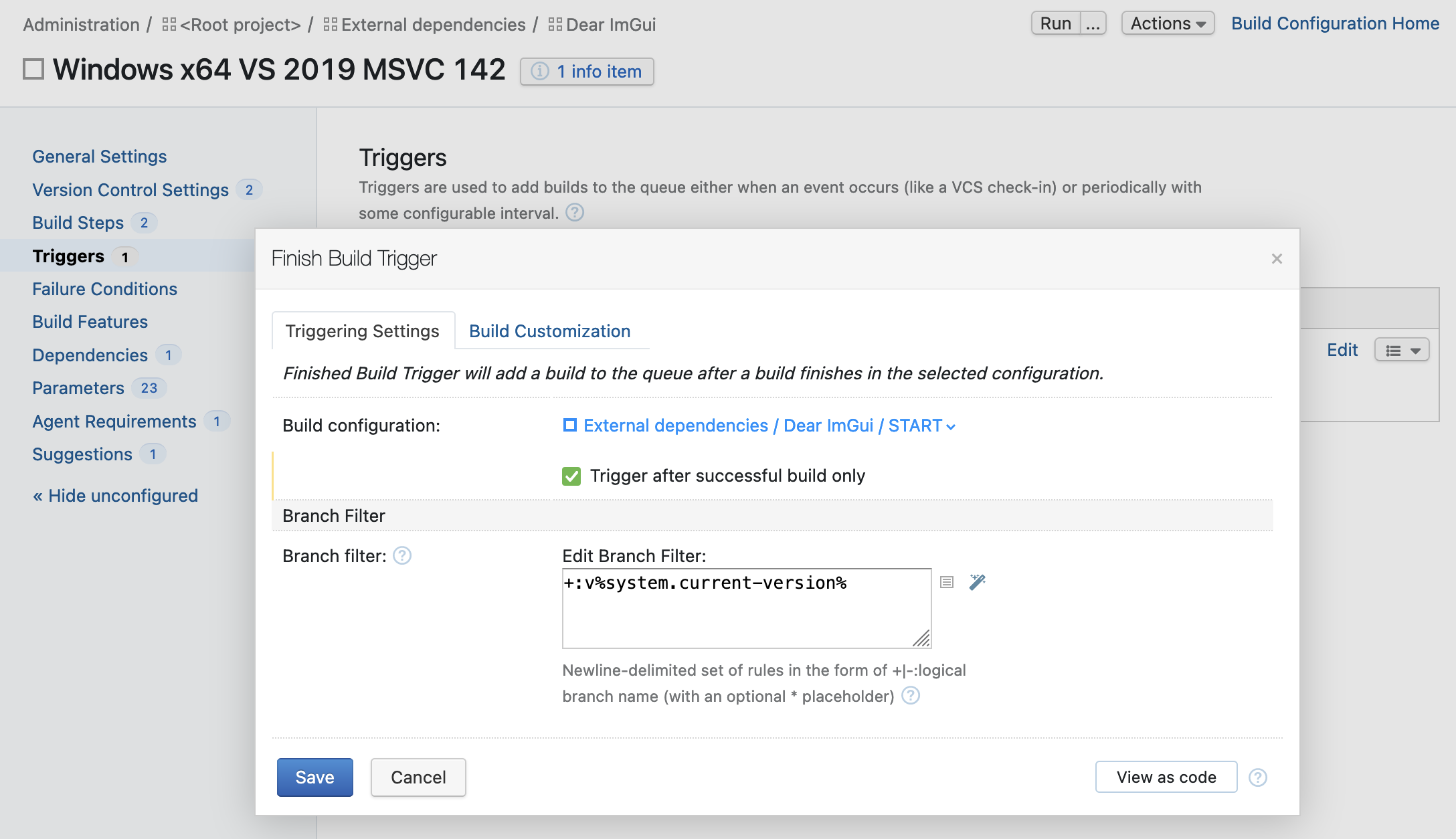
Here you can specify that builds won’t trigger for any version other than the default one that is set in the project parameters (note the v prefix again).
Finally, how to organize the sources checkout:
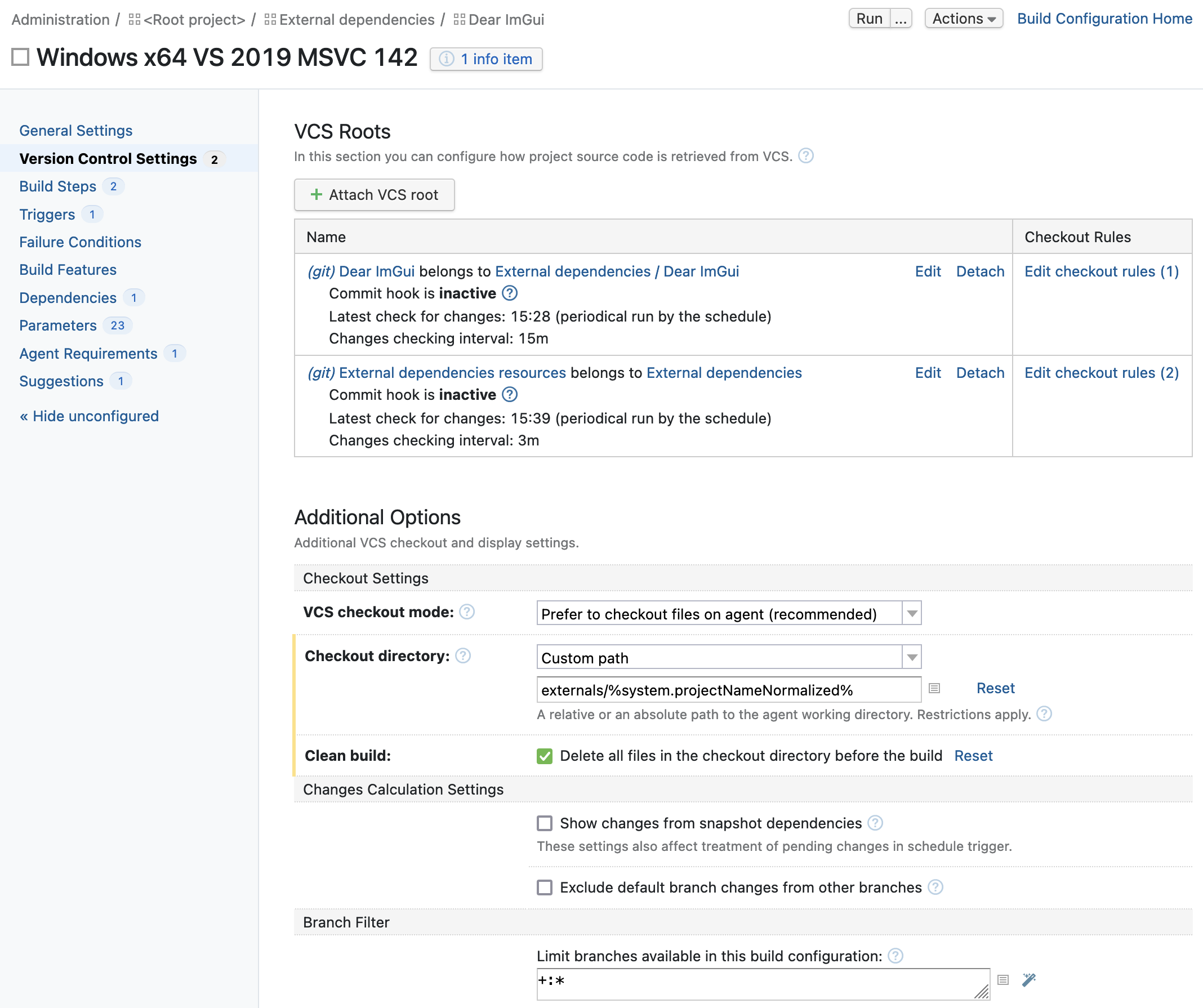
The library sources checkout rule is trivial:
+:. => ./And dependencies resources are checked out like this:
+:%system.projectNameNormalized% => ./
+:_cmake => ./cmake
So everything specific to this library (CMakeLists.txt, conanfile.py, patches, etc) is fetched to the top level, and common resources (CMake modules) are fetched into subfolders.
Since it’s two different repositories that are fetched into a common path, you won’t have .git data there, so if you do need it, then you’ll need to checkout those into separate paths.
Building
The build step in most cases is simple:
mkdir build
mkdir install

cd build
cmake -G "Visual Studio 16 2019" -DCMAKE_INSTALL_PREFIX="../install" -DCMAKE_DEBUG_POSTFIX="d" ..
cmake --build . --target install --config Debug
sh.exe -c "cp ./install_manifest.txt ../install-manifest-debug.txt"
cmake --build . --target install --config Release
sh.exe -c "cp ./install_manifest.txt ../install-manifest-release.txt"
The install_manifest.txt files are a very useful feature of CMake: when you build install target (or run cmake --install), CMake generates a list of files that were installed. These files can be then used to separate Debug and Release build artifacts, which is what’s happening here.
You can of course set different installation prefixes for Debug/Release configurations, but we need them in one folder (that way you also avoid duplication of some files between configurations).
On GNU/Linux the build step is somewhat less simple:
#!/bin/bash

mkdir build
mkdir install

cd build

cmake -G Ninja -DCMAKE_BUILD_TYPE=Debug -DCMAKE_INSTALL_PREFIX="../install" -DCMAKE_DEBUG_POSTFIX="d" ..
cmake --build . --target install
cp ./install_manifest.txt ../install-manifest-debug.txt
rm -r ./* && rm .ninja*

cmake -G Ninja -DCMAKE_BUILD_TYPE=Release -DCMAKE_INSTALL_PREFIX="../install" ..
cmake --build . --target install
cp ./install_manifest.txt ../install-manifest-release.txt
Without cleaning the build folder (rm -r ./* && rm .ninja*) after building and installing Debug configuration you’ll get a surprising result on installing the Release configuration:
-- Old export file "/home/build/buildAgent/work/externals/dear-imgui/src/install/cmake/DearImGuiConfig.cmake" will be replaced
Removing files [/home/build/buildAgent/work/externals/dear-imgui/src/install/cmake/DearImGuiConfig-debug.cmake]
And so you’ll be missing that file in your package (thanks a lot!).
Dependencies of dependencies
If (when) a dependency has dependencies of its own, the project configuration and build become slightly more complicated, but thanks to Conan not too complicated.
For example, let’s take E57Format library, which depends on Xerces-C++ library and expects to discover it with find_package().
In that case, naturally, first you need to build Xerces-C++ and publish it to your Conan packages storage. Then add the following to E57Format’s conanfile.py:
class E57FormatConan(ConanFile):
    projectName = "E57Format"
    # ...
    requires = [
        "Xerces-C/3.2.3@YOUR-PREFIX/public"
    ]
But that’s not enough, because E57Format’s CMakeLists.txt does not contain required commands for running Conan stuff, and that means that we need to make a patch (dependencies-resources/e57format/patches/2.2.0/CMakeLists.txt.patch) for adding them:
44a45,47
> include(${CMAKE_BINARY_DIR}/conanbuildinfo.cmake)
> conan_basic_setup()
>
106c109
<         DEBUG_POSTFIX "-d"
---
>         DEBUG_POSTFIX "d"
Here we also override their hardcoded DEBUG_POSTFIX, because we use d in our libraries and we would like this to be consistent. By the way, that hardcoding is a good example of doing bad things in CMake, because in that case user loses the ability to override this value with a -D argument (so a better patch would be to delete this line instead of replacing it).
The build step for E57Format project in CI/CD looks like this:
mkdir build
mkdir install

sh.exe -c "patch ./CMakeLists.txt ./patches/%system.current-version%/CMakeLists.txt.patch"

cd build
conan install .. -s compiler.version=16 -s build_type=Debug -r YOUR-CONAN-REMOTE
conan install .. -s compiler.version=16 -s build_type=Release -r YOUR-CONAN-REMOTE

cmake -G "Visual Studio 16 2019" -DCMAKE_INSTALL_PREFIX="../install" ..
cmake --build . --target install --config Debug
sh.exe -c "cp ./install_manifest.txt ../install-manifest-debug.txt"
cmake --build . --target install --config Release
sh.exe -c "cp ./install_manifest.txt ../install-manifest-release.txt"
Packing
When creating Conan package, you can put both Debug and Release configurations into one package. Thanks to CMake this work work just fine: find_package() will find both Debug (DearImGuiTargets-debug.cmake) and Release (DearImGuiTargets-release.cmake) configurations. And conan export-pkg wouldn’t care, as it packs everything it finds in the path specified in -pf argument.
But that would not be exactly correct, because if one tries to install such package like this:
$ conan install -s build_type=Debug -r YOUR-CONAN-REMOTEthen Conan will say that there are no available packages for this configuration. And why it works without providing -s build_type is because it defaults to Release (both for conan export-pkg and conan install).
It is actually possible to have Debug and Release in one package, so it would work for any -s build_type, but it’s not as simple as just splitting configurations into different packages.
The splitting can be done by using install-manifest-*.txt lists produced on the building step. But they store absolute paths to the files, and so we need to trim them with sed. After that the installation folder can be split into Debug/Release with cp --parents to preserve the folders structure.
After splitting is done, you can create packages with conan export-pkg and publish them to your Artifactory with conan upload.
Here are all the commands executing on the packing step:
mkdir package-debug
sh.exe -c "sed -i 's/.*install\///g' ./install-manifest-debug.txt"

mkdir package-release
sh.exe -c "sed -i 's/.*install\///g' ./install-manifest-release.txt"

cd install
sh.exe -c "cp --parents $(<../install-manifest-debug.txt) ../package-debug || :"
sh.exe -c "cp --parents $(<../install-manifest-release.txt) ../package-release || :"
cd ..

sh.exe -c "sed -i 's/version = \"0\.0\.0\"$/version = \"%system.current-version%\"/' ./conanfile.py"
conan export-pkg conanfile.py -s compiler.toolset="v142" -pf="./package-debug" -s build_type=Debug -f && conan upload %system.projectName% --all --remote=YOUR-CONAN-REMOTE --check --confirm
conan export-pkg conanfile.py -s compiler.toolset="v142" -pf="./package-release" -s build_type=Release -f && conan upload %system.projectName% --all --remote=YOUR-CONAN-REMOTE --check --confirm

conan remove "%system.projectName%*" -f
Setting the package version with sed is explained in conanfile description.
Removing the package (conan remove) from local cache after publishing it to Artifactory is optional.
As usual, on Mac OS Bash commands behave differently, so you’ll need to adjust sed arguments and use rsync instead of cp:
#!/bin/bash

mkdir ./package-debug
sed -i "" -E 's/.*install\///g' ./install-manifest-debug.txt

mkdir ./package-release
sed -i "" -E 's/.*install\///g' ./install-manifest-release.txt

cd install
rsync -R $(<../install-manifest-debug.txt) ../package-debug || :
rsync -R $(<../install-manifest-release.txt) ../package-release || :
cd ..

sed -i "" -E 's/version = "0\.0\.0"$/version = "%system.current-version%"/' ./conanfile.py
conan export-pkg conanfile.py -s arch=armv8 -pf="./package-debug" -s build_type=Debug -f && conan upload %system.projectName% --all --remote=YOUR-CONAN-REMOTE --check --confirm
conan export-pkg conanfile.py -s arch=armv8 -pf="./package-release" -s build_type=Release -f && conan upload %system.projectName% --all --remote=YOUR-CONAN-REMOTE --check --confirm

conan remove "%system.projectName%*" -f
By the way, since we are talking about Mac OS special needs, if you’ll need to RegEx a \w+ pattern, for example this one: 's/.*install\/\w\+\///g', then you’ll have to do it like that: 's/.*install\/[a-zA-Z0-9_]+\///g'.
After you run building and packing steps on all the platforms/targets, here’s what you’ll get in the Artifactory:
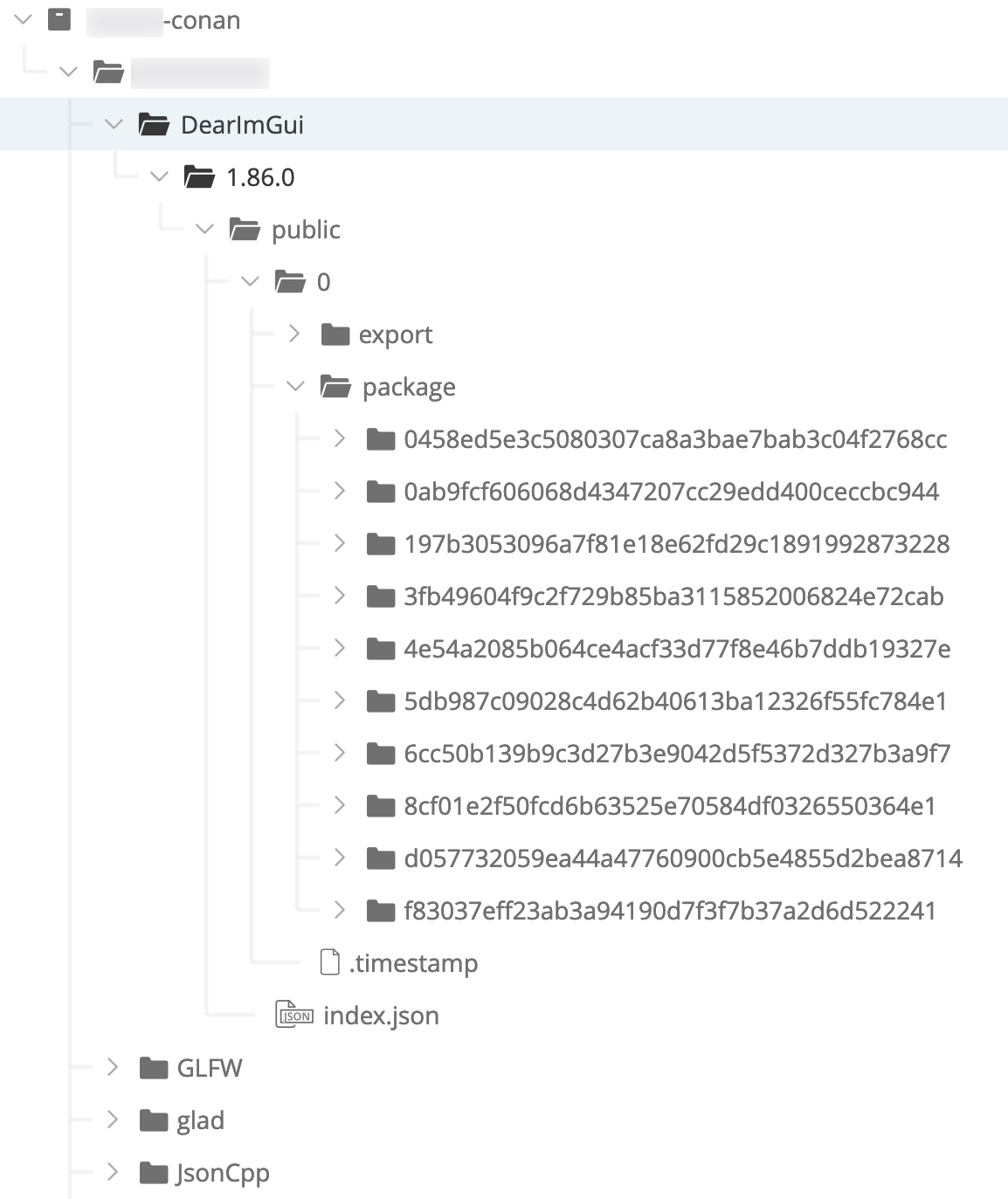
So it is 10 packages in total: 5 platforms, each having 2 configurations (Debug/Release).
Resolving dependencies in a project
As an example, let’s take the same application that was used for benchmarking build times in the beginning.
I have all of its dependencies pre-built and published in Artifactory, so I can fetch them with Conan. For that I can either create conanfile.txt:
[requires]
glad/0.1.36@YOUR-PREFIX/public
GLFW/3.3.5@YOUR-PREFIX/public
DearImGui/1.86.0@YOUR-PREFIX/public
or conanfile.py:
from conans import ConanFile, CMake

prefixChannel = "@YOUR-PREFIX/public"


class SandboxConan(ConanFile):
    settings = "os", "arch", "compiler"
    generators = "cmake"
    requires = [
        f"glad/0.1.36{prefixChannel}",
        f"GLFW/3.3.5{prefixChannel}",
        f"DearImGui/1.86.0{prefixChannel}"
    ]
Now I can fetch them all:
$ mkdir build && cd $_

$ conan install .. -r YOUR-CONAN-REMOTE
Configuration:
[settings]
arch=x86_64
build_type=Release
compiler=apple-clang
compiler.libcxx=libc++
compiler.version=12.0
os=Macos
[options]
[build_requires]
[env]

glad/0.1.36@YOUR-PREFIX/public: Retrieving from server 'YOUR-CONAN-REMOTE'
glad/0.1.36@YOUR-PREFIX/public: Trying with 'YOUR-CONAN-REMOTE'...
Downloading conanmanifest.txt completed [0.06k]
Downloading conanfile.py completed [0.94k]
glad/0.1.36@YOUR-PREFIX/public: Downloaded recipe revision 0
GLFW/3.3.5@YOUR-PREFIX/public: Retrieving from server 'YOUR-CONAN-REMOTE'
GLFW/3.3.5@YOUR-PREFIX/public: Trying with 'YOUR-CONAN-REMOTE'...
Downloading conanmanifest.txt completed [0.06k]
Downloading conanfile.py completed [0.86k]
GLFW/3.3.5@YOUR-PREFIX/public: Downloaded recipe revision 0
DearImGui/1.86.0@YOUR-PREFIX/public: Retrieving from server 'YOUR-CONAN-REMOTE'
DearImGui/1.86.0@YOUR-PREFIX/public: Trying with 'YOUR-CONAN-REMOTE'...
Downloading conanmanifest.txt completed [0.06k]
Downloading conanfile.py completed [0.92k]
DearImGui/1.86.0@YOUR-PREFIX/public: Downloaded recipe revision 0
conanfile.py: Installing package
Requirements
    DearImGui/1.86.0@YOUR-PREFIX/public from 'YOUR-CONAN-REMOTE' - Downloaded
    GLFW/3.3.5@YOUR-PREFIX/public from 'YOUR-CONAN-REMOTE' - Downloaded
    glad/0.1.36@YOUR-PREFIX/public from 'YOUR-CONAN-REMOTE' - Downloaded
Packages
    DearImGui/1.86.0@YOUR-PREFIX/public:f83037eff23ab3a94190d7f3f7b37a2d6d522241 - Download
    GLFW/3.3.5@YOUR-PREFIX/public:f83037eff23ab3a94190d7f3f7b37a2d6d522241 - Download
    glad/0.1.36@YOUR-PREFIX/public:f83037eff23ab3a94190d7f3f7b37a2d6d522241 - Download

Installing (downloading, building) binaries...
DearImGui/1.86.0@YOUR-PREFIX/public: Retrieving package f83037eff23ab3a94190d7f3f7b37a2d6d522241 from remote 'YOUR-CONAN-REMOTE'
Downloading conanmanifest.txt completed [0.63k]
Downloading conaninfo.txt completed [0.40k]
Downloading conan_package.tgz completed [577.86k]
Decompressing conan_package.tgz completed [0.00k]
DearImGui/1.86.0@YOUR-PREFIX/public: Package installed f83037eff23ab3a94190d7f3f7b37a2d6d522241
DearImGui/1.86.0@YOUR-PREFIX/public: Downloaded package revision 0
GLFW/3.3.5@YOUR-PREFIX/public: Retrieving package f83037eff23ab3a94190d7f3f7b37a2d6d522241 from remote 'YOUR-CONAN-REMOTE'
Downloading conanmanifest.txt completed [0.56k]
Downloading conaninfo.txt completed [0.40k]
Downloading conan_package.tgz completed [123.99k]
Decompressing conan_package.tgz completed [0.00k]
GLFW/3.3.5@YOUR-PREFIX/public: Package installed f83037eff23ab3a94190d7f3f7b37a2d6d522241
GLFW/3.3.5@YOUR-PREFIX/public: Downloaded package revision 0
glad/0.1.36@YOUR-PREFIX/public: Retrieving package f83037eff23ab3a94190d7f3f7b37a2d6d522241 from remote 'YOUR-CONAN-REMOTE'
Downloading conanmanifest.txt completed [0.39k]
Downloading conaninfo.txt completed [0.40k]
Downloading conan_package.tgz completed [333.16k]
Decompressing conan_package.tgz completed [0.00k]
glad/0.1.36@YOUR-PREFIX/public: Package installed f83037eff23ab3a94190d7f3f7b37a2d6d522241
glad/0.1.36@YOUR-PREFIX/public: Downloaded package revision 0
conanfile.py: Generator cmake created conanbuildinfo.cmake
conanfile.py: Generator txt created conanbuildinfo.txt
conanfile.py: Aggregating env generators
conanfile.py: Generated conaninfo.txt
conanfile.py: Generated graphinfo
Lucky me, the auto-generated Conan profile for my environment matches the one on the buildbots, so I got everything found and installed.
But actually it doesn’t match, and here’s what I was really getting with auto-generated profile:
Configuration:
[settings]
arch=x86_64
arch_build=x86_64
build_type=Release
compiler=clang
compiler.libcxx=libstdc++
compiler.version=13
os=Macos
os_build=Macos
[options]
[build_requires]
[env]

glad/0.1.36@YOUR-PREFIX/public: Retrieving from server 'YOUR-CONAN-REMOTE'
glad/0.1.36@YOUR-PREFIX/public: Trying with 'YOUR-CONAN-REMOTE'...
Downloading conanmanifest.txt completed [0.06k]
Downloading conanfile.py completed [0.94k]
glad/0.1.36@YOUR-PREFIX/public: Downloaded recipe revision 0
GLFW/3.3.5@YOUR-PREFIX/public: Retrieving from server 'YOUR-CONAN-REMOTE'
GLFW/3.3.5@YOUR-PREFIX/public: Trying with 'YOUR-CONAN-REMOTE'...
Downloading conanmanifest.txt completed [0.06k]
Downloading conanfile.py completed [0.86k]
GLFW/3.3.5@YOUR-PREFIX/public: Downloaded recipe revision 0
DearImGui/1.86.0@YOUR-PREFIX/public: Retrieving from server 'YOUR-CONAN-REMOTE'
DearImGui/1.86.0@YOUR-PREFIX/public: Trying with 'YOUR-CONAN-REMOTE'...
Downloading conanmanifest.txt completed [0.06k]
Downloading conanfile.py completed [0.92k]
DearImGui/1.86.0@YOUR-PREFIX/public: Downloaded recipe revision 0
conanfile.py: Installing package
Requirements
    DearImGui/1.86.0@YOUR-PREFIX/public from 'YOUR-CONAN-REMOTE' - Downloaded
    GLFW/3.3.5@YOUR-PREFIX/public from 'YOUR-CONAN-REMOTE' - Downloaded
    glad/0.1.36@YOUR-PREFIX/public from 'YOUR-CONAN-REMOTE' - Downloaded
Packages
    DearImGui/1.86.0@YOUR-PREFIX/public:c48a49ca4467bb2c7f002b84b691f213c49e91b4 - Missing
    GLFW/3.3.5@YOUR-PREFIX/public:c48a49ca4467bb2c7f002b84b691f213c49e91b4 - Missing
    glad/0.1.36@YOUR-PREFIX/public:c48a49ca4467bb2c7f002b84b691f213c49e91b4 - Missing

Installing (downloading, building) binaries...
ERROR: Missing binary: DearImGui/1.86.0@YOUR-PREFIX/public:c48a49ca4467bb2c7f002b84b691f213c49e91b4
ERROR: Missing binary: GLFW/3.3.5@YOUR-PREFIX/public:c48a49ca4467bb2c7f002b84b691f213c49e91b4
ERROR: Missing binary: glad/0.1.36@YOUR-PREFIX/public:c48a49ca4467bb2c7f002b84b691f213c49e91b4

DearImGui/1.86.0@YOUR-PREFIX/public: WARN: Can't find a 'DearImGui/1.86.0@YOUR-PREFIX/public' package for the specified settings, options and dependencies:
- Settings: arch=x86_64, build_type=Release, compiler=clang, compiler.libcxx=libstdc++, compiler.version=13, os=Macos
- Options:
- Dependencies:
- Requirements:
- Package ID: c48a49ca4467bb2c7f002b84b691f213c49e91b4

ERROR: Missing prebuilt package for 'DearImGui/1.86.0@YOUR-PREFIX/public', 'GLFW/3.3.5@YOUR-PREFIX/public', 'glad/0.1.36@YOUR-PREFIX/public'
Use 'conan search DearImGui/1.86.0@YOUR-PREFIX/public --table=table.html -r=remote' and open the table.html file to see available packages
Or try to build locally from sources with '--build=DearImGui --build=GLFW --build=glad'

More Info at 'https://docs.conan.io/en/latest/faq/troubleshooting.html#error-missing-prebuilt-package'
This command, for example:
$ conan search DearImGui/1.86.0@YOUR-PREFIX/public --table=table.html -r YOUR-CONAN-REMOTEwill generate a table of all the packages available for Dear ImGui in your Conan remote:
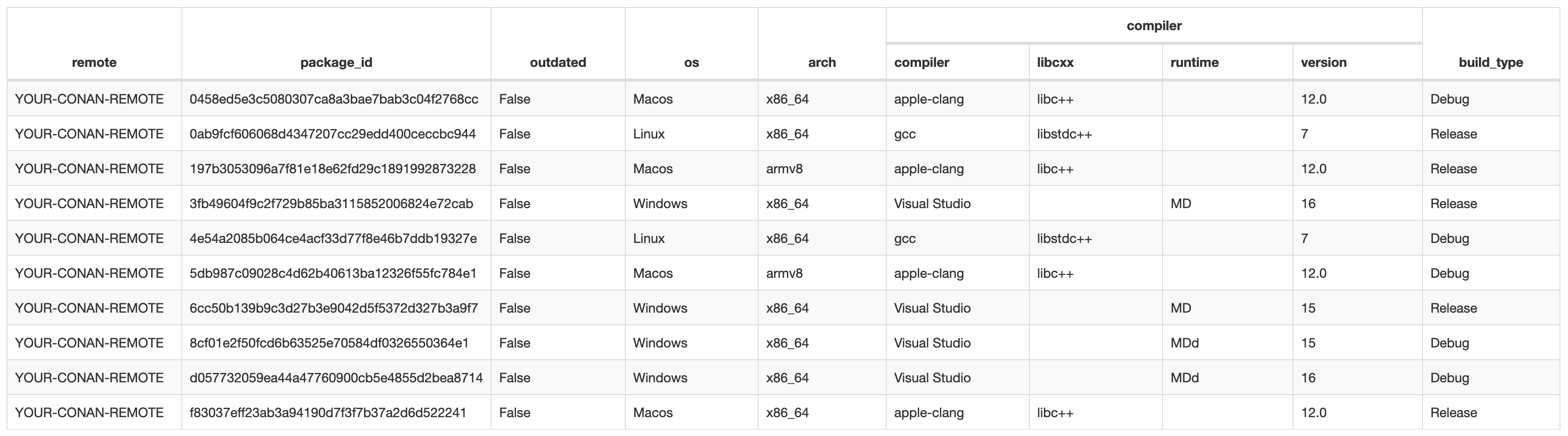
Ideally, I would need to add a build environment on the buildbots that matches mine, build all dependencies with it and publish them to Artifactory too, but it’s bloody impossible to cover all possible configurations that users might have, so instead users (and I) can just adjust their local Conan profiles. In my case it would be ~/.conan/profiles/artifactory with the following contents:
[settings]
    arch=x86_64
    build_type=Release
    compiler=apple-clang
    compiler.libcxx=libc++
    compiler.version=12.0
    os=Macos
And then I can use this profile like this:
$ conan install .. --profile artifactory -r YOUR-CONAN-REMOTEHowever, getting ahead of myself a bit, while this helps to convince Conan to install the packages, such profile tinkering will cause CMake to fail on configuration with the following error:
CMake Error at build/conanbuildinfo.cmake:731 (message):
  Detected a mismatch for the compiler version between your conan profile
  settings and CMake:

  Compiler version specified in your conan profile: 12.0

  Compiler version detected in CMake: 13.0
But it’s no worries, as this can be overcome with -DCONAN_DISABLE_CHECK_COMPILER=1.
When the conan install succeeds, packages are installed to the local cache on your machine:
$ tree -L 7 ~/.conan/data/
/Users/YOUR-USERNAME/.conan/data/
├── DearImGui
│   └── 1.86.0
│       └── YOUR-PREFIX
│           ├── public
│           │   ├── dl
│           │   │   ├── export
│           │   │   └── pkg
│           │   │       └── f83037eff23ab3a94190d7f3f7b37a2d6d522241
│           │   ├── export
│           │   │   ├── conanfile.py
│           │   │   └── conanmanifest.txt
│           │   ├── locks
│           │   │   └── f83037eff23ab3a94190d7f3f7b37a2d6d522241
│           │   ├── metadata.json
│           │   ├── metadata.json.lock
│           │   └── package
│           │       └── f83037eff23ab3a94190d7f3f7b37a2d6d522241
│           │           ├── cmake
│           │           ├── conaninfo.txt
│           │           ├── conanmanifest.txt
│           │           ├── include
│           │           └── lib
│           ├── public.count
│           └── public.count.lock
├── GLFW
│   └── 3.3.5
│       └── YOUR-PREFIX
│           ├── public
│           │   ├── dl
│           │   │   ├── export
│           │   │   └── pkg
│           │   │       └── f83037eff23ab3a94190d7f3f7b37a2d6d522241
│           │   ├── export
│           │   │   ├── conanfile.py
│           │   │   └── conanmanifest.txt
│           │   ├── locks
│           │   │   └── f83037eff23ab3a94190d7f3f7b37a2d6d522241
│           │   ├── metadata.json
│           │   ├── metadata.json.lock
│           │   └── package
│           │       └── f83037eff23ab3a94190d7f3f7b37a2d6d522241
│           │           ├── conaninfo.txt
│           │           ├── conanmanifest.txt
│           │           ├── include
│           │           └── lib
│           ├── public.count
│           └── public.count.lock
└── glad
    └── 0.1.36
        └── YOUR-PREFIX
            ├── public
            │   ├── dl
            │   │   ├── export
            │   │   └── pkg
            │   │       └── f83037eff23ab3a94190d7f3f7b37a2d6d522241
            │   ├── export
            │   │   ├── conanfile.py
            │   │   └── conanmanifest.txt
            │   ├── locks
            │   │   └── f83037eff23ab3a94190d7f3f7b37a2d6d522241
            │   ├── metadata.json
            │   ├── metadata.json.lock
            │   └── package
            │       └── f83037eff23ab3a94190d7f3f7b37a2d6d522241
            │           ├── cmake
            │           ├── conaninfo.txt
            │           ├── conanmanifest.txt
            │           ├── include
            │           └── lib
            ├── public.count
            └── public.count.lock
You can also list them like this:
$ conan search
Existing package recipes:

DearImGui/1.86.0@YOUR-PREFIX/public
GLFW/3.3.5@YOUR-PREFIX/public
glad/0.1.36@YOUR-PREFIX/public
And the project build directory now looks like this:
$ ls -L1 .
conan.lock
conanbuildinfo.cmake
conanbuildinfo.txt
conaninfo.txt
graph_info.json
The conanbuildinfo.cmake contains auto-generated CMake instructions for finding all the installed dependencies, and you need to add it to your project’s CMakeLists.txt:
include(${CMAKE_CURRENT_BINARY_DIR}/conanbuildinfo.cmake)
conan_basic_setup()
After that you can call find_package() as usual, for example:
find_package(glfw3 CONFIG REQUIRED)And this is it, the project is ready to build, and it will only build its own sources and link to pre-built dependencies.
Here are all the commands from the creation of the build folder:
$ mkdir build && cd $_
$ conan install .. --profile artifactory -r YOUR-CONAN-REMOTE
$ cmake -G Ninja -DCMAKE_BUILD_TYPE=Release -DCMAKE_INSTALL_PREFIX="../install" \
    -DUSING_CONAN=1 -DCONAN_DISABLE_CHECK_COMPILER=1 ..

$ time cmake --build . --target install
[3/4] Install the project...
-- Install configuration: "Release"
-- Installing: /path/to/glfw-imgui/install/bin/glfw-imgui/glfw-imgui
-- Installing: /path/to/glfw-imgui/install/bin/glfw-imgui/JetBrainsMono-ExtraLight.ttf

real    0m1.166s

$ ../install/bin/glfw-imgui/glfw-imgui
Absolutely magnificent.
Dependency graph
Speaking about dependencies of dependencies, here’s another nice feature of Conan - it can generate a dependency graph:
$ conan info ../conanfile.py -g ./graph.html
$ open ./graph.html
Here’s an example of a graph from one of our projects that actually depends on E57Format library:
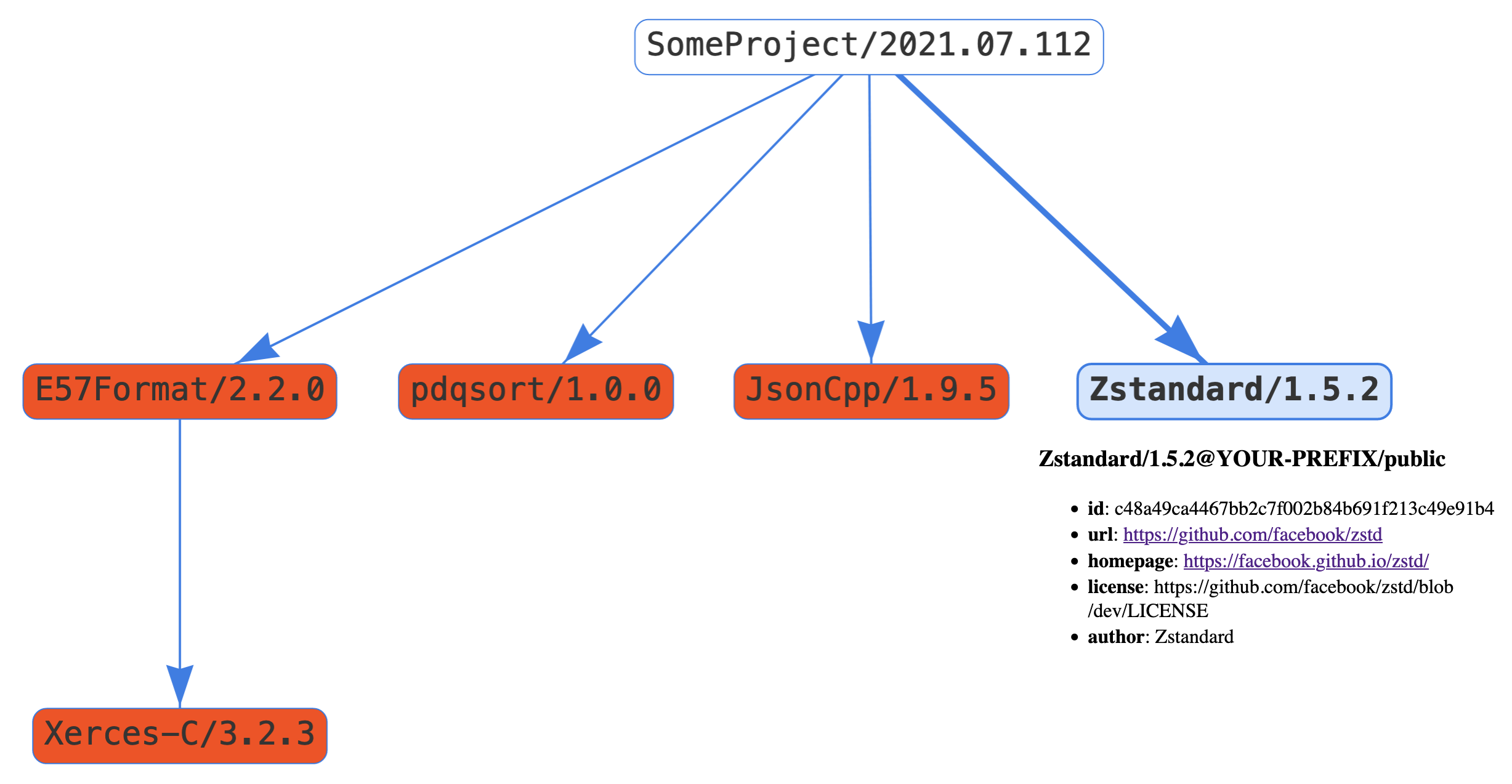
As you can see, E57Format is a direct dependency of the project and in turn E57Format has Xerces-C++ as its own dependency. You can also click on any node and get some more information about it (Zstandard is clicked on that screenshot).
In our project’s conanfile.py we only list direct dependencies:
requires = [
    "Zstandard/1.5.2@YOUR-PREFIX/public",
    "pdqsort/1.0.0@YOUR-PREFIX/public",
    "JsonCpp/1.9.5@YOUR-PREFIX/public",
    "E57Format/2.2.0@YOUR-PREFIX/public"
    # no Xerces-C/3.2.3@YOUR-PREFIX/public"
]
And Conan then takes care of fetching dependencies of dependencies, how convenient is that.
If you add -j argument to conan info, then you’ll get a JSON representation of the graph, which you can easily parse to generate a report about your dependencies (versions, licenses, etc):
$ conan info ../conanfile.py -j ./dependencies.jsonUpdates
2022-03-03 | Once more about self-hosting
Just a month after I wrote this:
If you are your own evil twin (сам себе злой Буратино), then you can just fetch it from original repositories on GitHub, GitLab or wherever. If you really are an enemy to yourself, then you can also store your own project source code in an external repository too.
…Russia attacked Ukraine and started a proper retarded war. Shortly after that several IT companies began to block users with russian IP addresses or russian billing addresses. No one cared whether those users were against the war themselves or not, as the companies apparently figured that collective responsibility is okay in the 21th century. Thus, hosting 3rd-party dependencies (both sources and pre-built binaries) in one’s own in-house IT infrastructure has already become a (very sudden) reality for at least russian users, so it’s no longer a theoretical possibility anymore.
2022-10-30 | Started using vcpkg instead of Conan
More than half a year after trying out Conan we started looking into resolving dependencies with vcpkg and then decided to adopt it as our main package manager.
2023-01-12 | An e-mail from JFrog
A couple of months after that article about vcpkg I got an e-mail from someone at JFrog. I won’t disclose his name, just in case, but the address was @jfrog.com and he represented himself as someone working with Conan.
It is nothing secret really, he just wanted to know a bit more details about why it took so long for me to resolve the project dependencies with Conan: I wrote in the article that it took 3 days with vcpkg versus 2 weeks with Conan to resolve the same set of dependencies. Apparently, he was under impression that I was trying to use ready-made packages that were already available in Conan Center, and in that case 2 weeks would indeed look like a crazy long period of time for such a trivial task.
So I explained again that we needed to make our own packages of 3rd-party dependencies for publishing them in our internal Artifactory, how in general the slowdown was likely due to the wrong approach that we took (where instead of packing pre-built binaries we should have probably tried to integrate Conan into the project’s build system), and also how Conan seemed less intuitive comparing with vcpkg.
2026-02-23 | Giving it another go with modern Conan
Some years have passed by, and we are still using vcpkg for managing our project dependencies, which works pretty splendid.
However, from time to time we get requests to provide Conan packages for some of our libraries, and by now we’ve accumulated enough of those requests for the task to become important enough and worth putting effort into.
Meanwhile, Conan has got version 2.0, which introduced certain changes, so it was a good opportunity to give it another go and this time try building packages from sources instead of just packing pre-built binaries.
Building packages from source in Conan 1.x
To warm-up, let’s see how we could/should have done it with Conan 1.x. Specifically, the version I’ll be using in the example below is 1.66.0 (the latest in the 1.x branch at the moment). And the example itself will be making a package for zlib.
The very first thing is naturally the sources, which we of course will be getting from Git repositories via SSH. It is assumed that you already have SSH connection established, so your ~/.ssh/config contains a record for your Git host and you have the keys in place.
Also, despite what I said about self-hosting earlier, in the examples below I will be using GitHub, but this is just for the sake of demonstration/simplicity, and in production you should really consider relying on your own Git hosting.
Alright, how does one tell Conan where to get the sources from? Well, one way is to use a special file - conandata.yml - where sources URLs can be nicely listed, and it looked so nice that I wrongly assumed that I can list the cloning URLs and commit hashes in there too, like so:
sources:
  "1.2.12":
    url: "git@github.com:madler/zlib.git"
    sha1: "21767c654d31d2dccdde4330529775c6c5fd5389"
  "1.3.1":
    url: "git@github.com:madler/zlib.git"
    sha1: "51b7f2abdade71cd9bb0e7a373ef2610ec6f9daf"
It was already slightly confusing that different versions can have different URLs/repositories, and that actually should have given me a hint that I am doing something wrong. Fast-forwarding a little bit, trying to use those in source() (the recipe method for declaring package sources) like this:
def source(self):
    get(
        self,
        **self.conan_data["sources"][self.version],
        strip_root=True
    )
resulted in errors like:
zlib/1.3.1@YOUR-PREFIX/public: ERROR: Error downloading file git@github.com:madler/zlib.git: 'No connection adapters were found for 'git@github.com:madler/zlib.git''
I tried other possible URLs, just in case:
ssh://git@github.com:madler/zlib.gitgit+ssh://git@github.com:madler/zlib.gitssh://github.com:madler/zlib.gitgit+ssh://github.com:madler/zlib.git
but the error was still the same. Which should have not come as a surprise, because conandata.yml file is simply not meant for listing repositories and commit hashes for cloning. As I realized, those url values in there are mere download URLs of the sources snapshots/archives, and sha1 values are checksums of those files. So a correct list of sources in conandata.yml would look like this:
sources:
  "1.2.12":
    url: "https://github.com/madler/zlib/archive/refs/tags/v1.2.12.zip"
    sha1: "35c02072f6e3d673f01df54735d5b6af786e0e84"
  "1.3.1":
    url: "https://github.com/madler/zlib/archive/refs/tags/v1.3.1.zip"
    sha1: "aafd4f6196c7024a81d3268bf0b777c9b814cf2c"
and then get() would be able to work with those.
Okay, but what if I want to clone a Git repository and checkout a specific version tag/commit, how is that done then? Turns out, there is a special scm thing for that:
class zlibConan(ConanFile):
    name = "zlib"
    version = "1.3.1"

    # ...

    scm = {
        "type": "git",
        "subfolder": "src",
        "url": "git@github.com:madler/zlib.git",
        "revision": "51b7f2abdade71cd9bb0e7a373ef2610ec6f9daf"
    }
This will get you zlib sources for version 1.3.1. And if you will need version 1.2.12, then you’ll need to edit the recipe and replace the version and Git commit hash. But then if you’ll need to make changes in 1.3.1 again and make a new package, there doesn’t seem to be a way to quickly find that particular revision of the recipe, so I guess one would have to go through the file history in Git log (that is if recipes are tracked with any VCS at all).
It is quite a shame that conandata.yml is not meant for listing cloning URLs and commit hashes. One could probably try to somewhat replicate it like this:
class zlibConan(ConanFile):
    name = "zlib"
    version = "1.3.1"

    # ...

    versionsHashes = {
        "1.2.12": "21767c654d31d2dccdde4330529775c6c5fd5389",
        "1.3.1": "51b7f2abdade71cd9bb0e7a373ef2610ec6f9daf"
    }

    scm = {
        "type": "git",
        "subfolder": "src",
        "url": "git@github.com:madler/zlib.git",
        "revision": versionsHashes[version]
    }

    # ...
so the commit hash would be looked up in versionsHashes dictionary, but that doesn’t strike me as a great solution. Besides, editing the version value in the recipe file would still be required, wouldn’t it, unless there is already a CLI argument for it?
Anyway, we got the sources, now let’s apply the patches (of course we have patches). Those can be listed in the same conandata.yml, and in this case it is intuitive enough:
patches:
  "1.3.1":
    - patch_file: "../patches/1.3.1/001-single-target-and-installation.patch"
The relative path with ../ here is because the recipe folder structure is like this:
├── 1.x
│   ├── conandata.yml
│   └── conanfile.py
├── 2.x
│   ├── conandata.yml
│   └── conanfile.py
└── patches
    └── 1.3.1
        └── 001-single-target-and-installation.patch
because I intend to re-use those patches later for the Conan 2.x recipe too.
But of course it does not really make a lot of sense to group patches by versions, because if you’ll need to make a package for a different version, then you will have to edit the version and commit hash values in the conanfile.py anyway, and so what’s the point of grouping patches by versions then, it can just as well be this:
patches:
  - patch_file: "../patches/001-single-target-and-installation.patch"
and you won’t need to keep the patches from other versions either, so it will be version-specific set of patches per commit. Yeah, I can’t say what was the grand idea here.
Next, patches are applied with apply_conandata_patches():
def source(self):
    apply_conandata_patches(self)
But if you do it like this straight away, it will fail:
ERROR: zlib/1.3.1@YOUR-PREFIX/public: Error in source() method, line 55
        apply_conandata_patches(self)
        FileNotFoundError: [Errno 2] No such file or directory: '/Users/USERNAME/.conan/data/zlib/1.3.1/YOUR-PREFIX/public/source/patches/1.3.1/001-single-target-and-installation.patch'
because, as you can see, it tries to use that ../patches/ path to find the patch in the sources folder that was created in Conan’s own internal directory. To make that work, you first need to “export” the patches with export_conandata_patches() in the export_sources() recipe method:
def export_sources(self):
    export_conandata_patches(self)
While we are here, the build will also need Config.cmake.in and Installing.cmake files that are not part of the original zlib repository, and such additional files are also supposed to be “exported” to that internal sources folder in the same export_sources() method:
def export_sources(self):
    export_conandata_patches(self)
    self.copy(
        "*",
        src=f"{self.recipe_folder}/../../_cmake"
    )
As you might have guessed, the recipes repository folder structure looks like this:
├── _cmake
│   ├── Config.cmake.in
│   └── Installing.cmake
├── README.md
└── zlib
    ├── 1.x
    │   └── ...
    ├── 2.x
    │   └── ...
    └── patches
        └── ...
where _cmake folder is dedicated for storing common files that might be used in more than one recipe/package.
The rest of the recipe is simple enough (if anything, the full recipe file is here):
# not sure what is the point of this
def layout(self):
    cmake_layout(self)

# one would guess that this is for configuring the project with CMake,
# and choosing Ninja generator points out to that, but no,
# this is not the configuration yet
def generate(self):
    tc = CMakeToolchain(self, generator="Ninja")
    tc.generate()

# ...because CMake configuration options are provided here,
# such as `-DZLIB_BUILD_EXAMPLES="NO"`, so apparently
# project configuration and actual build both happen here
def build(self):
    cmake = CMake(self)
    cmake.configure(
        variables={
            "ZLIB_BUILD_EXAMPLES": "NO"
        }
    )
    cmake.build()

# and this is apparently where `cmake --install ...` is executed
def package(self):
    cmake = CMake(self)
    cmake.install()

# but what is this one for - I still don't exactly understand
def package_info(self):
    self.cpp_info.libs = collect_libs(self)
Now, to make a package out of it:
conan create . -s build_type=Release
$ cd /path/to/conan-recipes/zlib/1.x/
$ conan create . -s build_type=Release

WARN: **************************************************
WARN: *** Conan 1 is legacy and on a deprecation path **
WARN: *********** Please upgrade to Conan 2 ************
WARN: **************************************************
Exporting package recipe
zlib/1.3.1@YOUR-PREFIX/public exports: File 'conandata.yml' found. Exporting it...
zlib/1.3.1@YOUR-PREFIX/public exports: Copied 1 '.yml' file: conandata.yml
zlib/1.3.1@YOUR-PREFIX/public: Calling export_sources()
zlib/1.3.1@YOUR-PREFIX/public export_sources() method: Copied 1 '.cmake' file: Installing.cmake
zlib/1.3.1@YOUR-PREFIX/public export_sources() method: Copied 1 '.in' file: Config.cmake.in
zlib/1.3.1@YOUR-PREFIX/public: A new conanfile.py version was exported
zlib/1.3.1@YOUR-PREFIX/public: Folder: /Users/USERNAME/.conan/data/zlib/1.3.1/YOUR-PREFIX/public/export
zlib/1.3.1@YOUR-PREFIX/public: Exported revision: 5e30e473e81f6d582d21db72125c9108
Configuration:
[settings]
arch=armv8
arch_build=armv8
build_type=Release
compiler=apple-clang
compiler.libcxx=libc++
compiler.version=17
os=Macos
os_build=Macos
[options]
[build_requires]
[env]

zlib/1.3.1@YOUR-PREFIX/public: Forced build from source
Installing package: zlib/1.3.1@YOUR-PREFIX/public
Requirements
    zlib/1.3.1@YOUR-PREFIX/public from local cache - Cache
Packages
    zlib/1.3.1@YOUR-PREFIX/public:b630615c359f51b1f6e37bde5d0a2d8a1dcd4438 - Build

Installing (downloading, building) binaries...
zlib/1.3.1@YOUR-PREFIX/public: Configuring sources in /Users/USERNAME/.conan/data/zlib/1.3.1/YOUR-PREFIX/public/source/.
zlib/1.3.1@YOUR-PREFIX/public: SCM: Getting sources from url: 'git@github.com:madler/zlib.git'
zlib/1.3.1@YOUR-PREFIX/public: Copying sources to build folder
zlib/1.3.1@YOUR-PREFIX/public: Building your package in /Users/USERNAME/.conan/data/zlib/1.3.1/YOUR-PREFIX/public/build/b630615c359f51b1f6e37bde5d0a2d8a1dcd4438
zlib/1.3.1@YOUR-PREFIX/public: Generator txt created conanbuildinfo.txt
zlib/1.3.1@YOUR-PREFIX/public: Calling generate()
zlib/1.3.1@YOUR-PREFIX/public: WARN: Using the new toolchains and generators without specifying a build profile (e.g: -pr:b=default) is discouraged and might cause failures and unexpected behavior
zlib/1.3.1@YOUR-PREFIX/public: Preset 'release' added to CMakePresets.json. Invoke it manually using 'cmake --preset release'
zlib/1.3.1@YOUR-PREFIX/public: If your CMake version is not compatible with CMakePresets (<3.19) call cmake like: 'cmake <path> -G Ninja -DCMAKE_TOOLCHAIN_FILE=/Users/USERNAME/.conan/data/zlib/1.3.1/YOUR-PREFIX/public/build/b630615c359f51b1f6e37bde5d0a2d8a1dcd4438/build/Release/generators/conan_toolchain.cmake -DCMAKE_POLICY_DEFAULT_CMP0091=NEW -DCMAKE_BUILD_TYPE=Release'
zlib/1.3.1@YOUR-PREFIX/public: Aggregating env generators
zlib/1.3.1@YOUR-PREFIX/public: Calling build()
zlib/1.3.1@YOUR-PREFIX/public: CMake command: cmake -G "Ninja" -DCMAKE_TOOLCHAIN_FILE="/Users/USERNAME/.conan/data/zlib/1.3.1/YOUR-PREFIX/public/build/b630615c359f51b1f6e37bde5d0a2d8a1dcd4438/build/Release/generators/conan_toolchain.cmake" -DCMAKE_INSTALL_PREFIX="/Users/USERNAME/.conan/data/zlib/1.3.1/YOUR-PREFIX/public/package/b630615c359f51b1f6e37bde5d0a2d8a1dcd4438" -DCMAKE_POLICY_DEFAULT_CMP0091="NEW" -DCMAKE_BUILD_TYPE="Release" -DZLIB_BUILD_EXAMPLES="NO" "/Users/USERNAME/.conan/data/zlib/1.3.1/YOUR-PREFIX/public/build/b630615c359f51b1f6e37bde5d0a2d8a1dcd4438/."
-- Using Conan toolchain: /Users/USERNAME/.conan/data/zlib/1.3.1/YOUR-PREFIX/public/build/b630615c359f51b1f6e37bde5d0a2d8a1dcd4438/build/Release/generators/conan_toolchain.cmake
-- The C compiler identification is AppleClang 17.0.0.17000603
-- Detecting C compiler ABI info
-- Detecting C compiler ABI info - done
-- Check for working C compiler: /opt/homebrew/opt/ccache/libexec/cc - skipped
-- Detecting C compile features
-- Detecting C compile features - done
-- Looking for sys/types.h
-- Looking for sys/types.h - found
-- Looking for stdint.h
-- Looking for stdint.h - found
-- Looking for stddef.h
-- Looking for stddef.h - found
-- Check size of off64_t
-- Check size of off64_t - failed
-- Looking for fseeko
-- Looking for fseeko - found
-- Looking for unistd.h
-- Looking for unistd.h - found
-- Configuring done (1.2s)
-- Generating done (0.0s)
CMake Warning:
  Manually-specified variables were not used by the project:

    CMAKE_POLICY_DEFAULT_CMP0091


-- Build files have been written to: /Users/USERNAME/.conan/data/zlib/1.3.1/YOUR-PREFIX/public/build/b630615c359f51b1f6e37bde5d0a2d8a1dcd4438/build/Release
zlib/1.3.1@YOUR-PREFIX/public: CMake command: cmake --build "/Users/USERNAME/.conan/data/zlib/1.3.1/YOUR-PREFIX/public/build/b630615c359f51b1f6e37bde5d0a2d8a1dcd4438/build/Release" '--' '-j12'
[16/16] Linking C static library libz.a
zlib/1.3.1@YOUR-PREFIX/public: Package 'b630615c359f51b1f6e37bde5d0a2d8a1dcd4438' built
zlib/1.3.1@YOUR-PREFIX/public: Build folder /Users/USERNAME/.conan/data/zlib/1.3.1/YOUR-PREFIX/public/build/b630615c359f51b1f6e37bde5d0a2d8a1dcd4438/build/Release
zlib/1.3.1@YOUR-PREFIX/public: Generated conaninfo.txt
zlib/1.3.1@YOUR-PREFIX/public: Generated conanbuildinfo.txt
zlib/1.3.1@YOUR-PREFIX/public: Generating the package
zlib/1.3.1@YOUR-PREFIX/public: Package folder /Users/USERNAME/.conan/data/zlib/1.3.1/YOUR-PREFIX/public/package/b630615c359f51b1f6e37bde5d0a2d8a1dcd4438
zlib/1.3.1@YOUR-PREFIX/public: Calling package()
zlib/1.3.1@YOUR-PREFIX/public: CMake command: cmake --install "/Users/USERNAME/.conan/data/zlib/1.3.1/YOUR-PREFIX/public/build/b630615c359f51b1f6e37bde5d0a2d8a1dcd4438/build/Release" --prefix "/Users/USERNAME/.conan/data/zlib/1.3.1/YOUR-PREFIX/public/package/b630615c359f51b1f6e37bde5d0a2d8a1dcd4438"
-- Install configuration: "Release"
-- Installing: /Users/USERNAME/.conan/data/zlib/1.3.1/YOUR-PREFIX/public/package/b630615c359f51b1f6e37bde5d0a2d8a1dcd4438/lib/libz.a
-- Installing: /Users/USERNAME/.conan/data/zlib/1.3.1/YOUR-PREFIX/public/package/b630615c359f51b1f6e37bde5d0a2d8a1dcd4438/include/zlib/zconf.h
-- Installing: /Users/USERNAME/.conan/data/zlib/1.3.1/YOUR-PREFIX/public/package/b630615c359f51b1f6e37bde5d0a2d8a1dcd4438/include/zlib/zlib.h
-- Installing: /Users/USERNAME/.conan/data/zlib/1.3.1/YOUR-PREFIX/public/package/b630615c359f51b1f6e37bde5d0a2d8a1dcd4438/share/zlib/zlibTargets.cmake
-- Installing: /Users/USERNAME/.conan/data/zlib/1.3.1/YOUR-PREFIX/public/package/b630615c359f51b1f6e37bde5d0a2d8a1dcd4438/share/zlib/zlibTargets-release.cmake
-- Installing: /Users/USERNAME/.conan/data/zlib/1.3.1/YOUR-PREFIX/public/package/b630615c359f51b1f6e37bde5d0a2d8a1dcd4438/share/zlib/zlibConfig.cmake
-- Installing: /Users/USERNAME/.conan/data/zlib/1.3.1/YOUR-PREFIX/public/package/b630615c359f51b1f6e37bde5d0a2d8a1dcd4438/share/zlib/zlibConfigVersion.cmake
zlib/1.3.1@YOUR-PREFIX/public package(): Packaged 2 '.h' files: zlib.h, zconf.h
zlib/1.3.1@YOUR-PREFIX/public package(): Packaged 1 '.a' file: libz.a
zlib/1.3.1@YOUR-PREFIX/public package(): Packaged 4 '.cmake' files: zlibConfig.cmake, zlibTargets.cmake, zlibConfigVersion.cmake, zlibTargets-release.cmake
zlib/1.3.1@YOUR-PREFIX/public: Package 'b630615c359f51b1f6e37bde5d0a2d8a1dcd4438' created
zlib/1.3.1@YOUR-PREFIX/public: Created package revision b5b84e57be5a98e7edadf57a952a1a52
WARN: Revisions are disabled. Using Conan without revisions enabled is deprecated
Resulting package will look like this:
$ tree /Users/USERNAME/.conan/data/zlib/1.3.1/YOUR-PREFIX/public/package/b630615c359f51b1f6e37bde5d0a2d8a1dcd4438
├── conaninfo.txt
├── conanmanifest.txt
├── include
│   └── zlib
│       ├── zconf.h
│       └── zlib.h
├── lib
│   └── libz.a
└── share
    └── zlib
        ├── zlibConfig.cmake
        ├── zlibConfigVersion.cmake
        ├── zlibTargets-release.cmake
        └── zlibTargets.cmake
That is for Release configuration, and let’s make one for Debug too:
$ conan create . -s build_type=Debug
Now it is ready to be published to a Conan remote. We are using Gitea, so:
$ conan remote add our-gitea https://gitea.OUR.HOST/api/packages/OUR-ORGANIZATION/conan
$ conan user SOME-BUILDBOT --remote our-gitea -p SOME-BUILDBOT-ACCESS-TOKEN

$ conan upload zlib/1.3.1@YOUR-PREFIX/public --all -r our-gitea
If will execute without errors, but the published package will have zero size for all of its files:
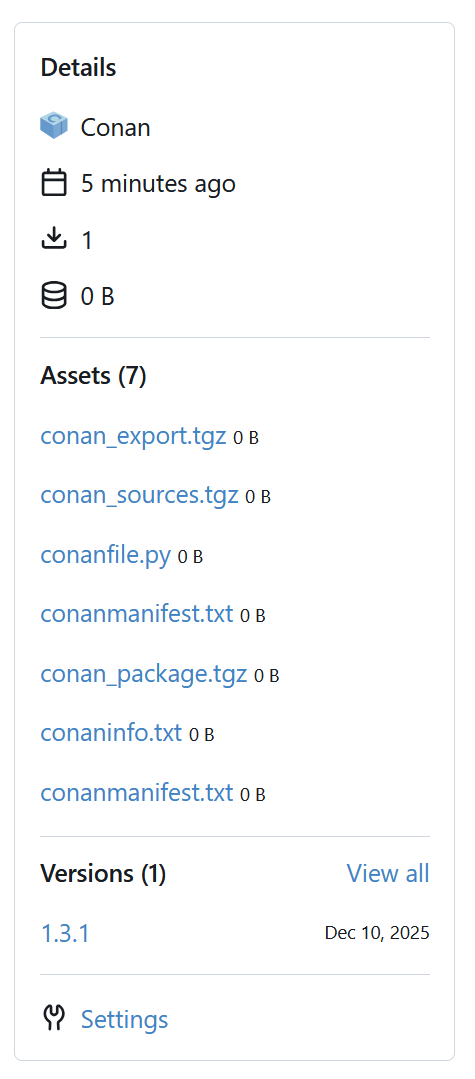
which clearly makes it unusable. Why did it even upload anything at all instead of just failing - that puzzles me to no end.
Moreover, trying to execute the same command again will fail like this:
$ conan upload zlib/1.3.1@YOUR-PREFIX/public --all -r our-gitea
Uploading to remote 'our-gitea':
Uploading zlib/1.3.1@YOUR-PREFIX/public to remote 'our-gitea'
ERROR: zlib/1.3.1@YOUR-PREFIX/public: Upload recipe to 'our-gitea' failed: invalid literal for int() with base 10: ''. [Remote: our-gitea]

ERROR: Errors uploading some packages
Don’t know who screwed up what, Conan or Gitea, but the(?) workaround seems to be setting the CONAN_REVISIONS_ENABLED environment variable before uploading (but first remove the invalid package from remote, just in case):
$ CONAN_REVISIONS_ENABLED=1 conan upload zlib/1.3.1@YOUR-PREFIX/public --all -r our-gitea
Then it will upload okay:
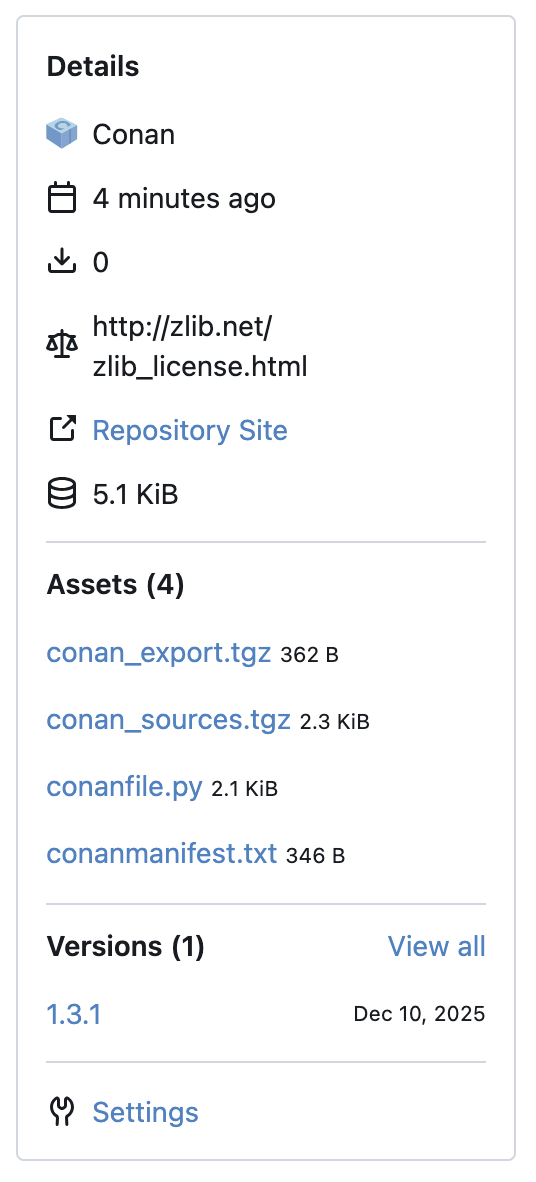
And trying to execute the same command once more will no longer be failing either:
$ CONAN_REVISIONS_ENABLED=1 conan upload zlib/1.3.1@YOUR-PREFIX/public --all -r our-gitea
Uploading to remote 'our-gitea':
Uploading zlib/1.3.1@YOUR-PREFIX/public to remote 'our-gitea'
Recipe is up to date, upload skipped
Now it’s all done, but be aware that this package is likely to fail with --build missing in other environments/platforms/profiles because of the… missing patches (surprise!), but more on that later.
Building packages from source in Conan 2.x
Right then, now let’s see how things are in Conan 2.x. Specifically, I’ll be using version 2.25.2.
First thing of note is that YOUR-PREFIX is now required to be lower-cased. In fact, the entire zlib/1.3.1@your-prefix/public specification string must be lower-cased, and that is a good requirement, I welcome it very much.
Then what I noticed right away is that there is no scm thing anymore. It doesn’t print any errors but it also does not do shit, and there is no 2.x documentation for it either. To be fair, it was marked as deprecated already in 1.x documentation, so this was more or less expected. From what I gather, instead of scm one should use the Git module now:
git = Git(self)
git.clone(url="git@github.com:madler/zlib.git")
git.checkout("51b7f2abdade71cd9bb0e7a373ef2610ec6f9daf")
But the checkout will fail, because default cloned folder name will be - you guessed it right - zlib, and it will do fuck all about letting you know about this. So you will want/need to add a target parameter, in order to introduce some consistency, and then also add one more step for changing the path into that directory, so the checkout could actually work:
git = Git(self)
git.clone(
    url="git@github.com:madler/zlib.git",
    hide_url=False, # why would I want to hide the repository URL?
    target="src"
)
git.folder = "src"
git.checkout("51b7f2abdade71cd9bb0e7a373ef2610ec6f9daf")
Since we are now dealing with sources being one level deeper - in that src subfolder - the build() method needs to be adjusted with build_script_folder parameter, otherwise it will quite naturally fail with something like:
CMake Error: The source directory "/Users/USERNAME/.conan2/p/b/zlib40f82666a9fd6/b" does not appear to contain CMakeLists.txt.
It is added here:
def build(self):
    cmake = CMake(self)
    cmake.configure(
        build_script_folder="src",
        variables={
            "ZLIB_BUILD_EXAMPLES": "NO"
        }
    )
    cmake.build()
Okay, we can get the sources, and the project even configures - great success. But we also need to apply patches, so let’s try the same way how we did it in Conan 1.x:
def source(self):
    git = Git(self)
    git.clone(
        url="git@github.com:madler/zlib.git",
        hide_url=False,
        target="src"
    )
    git.folder = "src"
    git.checkout("51b7f2abdade71cd9bb0e7a373ef2610ec6f9daf")

    apply_conandata_patches(self)
But that will fail:
zlib/1.3.1@your-prefix/public: Apply patch (file): ../patches/001-single-target-and-installation.patch
ERROR: zlib/1.3.1@your-prefix/public: Error in source() method, line 62
        apply_conandata_patches(self)
        FileNotFoundError: [Errno 2] No such file or directory: '/Users/USERNAME/.conan2/p/zlibf89b3b2101d0a/s/../patches/001-single-target-and-installation.patch'
…because the patches need to exported first, duh, how could you forget:
def export_sources(self):
    export_conandata_patches(self)
It will get a bit further after that, but will still fail:
zlib/1.3.1@your-prefix/public: Apply patch (file): ../patches/1.3.1/001-single-target-and-installation.patch
zlib/1.3.1@your-prefix/public: /Users/USERNAME/.conan2/p/zlib0e8f55016cf98/s/../patches/1.3.1/001-single-target-and-installation.patch: source/target file does not exist:
  --- b'CMakeLists.txt'
  +++ b'CMakeLists.txt'
ERROR: zlib/1.3.1@your-prefix/public: Error in source() method, line 62
        apply_conandata_patches(self)
        ConanException: Failed to apply patch: /Users/USERNAME/.conan2/p/zlib0e8f55016cf98/s/../patches/1.3.1/001-single-target-and-installation.patch
…because it tries to apply the patch in a wrong directory, as sources are now in the src subfolder, keep up! Unexpectedly and conveniently enough, conandata.yml can accommodate for that with the base_path parameter:
patches:
  "1.3.1":
    - patch_file: "../patches/1.3.1/001-single-target-and-installation.patch"
      base_path: "src"
so that is nice. By the way, the conandata.yml file seems to be documented only in Conan 1.x, as there is no such article in the documentation for version 2.x.
Anyway, now apply_conandata_patches() will succeed. But we also need those common CMake files - Config.cmake.in and Installing.cmake - so let’s export them too:
def export_sources(self):
    export_conandata_patches(self)

    copy(
        self,
        "*",
        src=f"{self.recipe_folder}/../../_cmake",
        dst=f"{self.export_sources_folder}/src"
    )
But while that part will work fine, now it’s cloning the repository who will fail, even though it was working with no problems just moments ago:
zlib/1.3.1@your-prefix/public: Cloning git repo
zlib/1.3.1@your-prefix/public: RUN: git clone "git@github.com:madler/zlib.git"  "src"
ERROR: zlib/1.3.1@your-prefix/public: Error in source() method, line 58
        git.clone(
        ConanException: Command 'git clone "git@github.com:madler/zlib.git"  "src"' failed with errorcode '128'
b"fatal: destination path 'src' already exists and is not an empty directory.\n"
No fucking shit! Destination already exists, really? How then am I supposed to get these files into the sources folder, if export_sources() runs before source()? I don’t fucking know, so here go the crutches:
def export_sources(self):
    export_conandata_patches(self)

    copy(
        self,
        "*",
        src=f"{self.recipe_folder}/../../_cmake",
        #dst=f"{self.export_sources_folder}/src"
        dst=self.export_sources_folder
    )

def source(self):
    git = Git(self)
    git.clone(
        url="git@github.com:madler/zlib.git",
        hide_url=False,
        target="src"
    )
    git.folder = "src"
    git.checkout("51b7f2abdade71cd9bb0e7a373ef2610ec6f9daf")

    apply_conandata_patches(self)
    copy(
        self,
        "*",
        self.export_sources_folder,
        f"{self.export_sources_folder}/src"
    )
Only now the entire bloody thing will finally work:
conan create . -s build_type=Release
$ conan create . -s build_type=Release

======== Exporting recipe to the cache ========
zlib/1.3.1@your-prefix/public: Exporting package recipe: /Users/USERNAME/code/cpp/conan-recipes/zlib/2.x/conanfile.py
zlib/1.3.1@your-prefix/public: exports: File 'conandata.yml' found. Exporting it...
zlib/1.3.1@your-prefix/public: Calling export_sources()
zlib/1.3.1@your-prefix/public: Copied 1 '.py' file: conanfile.py
zlib/1.3.1@your-prefix/public: Copied 1 '.yml' file: conandata.yml
zlib/1.3.1@your-prefix/public: Copied 1 '.cmake' file: Installing.cmake
zlib/1.3.1@your-prefix/public: Copied 1 '.in' file: Config.cmake.in
zlib/1.3.1@your-prefix/public: Exported to cache folder: /Users/USERNAME/.conan2/p/zlib6cd1a0937cc6f/e
zlib/1.3.1@your-prefix/public: Exported: zlib/1.3.1@your-prefix/public#e1951630376fcb6909b3f71fdac74dbe (2026-02-21 20:34:51 UTC)

======== Input profiles ========
Profile host:
[settings]
arch=armv8
build_type=Release
compiler=apple-clang
compiler.cppstd=gnu17
compiler.libcxx=libc++
compiler.version=17
os=Macos

Profile build:
[settings]
arch=armv8
build_type=Release
compiler=apple-clang
compiler.cppstd=gnu17
compiler.libcxx=libc++
compiler.version=17
os=Macos


======== Computing dependency graph ========
Graph root
    cli
Requirements
    zlib/1.3.1@your-prefix/public#e1951630376fcb6909b3f71fdac74dbe - Cache

======== Computing necessary packages ========
zlib/1.3.1@your-prefix/public: Forced build from source
Requirements
    zlib/1.3.1@your-prefix/public#e1951630376fcb6909b3f71fdac74dbe:b1ff6692ad7a5f789d07f1524fdaaba7e0428c67 - Build

======== Installing packages ========
zlib/1.3.1@your-prefix/public: Calling source() in /Users/USERNAME/.conan2/p/zlib6cd1a0937cc6f/s
zlib/1.3.1@your-prefix/public: Cloning git repo
zlib/1.3.1@your-prefix/public: RUN: git clone "git@github.com:madler/zlib.git"  "src"
zlib/1.3.1@your-prefix/public: Checkout: 51b7f2abdade71cd9bb0e7a373ef2610ec6f9daf
zlib/1.3.1@your-prefix/public: RUN: git checkout 51b7f2abdade71cd9bb0e7a373ef2610ec6f9daf
zlib/1.3.1@your-prefix/public: Apply patch (file): ../patches/1.3.1/001-single-target-and-installation.patch

-------- Installing package zlib/1.3.1@your-prefix/public (1 of 1) --------
zlib/1.3.1@your-prefix/public: Building from source
zlib/1.3.1@your-prefix/public: Package zlib/1.3.1@your-prefix/public:b1ff6692ad7a5f789d07f1524fdaaba7e0428c67
zlib/1.3.1@your-prefix/public: settings: os=Macos arch=armv8 compiler=apple-clang compiler.cppstd=gnu17 compiler.libcxx=libc++ compiler.version=17 build_type=Release
zlib/1.3.1@your-prefix/public: Copying sources to build folder
zlib/1.3.1@your-prefix/public: Building your package in /Users/USERNAME/.conan2/p/b/zlibb69029c81b6f1/b
zlib/1.3.1@your-prefix/public: Calling generate()
zlib/1.3.1@your-prefix/public: Generators folder: /Users/USERNAME/.conan2/p/b/zlibb69029c81b6f1/b/build/Release/generators
zlib/1.3.1@your-prefix/public: CMakeToolchain generated: conan_toolchain.cmake
zlib/1.3.1@your-prefix/public: CMakeToolchain generated: /Users/USERNAME/.conan2/p/b/zlibb69029c81b6f1/b/build/Release/generators/CMakePresets.json
zlib/1.3.1@your-prefix/public: Generating aggregated env files
zlib/1.3.1@your-prefix/public: Generated aggregated env files: ['conanbuild.sh', 'conanrun.sh']
zlib/1.3.1@your-prefix/public: Calling build()
zlib/1.3.1@your-prefix/public: Running CMake.configure()
zlib/1.3.1@your-prefix/public: RUN: cmake -G "Ninja" -DCMAKE_TOOLCHAIN_FILE="generators/conan_toolchain.cmake" -DCMAKE_INSTALL_PREFIX="/Users/USERNAME/.conan2/p/b/zlibb69029c81b6f1/p" -DCMAKE_POLICY_DEFAULT_CMP0091="NEW" -DCMAKE_BUILD_TYPE="Release" -DZLIB_BUILD_EXAMPLES="NO" "/Users/USERNAME/.conan2/p/b/zlibb69029c81b6f1/b/src"
-- Using Conan toolchain: /Users/USERNAME/.conan2/p/b/zlibb69029c81b6f1/b/build/Release/generators/conan_toolchain.cmake
-- Conan toolchain: Defining libcxx as C++ flags: -stdlib=libc++
-- Conan toolchain: C++ Standard 17 with extensions ON
-- The C compiler identification is AppleClang 17.0.0.17000603
-- Detecting C compiler ABI info
-- Detecting C compiler ABI info - done
-- Check for working C compiler: /opt/homebrew/opt/ccache/libexec/cc - skipped
-- Detecting C compile features
-- Detecting C compile features - done
-- Looking for sys/types.h
-- Looking for sys/types.h - found
-- Looking for stdint.h
-- Looking for stdint.h - found
-- Looking for stddef.h
-- Looking for stddef.h - found
-- Check size of off64_t
-- Check size of off64_t - failed
-- Looking for fseeko
-- Looking for fseeko - found
-- Looking for unistd.h
-- Looking for unistd.h - found
-- Configuring done (1.2s)
-- Generating done (0.0s)
-- Build files have been written to: /Users/USERNAME/.conan2/p/b/zlibb69029c81b6f1/b/build/Release

zlib/1.3.1@your-prefix/public: Running CMake.build()
zlib/1.3.1@your-prefix/public: RUN: cmake --build "/Users/USERNAME/.conan2/p/b/zlibb69029c81b6f1/b/build/Release" -- -j12
[16/16] Linking C static library libz.a

zlib/1.3.1@your-prefix/public: Package 'b1ff6692ad7a5f789d07f1524fdaaba7e0428c67' built
zlib/1.3.1@your-prefix/public: Build folder /Users/USERNAME/.conan2/p/b/zlibb69029c81b6f1/b/build/Release
zlib/1.3.1@your-prefix/public: Generating the package
zlib/1.3.1@your-prefix/public: Packaging in folder /Users/USERNAME/.conan2/p/b/zlibb69029c81b6f1/p
zlib/1.3.1@your-prefix/public: Calling package()
zlib/1.3.1@your-prefix/public: Running CMake.install()
zlib/1.3.1@your-prefix/public: RUN: cmake --install "/Users/USERNAME/.conan2/p/b/zlibb69029c81b6f1/b/build/Release" --prefix "/Users/USERNAME/.conan2/p/b/zlibb69029c81b6f1/p"
-- Install configuration: "Release"
-- Installing: /Users/USERNAME/.conan2/p/b/zlibb69029c81b6f1/p/lib/libz.a
-- Installing: /Users/USERNAME/.conan2/p/b/zlibb69029c81b6f1/p/include/zlib/zconf.h
-- Installing: /Users/USERNAME/.conan2/p/b/zlibb69029c81b6f1/p/include/zlib/zlib.h
-- Installing: /Users/USERNAME/.conan2/p/b/zlibb69029c81b6f1/p/share/zlib/zlibTargets.cmake
-- Installing: /Users/USERNAME/.conan2/p/b/zlibb69029c81b6f1/p/share/zlib/zlibTargets-release.cmake
-- Installing: /Users/USERNAME/.conan2/p/b/zlibb69029c81b6f1/p/share/zlib/zlibConfig.cmake
-- Installing: /Users/USERNAME/.conan2/p/b/zlibb69029c81b6f1/p/share/zlib/zlibConfigVersion.cmake

zlib/1.3.1@your-prefix/public: package(): Packaged 2 '.h' files: zlib.h, zconf.h
zlib/1.3.1@your-prefix/public: package(): Packaged 1 '.a' file: libz.a
zlib/1.3.1@your-prefix/public: package(): Packaged 4 '.cmake' files: zlibConfig.cmake, zlibTargets.cmake, zlibConfigVersion.cmake, zlibTargets-release.cmake
zlib/1.3.1@your-prefix/public: Created package revision 130179c00685fb7a3ebd57b51e19a425
zlib/1.3.1@your-prefix/public: Package 'b1ff6692ad7a5f789d07f1524fdaaba7e0428c67' created
zlib/1.3.1@your-prefix/public: Full package reference: zlib/1.3.1@your-prefix/public#e1951630376fcb6909b3f71fdac74dbe:b1ff6692ad7a5f789d07f1524fdaaba7e0428c67#130179c00685fb7a3ebd57b51e19a425
zlib/1.3.1@your-prefix/public: Package folder /Users/USERNAME/.conan2/p/b/zlibb69029c81b6f1/p
Here you can take a look at how the full recipe file looks like at this point (and so just you know, it is not entirely correct, but more on that later).
The resulting package will be this:
$ tree /Users/USERNAME/.conan2/p/b/zlib1f9e8e16e0f1d/p
├── conaninfo.txt
├── conanmanifest.txt
├── include
│   └── zlib
│       ├── zconf.h
│       └── zlib.h
├── lib
│   └── libz.a
└── share
    └── zlib
        ├── zlibConfig.cmake
        ├── zlibConfigVersion.cmake
        ├── zlibTargets-release.cmake
        └── zlibTargets.cmake
Same as before, make a package for Debug configuration too:
$ conan create . -s build_type=Debug
and then the commands for adding a new remote and publishing the package are a little bit different from 1.x:
$ conan remote add our-gitea https://gitea.OUR.HOST/api/packages/OUR-ORGANIZATION/conan
$ conan remote login our-gitea SOME-BUILDBOT -p SOME-BUILDBOT-ACCESS-TOKEN

$ conan upload zlib/1.3.1@YOUR-PREFIX/public -r our-gitea
In particular, there is no --all parameter anymore, as both Debug and Release are uploaded by default:
======== Uploading to remote our-gitea ========

-------- Checking server for existing packages --------
zlib/1.3.1@your-prefix/public: Checking which revisions exist in the remote server
Connecting to remote 'our-gitea' with user 'SOME-BUILDBOT'

-------- Preparing artifacts for upload --------
zlib/1.3.1@your-prefix/public: Compressing conan_export.tgz
zlib/1.3.1@your-prefix/public: Compressing conan_sources.tgz
zlib/1.3.1@your-prefix/public:b1ff6692ad7a5f789d07f1524fdaaba7e0428c67: Compressing conan_package.tgz
zlib/1.3.1@your-prefix/public:b4653e854542d65f58ec9b607521d1c6da3dd37f: Compressing conan_package.tgz

-------- Uploading artifacts --------
zlib/1.3.1@your-prefix/public: Uploading recipe 'zlib/1.3.1@your-prefix/public#8c9021bf2f5c373e741a59f6341556f0' (4.4KB)
zlib/1.3.1@your-prefix/public: Uploading package 'zlib/1.3.1@your-prefix/public#8c9021bf2f5c373e741a59f6341556f0:b1ff6692ad7a5f789d07f1524fdaaba7e0428c67#21d4bf703f1ef737e09cfe72a5dd13c0' (80.2KB)
zlib/1.3.1@your-prefix/public: Uploading package 'zlib/1.3.1@your-prefix/public#8c9021bf2f5c373e741a59f6341556f0:b4653e854542d65f58ec9b607521d1c6da3dd37f#c88b3c405b4fd5824f77dc6a6c13e410' (128.4KB)
Upload completed in 0s


-------- Upload summary --------
our-gitea
  zlib/1.3.1@your-prefix/public
    revisions
      8c9021bf2f5c373e741a59f6341556f0 (Uploaded)
        packages
          b1ff6692ad7a5f789d07f1524fdaaba7e0428c67
            revisions
              21d4bf703f1ef737e09cfe72a5dd13c0 (Uploaded)
          b4653e854542d65f58ec9b607521d1c6da3dd37f
            revisions
              c88b3c405b4fd5824f77dc6a6c13e410 (Uploaded)
Making sure that build missing works
Now let’s verify that it all was not for nothing, so users will be able build the package from sources in their environments too (when there are no pre-built binaries available in the remote).
My original Conan profile was on Mac OS, as you could see, and I will be testing the package on a different host with GNU/Linux:
$ conan profile detect
detect_api: Found cc=gcc-13.3.0
detect_api: gcc>=5, using the major as version
detect_api: gcc C++ standard library: libstdc++11

Detected profile:
[settings]
arch=armv8
build_type=Release
compiler=gcc
compiler.cppstd=gnu17
compiler.libcxx=libstdc++11
compiler.version=13
os=Linux
The conanfile.txt is simple:
[requires]
zlib/1.3.1@your-prefix/public
And here we go:
$ conan remote add our-gitea https://gitea.OUR.HOST/api/packages/OUR-ORGANIZATION/conan
$ conan remote login our-gitea SOME-BUILDBOT -p SOME-BUILDBOT-ACCESS-TOKEN

$ conan install . -s build_type=Release

# ...

======== Computing dependency graph ========
zlib/1.3.1@your-prefix/public: Not found in local cache, looking in remotes...
zlib/1.3.1@your-prefix/public: Checking remote: conancenter
Connecting to remote 'conancenter' anonymously
zlib/1.3.1@your-prefix/public: Checking remote: our-gitea
Connecting to remote 'our-gitea' with user 'SOME-BUILDBOT'
zlib/1.3.1@your-prefix/public: Downloaded recipe revision 8c9021bf2f5c373e741a59f6341556f0
Graph root
    conanfile.txt: /tmp/tst/conanfile.txt
Requirements
    zlib/1.3.1@your-prefix/public#8c9021bf2f5c373e741a59f6341556f0 - Downloaded (our-gitea)

======== Computing necessary packages ========
zlib/1.3.1@your-prefix/public: Main binary package '7e86c4b3602206723f284fdfdde6a34cf597348b' missing
zlib/1.3.1@your-prefix/public: Checking 11 compatible configurations
zlib/1.3.1@your-prefix/public: Compatible configurations not found in cache, checking servers
zlib/1.3.1@your-prefix/public: '8aaaffb6879050f7935d3eb75886df5c364ef04d': compiler.cppstd=98
zlib/1.3.1@your-prefix/public: '98c5b5e12c29fd04618c3271f52eb5cc86525ac0': compiler.cppstd=gnu98
zlib/1.3.1@your-prefix/public: '2f963acd1db98563cdd4cb8c668c074ccb2f6a0e': compiler.cppstd=11
zlib/1.3.1@your-prefix/public: '095cbcae727f77a229cd27f333336466c57fb945': compiler.cppstd=gnu11
zlib/1.3.1@your-prefix/public: 'c3c1c9c37a8b7a1bf5fe9560f790b4db9fbef4e7': compiler.cppstd=14
zlib/1.3.1@your-prefix/public: 'ad16df6c61867c7bce3d99cac8156bbc0f4c35fa': compiler.cppstd=gnu14
zlib/1.3.1@your-prefix/public: 'fbfc70eb56ad38e231d8c02e8588785062b4605c': compiler.cppstd=17
zlib/1.3.1@your-prefix/public: '40e4da6a63e5ecc66fe5cb1eefd3e01a64401d4e': compiler.cppstd=20
zlib/1.3.1@your-prefix/public: '9f9ec3b60ea1e556cd8b4c1526d1f0a232742c36': compiler.cppstd=gnu20
zlib/1.3.1@your-prefix/public: 'c06a3ccc19b7b3dbbcf4c95b073c5adf7b0b066b': compiler.cppstd=23
zlib/1.3.1@your-prefix/public: 'dc4a3934e08b94e0d9da65b7303adf4b1921e2ce': compiler.cppstd=gnu23
zlib/1.3.1@your-prefix/public: No compatible configuration found

A new experimental approach for binary compatibility detection is available.
    Enable it by setting the core.graph:compatibility_mode=optimized conf
    and get improved performance when querying multiple compatible binaries in remotes.

Requirements
    zlib/1.3.1@your-prefix/public#8c9021bf2f5c373e741a59f6341556f0:7e86c4b3602206723f284fdfdde6a34cf597348b - Missing
ERROR: Missing binary: zlib/1.3.1@your-prefix/public:7e86c4b3602206723f284fdfdde6a34cf597348b

zlib/1.3.1@your-prefix/public: WARN: Can't find a 'zlib/1.3.1@your-prefix/public' package binary '7e86c4b3602206723f284fdfdde6a34cf597348b' for the configuration:
[settings]
arch=armv8
build_type=Release
compiler=gcc
compiler.cppstd=gnu17
compiler.libcxx=libstdc++11
compiler.version=13
os=Linux

ERROR: Missing prebuilt package for 'zlib/1.3.1@your-prefix/public'. You can try:
    - List all available packages using 'conan list "zlib/1.3.1@your-prefix/public:*" -r=remote'
    - Explain missing binaries: replace 'conan install ...' with 'conan graph explain ...'
    - Try to build locally from sources using the '--build=zlib/1.3.1@your-prefix/public' argument

More Info at 'https://docs.conan.io/2/knowledge/faq.html#error-missing-prebuilt-package'
As expected, no pre-built binaries for this platform/profile yet, so we need to explicitly tell Conan that we want to build the package from sources (should be the default behaviour, in my opinion):
$ conan install . -s build_type=Release --build missing
…aaaaand it fucking failed:
======== Installing packages ========
zlib/1.3.1@your-prefix/public: Sources downloaded from 'our-gitea'
zlib/1.3.1@your-prefix/public: Calling source() in /home/USERNAME/.conan2/p/zlibf05b26372de83/s
zlib/1.3.1@your-prefix/public: Cloning git repo
zlib/1.3.1@your-prefix/public: RUN: git clone "git@github.com:madler/zlib.git"  "src"
zlib/1.3.1@your-prefix/public: Checkout: 51b7f2abdade71cd9bb0e7a373ef2610ec6f9daf
zlib/1.3.1@your-prefix/public: RUN: git checkout 51b7f2abdade71cd9bb0e7a373ef2610ec6f9daf
zlib/1.3.1@your-prefix/public: Apply patch (file): ../patches/1.3.1/001-single-target-and-installation.patch
ERROR: zlib/1.3.1@your-prefix/public: Error in source() method, line 58
    apply_conandata_patches(self)
    FileNotFoundError: [Errno 2] No such file or directory: '/home/USERNAME/.conan2/p/zlibf05b26372de83/s/../patches/1.3.1/001-single-target-and-installation.patch'
…because patches were not distributed together with the package. At first I thought that I should have added them in package() method:
def package(self):
    cmake = CMake(self)
    cmake.install()

    copy(
        self,
        "*",
        # yet again, this `recipe_folder` here is not where the `conanfile.py` is
        src=f"{self.recipe_folder}/../patches",
        dst=f"{self.package_folder}/patches"
    )
which will indeed add them to the package:
$ conan create . -s build_type=Debug
$ conan create . -s build_type=Release

$ tree /Users/USERNAME/.conan2/p/b/zlib1495b2f7e6558/p
├── conaninfo.txt
├── conanmanifest.txt
├── include
│   └── zlib
│       ├── zconf.h
│       └── zlib.h
├── lib
│   └── libz.a
├── patches
│   └── 1.3.1
│       └── 001-single-target-and-installation.patch
└── share
    └── zlib
        ├── zlibConfig.cmake
        ├── zlibConfigVersion.cmake
        ├── zlibTargets-release.cmake
        └── zlibTargets.cmake

$ conan upload zlib/1.3.1@YOUR-PREFIX/public -r our-gitea
and they will be packed into the conan_package.tgz archive, but they will still be nowhere to find during the package build:
$ tree -L 2 /home/USERNAME/.conan2/p/zlib3a471b8319eee/
├── d
│ ├── conan_export.tgz
│ ├── conan_sources.tgz
│ └── metadata
├── e
│ ├── conandata.yml
│ ├── conanfile.py
│ └── conanmanifest.txt
├── es
│ ├── Config.cmake.in
│ └── Installing.cmake
├── s
│ ├── Config.cmake.in
│ ├── Installing.cmake
│ └── src
└── s.dirty
Only then I realized that package() method is not meant for adding patches into the package, although its name (which is package) is really deceiving in that regard. What’s getting packed in this method is really just the build/install artifacts of the library, such as public headers, binaries, CMake configs and so on. Patches simply do not belong here, as they are needed only for building the library itself, or actually even earlier than that - before the project is configured for the build.
So then my next guess was that since those additional files Config.cmake.in and Installing.cmake are present on the target host after unpacking, then maybe I should “export” the patches in export_sources() too:
def export_sources(self):
    export_conandata_patches(self)

    copy(
        self,
        "*",
        src=f"{self.recipe_folder}/../patches",
        dst=f"{self.export_sources_folder}/patches"
    )

    copy(
        self,
        "*", # or do it with explicit files names in several `copy()` calls
        src=f"{self.recipe_folder}/../../_cmake",
        # trying to "export" additional files directly into `src` folder
        # will prevent `git.clone()` from cloning the repository,
        # because `src` folder will already exist by that moment
        #dst=f"{self.export_sources_folder}/src"
        dst=self.export_sources_folder
    )

# ...

def package(self):
    cmake = CMake(self)
    cmake.install()

    # delete that as this is wrong
    #copy(
    #    self,
    #    "*",
    #    # yet again, don't forget that `recipe_folder` here is not where the `conanfile.py` is
    #    src=f"{self.recipe_folder}/../patches",
    #    dst=f"{self.package_folder}/patches"
    #)
Then after re-making and re-publishing the package the unpacked files on the target computer will contain the patches:
$ tree -L 2 /home/USERNAME/.conan2/p/zlib25c7db754f26d/
├── d
│   ├── conan_export.tgz
│   ├── conan_sources.tgz
│   └── metadata
├── e
│   ├── conandata.yml
│   ├── conanfile.py
│   └── conanmanifest.txt
├── es
│   ├── Config.cmake.in
│   ├── Installing.cmake
│   └── patches
│       └── 1.3.1
│           └── 001-single-target-and-installation.patch
├── s
│   ├── Config.cmake.in
│   ├── Installing.cmake
│   ├── patches
│   │   └── 1.3.1
│   │       └── 001-single-target-and-installation.patch
│   └── src
│       ├── ...
└── s.dirty
…but the build will still fail:
zlib/1.3.1@your-prefix/public: Apply patch (file): ../patches/1.3.1/001-single-target-and-installation.patch
ERROR: zlib/1.3.1@your-prefix/public: Error in source() method, line 67
    apply_conandata_patches(self)
    FileNotFoundError: [Errno 2] No such file or directory: '/home/USERNAME/.conan2/p/zlib25c7db754f26d/s/../patches/1.3.1/001-single-target-and-installation.patch'
because now all of the bloody sudden it constructs the path to patches differently. In the original environment it puts them one level up relative to s directory, and while that works there, it does not work with --build missing in other environments. So, unless I have messed up something somewhere, conandata.yml and export_conandata_patches()/apply_conandata_patches() apparently were not designed to work with ../ paths, so me trying to reuse the same set of patches for 1.x and 2.x recipes broke that fragily thingy.
One way to resolve this would be to add one more copy() in export_sources():
def source(self):
    # ...

    # guarding the copy operation with this condition doesn't seem to be a reliable way
    # of determining that we are not in the original environment, but actually it is fine
    # even without it, as `copy()` just silently continues when it can't find anything
    #if self.build_policy == "missing":
    if True:
        copy(
            self,
            "*",
            src=f"{self.export_sources_folder}/patches",
            dst=f"{self.export_sources_folder}/../patches"
        )
    apply_conandata_patches(self)

    # ...
But it is likely a bad idea. So maybe it is better not to challenge the poor thing beyond its little capabilities and just restructure the recipe folder the way it is expected:
$ tree /path/to/conan-recipes/
..
├── _cmake
│   ├── Config.cmake.in
│   └── Installing.cmake
├── README.md
└── zlib
    ├── conandata.yml
    ├── conanfile.py
    └── patches
        └── 1.3.1
            └── 001-single-target-and-installation.patch
Now there will also be no need to copy() the patches in export_sources() or anywhere else, as it will all be nicely handled by export_conandata_patches()/apply_conandata_patches() out of the box.
Then, after re-making and re-publishing the package, the package will work fine with --build missing too:
conan install . -s build_type=Release --build missing
$ conan install . -s build_type=Release --build missing

======== Input profiles ========
Profile host:
[settings]
arch=armv8
build_type=Release
compiler=gcc
compiler.cppstd=gnu17
compiler.libcxx=libstdc++11
compiler.version=13
os=Linux

Profile build:
[settings]
arch=armv8
build_type=Release
compiler=gcc
compiler.cppstd=gnu17
compiler.libcxx=libstdc++11
compiler.version=13
os=Linux


======== Computing dependency graph ========
zlib/1.3.1@your-prefix/public: Not found in local cache, looking in remotes...
zlib/1.3.1@your-prefix/public: Checking remote: conancenter
Connecting to remote 'conancenter' anonymously
zlib/1.3.1@your-prefix/public: Checking remote: our-gitea
Connecting to remote 'our-gitea' with user 'SOME-BUILDBOT'
zlib/1.3.1@your-prefix/public: Downloaded recipe revision 29c8feca6abac3bceb76569245d8acc4
Graph root
    conanfile.txt: /tmp/tst/conanfile.txt
Requirements
    zlib/1.3.1@your-prefix/public#29c8feca6abac3bceb76569245d8acc4 - Downloaded (our-gitea)

======== Computing necessary packages ========
zlib/1.3.1@your-prefix/public: Main binary package '7e86c4b3602206723f284fdfdde6a34cf597348b' missing
zlib/1.3.1@your-prefix/public: Checking 11 compatible configurations
zlib/1.3.1@your-prefix/public: Compatible configurations not found in cache, checking servers
zlib/1.3.1@your-prefix/public: '8aaaffb6879050f7935d3eb75886df5c364ef04d': compiler.cppstd=98
zlib/1.3.1@your-prefix/public: '98c5b5e12c29fd04618c3271f52eb5cc86525ac0': compiler.cppstd=gnu98
zlib/1.3.1@your-prefix/public: '2f963acd1db98563cdd4cb8c668c074ccb2f6a0e': compiler.cppstd=11
zlib/1.3.1@your-prefix/public: '095cbcae727f77a229cd27f333336466c57fb945': compiler.cppstd=gnu11
zlib/1.3.1@your-prefix/public: 'c3c1c9c37a8b7a1bf5fe9560f790b4db9fbef4e7': compiler.cppstd=14
zlib/1.3.1@your-prefix/public: 'ad16df6c61867c7bce3d99cac8156bbc0f4c35fa': compiler.cppstd=gnu14
zlib/1.3.1@your-prefix/public: 'fbfc70eb56ad38e231d8c02e8588785062b4605c': compiler.cppstd=17
zlib/1.3.1@your-prefix/public: '40e4da6a63e5ecc66fe5cb1eefd3e01a64401d4e': compiler.cppstd=20
zlib/1.3.1@your-prefix/public: '9f9ec3b60ea1e556cd8b4c1526d1f0a232742c36': compiler.cppstd=gnu20
zlib/1.3.1@your-prefix/public: 'c06a3ccc19b7b3dbbcf4c95b073c5adf7b0b066b': compiler.cppstd=23
zlib/1.3.1@your-prefix/public: 'dc4a3934e08b94e0d9da65b7303adf4b1921e2ce': compiler.cppstd=gnu23
zlib/1.3.1@your-prefix/public: No compatible configuration found

A new experimental approach for binary compatibility detection is available.
    Enable it by setting the core.graph:compatibility_mode=optimized conf
    and get improved performance when querying multiple compatible binaries in remotes.

Requirements
    zlib/1.3.1@your-prefix/public#29c8feca6abac3bceb76569245d8acc4:7e86c4b3602206723f284fdfdde6a34cf597348b - Build

======== Installing packages ========
zlib/1.3.1@your-prefix/public: Sources downloaded from 'our-gitea'
zlib/1.3.1@your-prefix/public: Calling source() in /home/USERNAME/.conan2/p/zlib2b7271a1100fd/s
zlib/1.3.1@your-prefix/public: Cloning git repo
zlib/1.3.1@your-prefix/public: RUN: git clone "git@github.com:madler/zlib.git"  "src"
zlib/1.3.1@your-prefix/public: Checkout: 51b7f2abdade71cd9bb0e7a373ef2610ec6f9daf
zlib/1.3.1@your-prefix/public: RUN: git checkout 51b7f2abdade71cd9bb0e7a373ef2610ec6f9daf
zlib/1.3.1@your-prefix/public: Apply patch (file): patches/1.3.1/001-single-target-and-installation.patch

-------- Installing package zlib/1.3.1@your-prefix/public (1 of 1) --------
zlib/1.3.1@your-prefix/public: Building from source
zlib/1.3.1@your-prefix/public: Package zlib/1.3.1@your-prefix/public:7e86c4b3602206723f284fdfdde6a34cf597348b
zlib/1.3.1@your-prefix/public: settings: os=Linux arch=armv8 compiler=gcc compiler.cppstd=gnu17 compiler.libcxx=libstdc++11 compiler.version=13 build_type=Release
zlib/1.3.1@your-prefix/public: Copying sources to build folder
zlib/1.3.1@your-prefix/public: Building your package in /home/USERNAME/.conan2/p/b/zlib1fbb527e4c153/b
zlib/1.3.1@your-prefix/public: Calling generate()
zlib/1.3.1@your-prefix/public: Generators folder: /home/USERNAME/.conan2/p/b/zlib1fbb527e4c153/b/build/Release/generators
zlib/1.3.1@your-prefix/public: CMakeToolchain generated: conan_toolchain.cmake
zlib/1.3.1@your-prefix/public: CMakeToolchain generated: /home/USERNAME/.conan2/p/b/zlib1fbb527e4c153/b/build/Release/generators/CMakePresets.json
zlib/1.3.1@your-prefix/public: Generating aggregated env files
zlib/1.3.1@your-prefix/public: Generated aggregated env files: ['conanbuild.sh', 'conanrun.sh']
zlib/1.3.1@your-prefix/public: Calling build()
zlib/1.3.1@your-prefix/public: Running CMake.configure()
zlib/1.3.1@your-prefix/public: RUN: cmake -G "Ninja" -DCMAKE_TOOLCHAIN_FILE="generators/conan_toolchain.cmake" -DCMAKE_INSTALL_PREFIX="/home/USERNAME/.conan2/p/b/zlib1fbb527e4c153/p" -DCMAKE_POLICY_DEFAULT_CMP0091="NEW" -DCMAKE_BUILD_TYPE="Release" -DZLIB_BUILD_EXAMPLES="NO" "/home/USERNAME/.conan2/p/b/zlib1fbb527e4c153/b/src"
-- Using Conan toolchain: /home/USERNAME/.conan2/p/b/zlib1fbb527e4c153/b/build/Release/generators/conan_toolchain.cmake
-- Conan toolchain: C++ Standard 17 with extensions ON
-- The C compiler identification is GNU 13.3.0
-- Detecting C compiler ABI info
-- Detecting C compiler ABI info - done
-- Check for working C compiler: /usr/bin/cc - skipped
-- Detecting C compile features
-- Detecting C compile features - done
-- Looking for sys/types.h
-- Looking for sys/types.h - found
-- Looking for stdint.h
-- Looking for stdint.h - found
-- Looking for stddef.h
-- Looking for stddef.h - found
-- Check size of off64_t
-- Check size of off64_t - done
-- Looking for fseeko
-- Looking for fseeko - found
-- Looking for unistd.h
-- Looking for unistd.h - found
-- Configuring done (0.2s)
-- Generating done (0.0s)
-- Build files have been written to: /home/USERNAME/.conan2/p/b/zlib1fbb527e4c153/b/build/Release

zlib/1.3.1@your-prefix/public: Running CMake.build()
zlib/1.3.1@your-prefix/public: RUN: cmake --build "/home/USERNAME/.conan2/p/b/zlib1fbb527e4c153/b/build/Release" -- -j4
[16/16] Linking C static library libz.a

zlib/1.3.1@your-prefix/public: Package '7e86c4b3602206723f284fdfdde6a34cf597348b' built
zlib/1.3.1@your-prefix/public: Build folder /home/USERNAME/.conan2/p/b/zlib1fbb527e4c153/b/build/Release
zlib/1.3.1@your-prefix/public: Generating the package
zlib/1.3.1@your-prefix/public: Packaging in folder /home/USERNAME/.conan2/p/b/zlib1fbb527e4c153/p
zlib/1.3.1@your-prefix/public: Calling package()
zlib/1.3.1@your-prefix/public: Running CMake.install()
zlib/1.3.1@your-prefix/public: RUN: cmake --install "/home/USERNAME/.conan2/p/b/zlib1fbb527e4c153/b/build/Release" --prefix "/home/USERNAME/.conan2/p/b/zlib1fbb527e4c153/p"
-- Install configuration: "Release"
-- Installing: /home/USERNAME/.conan2/p/b/zlib1fbb527e4c153/p/lib/libz.a
-- Installing: /home/USERNAME/.conan2/p/b/zlib1fbb527e4c153/p/include/zlib/zconf.h
-- Installing: /home/USERNAME/.conan2/p/b/zlib1fbb527e4c153/p/include/zlib/zlib.h
-- Installing: /home/USERNAME/.conan2/p/b/zlib1fbb527e4c153/p/share/zlib/zlibTargets.cmake
-- Installing: /home/USERNAME/.conan2/p/b/zlib1fbb527e4c153/p/share/zlib/zlibTargets-release.cmake
-- Installing: /home/USERNAME/.conan2/p/b/zlib1fbb527e4c153/p/share/zlib/zlibConfig.cmake
-- Installing: /home/USERNAME/.conan2/p/b/zlib1fbb527e4c153/p/share/zlib/zlibConfigVersion.cmake

zlib/1.3.1@your-prefix/public: package(): Packaged 4 '.cmake' files: zlibConfigVersion.cmake, zlibConfig.cmake, zlibTargets.cmake, zlibTargets-release.cmake
zlib/1.3.1@your-prefix/public: package(): Packaged 1 '.a' file: libz.a
zlib/1.3.1@your-prefix/public: package(): Packaged 2 '.h' files: zlib.h, zconf.h
zlib/1.3.1@your-prefix/public: Created package revision 5136954c6fc51833ca445f2655fcf691
zlib/1.3.1@your-prefix/public: Package '7e86c4b3602206723f284fdfdde6a34cf597348b' created
zlib/1.3.1@your-prefix/public: Full package reference: zlib/1.3.1@your-prefix/public#29c8feca6abac3bceb76569245d8acc4:7e86c4b3602206723f284fdfdde6a34cf597348b#5136954c6fc51833ca445f2655fcf691
zlib/1.3.1@your-prefix/public: Package folder /home/USERNAME/.conan2/p/b/zlib1fbb527e4c153/p

======== Finalizing install (deploy, generators) ========
conanfile.txt: Generating aggregated env files
conanfile.txt: Generated aggregated env files: ['conanbuild.sh', 'conanrun.sh']
Install finished successfully
Fucking finally! The full updated/corrected recipe file is here.
Building a shared/dynamic library
Another question is how to build/make a package with a shared/dynamic library? Quick googling revealed that merely adding -o *:shared=True should be enough:
$ conan create . -s build_type=Release -o *:shared=True
but no, it still produced libz.a, which is a static library. I’d like to be wrong, but apparently (every) recipe must explicitly state that it cares about this option, otherwise -o *:shared=True has no effect on it:
options = {
    "shared": [True, False]
}
default_options = {
    "shared": False
}
And indeed, this time package produced a shared library:
$ conan create . -s build_type=Release -o *:shared=True

$ tree /Users/USERNAME/.conan2/p/b/zlib0cf72d632a88e/p
├── conaninfo.txt
├── conanmanifest.txt
├── include
│ └── zlib
│     ├── zconf.h
│     └── zlib.h
├── lib
│ ├── libz.1.3.1.dylib
│ ├── libz.1.dylib -> libz.1.3.1.dylib
│ └── libz.dylib -> libz.1.dylib
└── share
    └── zlib
        ├── zlibConfig.cmake
        ├── zlibConfigVersion.cmake
        ├── zlibTargets-release.cmake
        └── zlibTargets.cmake
What’s convenient here is that the recipe maintainer does not need to set BUILD_SHARED_LIBS in cmake.configure(), because Conan will do that automatically (I could only find documentation for it in version 1.x, but it seems to work fine in 2.x too), although it happens somewhere on the toolchain level:
# ...
zlib/1.3.1@your-prefix/public: Running CMake.configure()
zlib/1.3.1@your-prefix/public: RUN: cmake -G "Ninja" -DCMAKE_TOOLCHAIN_FILE="generators/conan_toolchain.cmake" -DCMAKE_INSTALL_PREFIX="/Users/USERNAME/.conan2/p/b/zlib0cf72d632a88e/p" -DCMAKE_POLICY_DEFAULT_CMP0091="NEW" -DCMAKE_BUILD_TYPE="Release" -DZLIB_BUILD_EXAMPLES="NO" "/Users/USERNAME/.conan2/p/b/zlib0cf72d632a88e/b/src"
-- Using Conan toolchain: /Users/USERNAME/.conan2/p/b/zlib0cf72d632a88e/b/build/Release/generators/conan_toolchain.cmake
-- Conan toolchain: Defining libcxx as C++ flags: -stdlib=libc++
-- Conan toolchain: C++ Standard 17 with extensions ON
-- Conan toolchain: Setting BUILD_SHARED_LIBS = ON
-- The C compiler identification is AppleClang 17.0.0.17000603
# ...
but that is probably okay.
Going deeper, what if some library needs to be limited to building only static variant under certain conditions? Specifically, if it does not export symbols for making a DLL on Windows (one such example is ryu library), then it should always build as static library on Windows but keep building as shared library on other platforms.
My first guess was to introduce this limitation in configure() method:
def configure(self):
    if self.settings.os == "Windows" and self.options.shared:
        self.options.shared = False
but that failed with:
ConanException: Incorrect attempt to modify option 'shared' from 'True' to 'False'
Fucking okay, in config_options() then:
def config_options(self):
    if self.settings.os == "Windows" and self.options.shared:
        self.options.shared = False
And that didn’t fail, but it also did not do jack shit, as the build still got BUILD_SHARED_LIBS = ON. That was a rather knife-in-the-back discovery, because I’ve seen several Conan examples where config_options() was used exactly for the purpose of modifying options under certain conditions, and yet here we are.
I had no idea what to do next, but then I remembered that I read somewhere something about removing options, so I tried that:
def config_options(self):
    if self.settings.os == "Windows" and self.options.shared:
        del self.options.shared
But that too did not prevent it from building a shared/dynamic library either - BUILD_SHARED_LIBS was still set. MotherfFinally, I also remembered reading about a different kind of options removal (why in the fucking hell there is more than one?), which happens not in config_options() but in… configure(), back where I started:
def configure(self):
    if self.settings.os == "Windows" and self.options.shared:
        self.options.rm_safe("shared")
And that one did work - building on Windows got limited to static-only. Jesus.
If you will need to do something based on shared option in “lower” methods (such as build()) down the execution lane, then you will have to use get_safe() function, because the option could be already removed at that point. With JsonCpp as an example, it might look like this:
def build(self):
    JSONCPP_STATIC = 1
    JSONCPP_SHARED = 0
    # the `shared` option might be already removed in the "higher" methods,
    # so you can't access it like this
    #self.options.shared:
    if self.options.get_safe("shared", default=False):
        # checking `self.settings.os != "Windows"` should not be required,
        # assuming that `configure()` already removed the option for Windows
        JSONCPP_STATIC = 0
        JSONCPP_SHARED = 1

    cmake = CMake(self)
    cmake.configure(
        build_script_folder="src",
        variables={
            "JSONCPP_WITH_TESTS": 0,
            "JSONCPP_WITH_EXAMPLE": 0,
            # ...
            "BUILD_SHARED_LIBS": JSONCPP_SHARED,
            "BUILD_STATIC_LIBS": JSONCPP_STATIC
        }
    )
    cmake.build()
Making sure that requirements use proper CMake configs
I was about to start celebrating, but then I discovered another nasty thing. If one generates and exports CMake configs as a part of the installation steps when building the project with CMake, then one will be very surprised to learn that by default Conan does not use those configs (here be sounds of explosions, people screaming and general armageddon vibes).
For instance, let’s make a package for png, whose only dependency is zlib, which is going to be discovered in png’s CMake project like this, as one would expect:
find_package(zlib CONFIG REQUIRED)
Then in the png’s Conan recipe we declare the dependency like this:
def requirements(self):
    self.requires("zlib/1.3.1@your-prefix/public")
But even though our zlib package does contains proper CMake configs (as you could see above in the /Users/USERNAME/.conan2/p/b/zlib1f9e8e16e0f1d/p tree), the Conan-managed build of png failed to discover those CMake configs for zlib:
# ...
png/1.6.53@your-prefix/public: Running CMake.configure()
png/1.6.53@your-prefix/public: RUN: cmake -G "Ninja" -DCMAKE_TOOLCHAIN_FILE="generators/conan_toolchain.cmake" -DCMAKE_INSTALL_PREFIX="/Users/USERNAME/.conan2/p/b/pngdb349cb03f4e6/p" -DCMAKE_POLICY_DEFAULT_CMP0091="NEW" -DCMAKE_BUILD_TYPE="Debug" -DPNG_TESTS="0" -DPNG_TOOLS="0" -DPNG_STATIC="1" -DPNG_SHARED="0" "/Users/USERNAME/.conan2/p/b/pngdb349cb03f4e6/b/src"
-- Using Conan toolchain: /Users/USERNAME/.conan2/p/b/png624dddf43c215/b/build/Debug/generators/conan_toolchain.cmake
-- Conan toolchain: Defining libcxx as C++ flags: -stdlib=libc++
-- Conan toolchain: C++ Standard 17 with extensions ON
-- Conan toolchain: Setting BUILD_SHARED_LIBS = OFF
-- The C compiler identification is AppleClang 17.0.0.17000603
-- Detecting C compiler ABI info
-- Detecting C compiler ABI info - done
-- Check for working C compiler: /opt/homebrew/opt/ccache/libexec/cc - skipped
-- Detecting C compile features
-- Detecting C compile features - done
-- Building for target architecture: arm64
CMake Error at CMakeLists.txt:120 (find_package):
  Could not find a package configuration file provided by "zlib" with any of
  the following names:

    zlibConfig.cmake
    zlib-config.cmake

  Add the installation prefix of "zlib" to CMAKE_PREFIX_PATH or set
  "zlib_DIR" to a directory containing one of the above files.  If "zlib"
  provides a separate development package or SDK, be sure it has been
  installed.
That felt somewhat surreal, because this is the last kind of error I’d expect to see using a package manager, whose job is to make resolving dependencies easier, not more difficult. I ran to documentation faster than light, and surely enough it turned out that it was just me being stupid, because if I wanted to resolve dependencies, then requirements() alone is not good enough, and I should have also declared CMakeDeps generator in the png’s recipe:
generators = "CMakeDeps"
Or, actually, looks like it should be CMakeConfigDeps instead, because apparently there is something wrong with CMakeDeps, but at the same time CMakeConfigDeps is marked as experimental, sooooo what do I… jesus christ, I guess I’ll go with CMakeDeps.
So I added that, and then the build progressed further, but failed with a different error - something I have expected even less:
# ...
png/1.6.53@your-prefix/public: Running CMake.build()
png/1.6.53@your-prefix/public: RUN: cmake --build "/Users/USERNAME/.conan2/p/b/png098b4bf951dc7/b/build/Release" -- -j12
[6/32] Generating pnglibconf.out
FAILED: [code=1] pnglibconf.out /Users/USERNAME/.conan2/p/b/png098b4bf951dc7/b/build/Release/pnglibconf.out
cd /Users/USERNAME/.conan2/p/b/png098b4bf951dc7/b/build/Release && /opt/homebrew/bin/cmake -DINPUT=/Users/USERNAME/.conan2/p/b/png098b4bf951dc7/b/build/Release/pnglibconf.c -DOUTPUT=/Users/USERNAME/.conan2/p/b/png098b4bf951dc7/b/build/Release/pnglibconf.out -P /Users/USERNAME/.conan2/p/b/png098b4bf951dc7/b/build/Release/scripts/cmake/genout.cmake
/Users/USERNAME/.conan2/p/b/png098b4bf951dc7/b/build/Release/pnglibconf.c:34:11: fatal error: 'zlib/zlib.h' file not found
   34 | # include <zlib/zlib.h>
      |           ^~~~~~~~~~~~~
1 error generated.
CMake Error at scripts/cmake/genout.cmake:88 (message):
  Failed to generate
  /Users/USERNAME/.conan2/p/b/png098b4bf951dc7/b/build/Release/pnglibconf.out.tf1
The zlib/zlib.h include pattern is my doing, because I don’t like every other library trying to take a dump with its headers into the top level of include - fuck that noise, no bare files without subfolder allowed in there. And that is addressed in CMake configs that are generated in my zlib package, which means that Conan still did not use CMake configs from the package. But what did it use then, since find_package(zlib CONFIG REQUIRED) succeeded?
Conan output contains a hint:
# ...
png/1.6.53@your-prefix/public: Generator 'CMakeDeps' calling 'generate()'
png/1.6.53@your-prefix/public: CMakeDeps necessary find_package() and targets for your CMakeLists.txt
    find_package(zlib)
    target_link_libraries(... zlib::zlib)
png/1.6.53@your-prefix/public: Calling generate()
png/1.6.53@your-prefix/public: Generators folder: /Users/USERNAME/.conan2/p/b/png098b4bf951dc7/b/build/Release/generators
# ...
Whaaaat the fuck is this find_package(zlib), where are CONFIG and REQUIRED keywords/options? Why the target name is zlib::zlib, I never called it so (although, in general, namespaced targets is a good practice, just not when they are set against my will). And what is this bunch of crap:
$ ls -L1 /Users/USERNAME/.conan2/p/b/png098b4bf951dc7/b/build/Release/generators
cmakedeps_macros.cmake
CMakePresets.json
conan_toolchain.cmake
conanbuild.sh
conanbuildenv-release-armv8.sh
conandeps_legacy.cmake
conanrun.sh
conanrunenv-release-armv8.sh
deactivate_conanbuild.sh
deactivate_conanbuildenv-release-armv8.sh
deactivate_conanrun.sh
zlib-config-version.cmake
zlib-config.cmake
zlib-release-armv8-data.cmake
zlib-Target-release.cmake
zlibTargets.cmake
I could barely believe it - motherfucker generated its own CMake configs! In those configs it creates zlib::zlib target and it is this one who gets INTERFACE_INCLUDE_DIRECTORIES target property with the path to headers, but in the png’s CMake project I link to zlib target, which simply does not exist in those configs, so compiler does not get to know where to find zlib/zlib.h header.
Sweet suffering Jehovah, whose dick do I gotta suck to get Conan use my pre-made CMake configs from the package instead of those smart-ass-generated ones? But as it has already become a recurring theme, that was just me being stupid again, because documentation clearly describes this exact scenario:
Some projects may want to disable theCMakeDepsgenerator for downstream consumers. This can be done by settingscmake_find_modetonone. If the project wants to provide its own configuration targets, it should append them to thebuildirsattribute ofcpp_info.
I’d probably replace “Some projects may want to” with “Everyone should absolutely”, but that’s just me (being stupid). Next, that last part about appending targets I did not understand at first, as it does not make sense, but later I realized that they actually meant not targets but folders inside the package where your CMake configs are. Specifically, this is what needs to be done (along with removing generators = "CMakeDeps" from the recipe):
def package_info(self):
    # do not let Conan try to be smarter than CMake or/and maintainer,
    # otherwise it will generate some bizarre CMake configs of its own
    # based on god knows what
    self.cpp_info.set_property("cmake_find_mode", "none")
    # this is required too, otherwise consumers won't be able to find CMake configs,
    # and obviously if you are installing package configs to a different path,
    # then you will need to replace `share` with whichever you are using
    self.cpp_info.builddirs.append("share")
After re-making and re-publishing this updated zlib package I could then make a png package, as it finally used CMake configs from the package.
In case it isn’t obvious, the png package itself (and any other package, for that matter) also needs to perform the same ritual passes in its package_info() method, otherwise its own CMake configs are going to suffer the same fate.
If you’d like to see how Conan resolves dependencies in an actual CMake project, you can take a look at this example. It demonstrates resolving the same set of dependencies either with bare FetchContent, or with vcpkg, or with Conan (build instructions are in README.md).
But there might be scenarios where you’ll actually need those auto-generated CMake configs for some of your dependencies. For instance, you might need to rely on packages from Conan Center too, and those often do not include CMake configs. In that case, here’s how you can get auto-generated configs for those handicapped packages but also exclude your proper packages from that atrocity:
# ...

from conan.tools.cmake import (
    # ...
    CMakeDeps,
    CMakeToolchain
)

# ...

def requirements(self):
    # packages from Conan Center or wherever
    self.requires("jsoncpp/1.9.6")
    # our own packages with proper CMake configs
    self.requires("png/1.6.53@your-prefix/public") # will also bring `zlib/1.3.1@your-prefix/public`

# ...

def generate(self):
    # some packages do not contain CMake configs, so for those
    # one has to rely on auto-generated configs from Conan,
    # and in this example JsonCpp is exactly that kind of a package
    dependencies = CMakeDeps(self)
    # at the same time, packages that do contain proper CMake configs
    # should be excluded
    dependencies.set_property("png", "cmake_find_mode", "none")
    dependencies.set_property("zlib", "cmake_find_mode", "none")
    #
    dependencies.generate()

    tc = CMakeToolchain(self, generator="Ninja")
    tc.generate()

# ...
And then the ~/.conan2/path/to/build/Release/generators/ will not contain auto-generated CMake configs for png and zlib, there will be only things for JsonCpp.
It was not easy to figure this out, despite Conan maintainers claiming that it is “explicitly documented”. The linked documentation page certainly does mention setting cmake_find_mode, but there it is about package_info() of that particular package recipe again, while I needed to control this in the final project that depends on those packages, and that leap from .set_property("cmake_find_mode", "none") to .set_property("PACKAGE-NAME-HERE", "cmake_find_mode", "none") was far from being obvious.
Transitive dependencies might not be discoverable
But that is not the end of it, oh no. As a continuation of that section about building shared/dynamic libraries: given that you have a library which is “restricted” to build as static-only on Windows, if you will have a yet another library that depends on that one, then the final project will fail to discover that transitive dependency, or rather Conan will “obstruct” the discovery.
To demonstrate that, I made the following (otherwise pointless) library - ryu-wrapper - which has nothing but a dumb call to the actual ryu library. Unlike the original ryu library, this wrapper of mine has a proper auto-generated export header, so it does export symbols for making a DLL on Windows.
Trying to build it with -o *:shared=False along with building and running its test_package will succeed, and here’s a fragment of the generated /path/to/ryu-wrapper/test_package/build/msvc-194-x86_64-17-debug/generators/conan_toolchain.cmake:
# ...

set(CMAKE_FIND_PACKAGE_PREFER_CONFIG ON)

# Definition of CMAKE_MODULE_PATH
list(PREPEND CMAKE_MODULE_PATH "C:/Users/USERNAME/.conan2/p/b/ryu-wfb78e405a5e99/p/share" "C:/Users/USERNAME/.conan2/p/b/ryu0f242eac383e6/p/share")
# the generators folder (where conan generates files, like this toolchain)
list(PREPEND CMAKE_MODULE_PATH ${CMAKE_CURRENT_LIST_DIR})

# Definition of CMAKE_PREFIX_PATH, CMAKE_XXXXX_PATH
# The explicitly defined "builddirs" of "host" context dependencies must be in PREFIX_PATH
list(PREPEND CMAKE_PREFIX_PATH "C:/Users/USERNAME/.conan2/p/b/ryu-wfb78e405a5e99/p/share" "C:/Users/USERNAME/.conan2/p/b/ryu0f242eac383e6/p/share")
# The Conan local "generators" folder, where this toolchain is saved.
list(PREPEND CMAKE_PREFIX_PATH ${CMAKE_CURRENT_LIST_DIR} )
list(PREPEND CMAKE_LIBRARY_PATH "C:/Users/USERNAME/.conan2/p/b/ryu-wfb78e405a5e99/p/lib" "C:/Users/USERNAME/.conan2/p/b/ryu0f242eac383e6/p/lib")
list(PREPEND CMAKE_INCLUDE_PATH "C:/Users/USERNAME/.conan2/p/b/ryu-wfb78e405a5e99/p/include" "C:/Users/USERNAME/.conan2/p/b/ryu0f242eac383e6/p/include")
set(CONAN_RUNTIME_LIB_DIRS "C:/Users/USERNAME/.conan2/p/b/ryu-wfb78e405a5e99/p/bin" "C:/Users/USERNAME/.conan2/p/b/ryu0f242eac383e6/p/bin" )

# ...
As you can see, CMAKE_PREFIX_PATH got both the ryu and the wrapper packages paths, so everything is fine (except for the overkill of also setting CMAKE_LIBRARY_PATH, CMAKE_INCLUDE_PATH and others).
But if I’ll try to make a package with -o *:shared=True, then configuring the test_package will suddenly fail:
CMake Error at E:/tools/cmake/share/cmake-4.2/Modules/CMakeFindDependencyMacro.cmake:93 (find_package):
  Could not find a package configuration file provided by "ryu" with any of
  the following names:

    ryuConfig.cmake
    ryu-config.cmake

  Add the installation prefix of "ryu" to CMAKE_PREFIX_PATH or set "ryu_DIR"
  to a directory containing one of the above files.  If "ryu" provides a
  separate development package or SDK, be sure it has been installed.
Call Stack (most recent call first):
  E:/tools/cmake/share/cmake-4.2/Modules/CMakeFindDependencyMacro.cmake:125 (__find_dependency_common)
  C:/Users/USERNAME/.conan2/p/b/ryu-w70aa37d1511a9/p/share/thingy/thingyConfig.cmake:29 (find_dependency)
  CMakeLists.txt:11 (find_package)


-- Configuring incomplete, errors occurred!

ERROR: ryu-wrapper/2026.3.12@decovar/public (test package): Error in build() method, line 24
        cmake.configure()
        ConanException: Error 1 while executing
What in the shit, why could it not find the CMake config this time? Let’s take a look inside the generated conan_toolchain.cmake again, maybe something is different there now:
# ...

set(CMAKE_FIND_PACKAGE_PREFER_CONFIG ON)

# Definition of CMAKE_MODULE_PATH
list(PREPEND CMAKE_MODULE_PATH "C:/Users/USERNAME/.conan2/p/b/ryu-w70aa37d1511a9/p/share")
# the generators folder (where conan generates files, like this toolchain)
list(PREPEND CMAKE_MODULE_PATH ${CMAKE_CURRENT_LIST_DIR})

# Definition of CMAKE_PREFIX_PATH, CMAKE_XXXXX_PATH
# The explicitly defined "builddirs" of "host" context dependencies must be in PREFIX_PATH
list(PREPEND CMAKE_PREFIX_PATH "C:/Users/USERNAME/.conan2/p/b/ryu-w70aa37d1511a9/p/share")
# The Conan local "generators" folder, where this toolchain is saved.
list(PREPEND CMAKE_PREFIX_PATH ${CMAKE_CURRENT_LIST_DIR} )
list(PREPEND CMAKE_LIBRARY_PATH "C:/Users/USERNAME/.conan2/p/b/ryu-w70aa37d1511a9/p/lib" "lib")
list(PREPEND CMAKE_INCLUDE_PATH "C:/Users/USERNAME/.conan2/p/b/ryu-w70aa37d1511a9/p/include" "include")
set(CONAN_RUNTIME_LIB_DIRS "C:/Users/USERNAME/.conan2/p/b/ryu-w70aa37d1511a9/p/bin" "bin" )

# ...
Here’s also a diff with the previous one for clarity:
 # Definition of CMAKE_MODULE_PATH
-list(PREPEND CMAKE_MODULE_PATH "C:/Users/USERNAME/.conan2/p/b/ryu-wbcbd7a84c74b8/p/share" "C:/Users/USERNAME/.conan2/p/b/ryu96c82dfc54341/p/share")
+list(PREPEND CMAKE_MODULE_PATH "C:/Users/USERNAME/.conan2/p/b/ryu-w409672043f90d/p/share")
 # the generators folder (where conan generates files, like this toolchain)
 list(PREPEND CMAKE_MODULE_PATH ${CMAKE_CURRENT_LIST_DIR})

 # Definition of CMAKE_PREFIX_PATH, CMAKE_XXXXX_PATH
 # The explicitly defined "builddirs" of "host" context dependencies must be in PREFIX_PATH
-list(PREPEND CMAKE_PREFIX_PATH "C:/Users/USERNAME/.conan2/p/b/ryu-wbcbd7a84c74b8/p/share" "C:/Users/USERNAME/.conan2/p/b/ryu96c82dfc54341/p/share")
+list(PREPEND CMAKE_PREFIX_PATH "C:/Users/USERNAME/.conan2/p/b/ryu-w409672043f90d/p/share")
 # The Conan local "generators" folder, where this toolchain is saved.
 list(PREPEND CMAKE_PREFIX_PATH ${CMAKE_CURRENT_LIST_DIR} )
-list(PREPEND CMAKE_LIBRARY_PATH "C:/Users/USERNAME/.conan2/p/b/ryu-wbcbd7a84c74b8/p/lib" "C:/Users/USERNAME/.conan2/p/b/ryu96c82dfc54341/p/lib")
-list(PREPEND CMAKE_INCLUDE_PATH "C:/Users/USERNAME/.conan2/p/b/ryu-wbcbd7a84c74b8/p/include" "C:/Users/USERNAME/.conan2/p/b/ryu96c82dfc54341/p/include")
-set(CONAN_RUNTIME_LIB_DIRS "C:/Users/USERNAME/.conan2/p/b/ryu-wbcbd7a84c74b8/p/bin" "C:/Users/USERNAME/.conan2/p/b/ryu96c82dfc54341/p/bin" )
+list(PREPEND CMAKE_LIBRARY_PATH "C:/Users/USERNAME/.conan2/p/b/ryu-w409672043f90d/p/lib" "lib")
+list(PREPEND CMAKE_INCLUDE_PATH "C:/Users/USERNAME/.conan2/p/b/ryu-w409672043f90d/p/include" "include")
+set(CONAN_RUNTIME_LIB_DIRS "C:/Users/USERNAME/.conan2/p/b/ryu-w409672043f90d/p/bin" "bin" )
Oh yes, there is something different alright: while the wrapper paths are still there, the actual ryu library paths are fucking gone. They are motherfucking goooone, whhyyy is that. Блять, как же меня заебал этот Конан, сил нет. Я там написал, что у меня 3 дня заняло сделать пакет для zlib, но это ещё оказалось мне просто “повезло” с “тривиальным” случаем, а так вообще постоянно обнаруживаются новые ебанутые особенности (и несть им числа), которые надо героически превозмогать, натыкаясь при этом на “а вам зачем такое нужно” у них в багтрекере. Такая-то боль в моя дырка задница, я реально устал.
I tried to reproduce this with another dumb wrapper for a different library - zlib this time, as it does make a proper DLL on Windows - but that one worked fine: both the library and my wrapper paths were present in the generated conan_toolchain.cmake at all times, no matter -o *:shared=False or -o *:shared=True. This made me think that ryu-wrapper issue is caused by the removal of the shared option, as apparently this affects the generation of conan_toolchain.cmake, so it does not include the ryu paths in case of -o *:shared=True. Or, in other words, transitive dependencies, if they are static libraries, don’t get included into conan_toolchain.cmake.
To verify this theory I tried to re-create the wrapper package with static zlib:
$ conan create /path/to/zlib-wrapper -s build_type=Debug \
    -o *:shared=True \
    -o zlib/*:shared=False
and indeed, its test_package failed to configure the same way:
CMake Error at E:/tools/cmake/share/cmake-4.2/Modules/CMakeFindDependencyMacro.cmake:93 (find_package):
  Could not find a package configuration file provided by "zlib" with any of
  the following names:

    zlibConfig.cmake
    zlib-config.cmake

  Add the installation prefix of "zlib" to CMAKE_PREFIX_PATH or set
  "zlib_DIR" to a directory containing one of the above files.  If "zlib"
  provides a separate development package or SDK, be sure it has been
  installed.
Okay, so at least this is not because of the shared option removal. Apparently, this is an expected(?) behaviour for static transitive dependencies.
As a side note, one could say that my CMake config is incorrect, because find_dependency() for ryu should only be called if BUILD_SHARED_LIBS is not set, since the linking scope is PRIVATE, and that is actually a fair point. But what if it will be PUBLIC, what if I will need this linking requirement and other target properties to propagate to the final project (test_package in this case, although this one does not use them for anything), then what? Without find_dependency() call in the config the process will go further, sure, but then it will of course fail like this, as it should:
CMake Error at C:/Users/USERNAME/.conan2/p/b/ryu-wdd7583a8b2d0b/p/share/thingy/thingyTargets.cmake:60 (set_target_properties):
  The link interface of target "some::thingy" contains:

    ryu::ryu

  but the target was not found.
So, find_dependency() in the config (or find_package() in the project) are required, and then the question is how to tell Conan that it should not fucking drop the the discovery paths from conan_toolchain.cmake.
If you are curious, explicitly failing the process with ConanInvalidConfiguration in validate():
def validate(self):
    if self.settings.os == "Windows" and self.options.shared:
        raise ConanInvalidConfiguration(
            " ".join((
                f"The [{self.name}] package does not support building as SHARED on Windows",
                "(original library project does not export symbols for making a DLL)"
            ))
        )
won’t help either. Well, it will fail the process with an explicit and clear error message:
$ conan create /path/to/ryu-wrapper -s build_type=Debug -o *:shared=True

# ...

======== Computing necessary packages ========
ryu-wrapper/2026.3.12@decovar/public: Forced build from source
Requirements
    ryu-wrapper/2026.3.12@decovar/public#c86d64e0ecde2a4dfda2350d715a0ae6:4641701ba8fa97ba2827d4aede59948e8b4a7241 - Build
    ryu/2024.2.19@decovar/public#7cd5940fefdfb669f38d2935719c969c:099523365ee93c8c4b4a51f4fbf048ca3f82e007 - Invalid
ERROR: There are invalid packages:
ryu/2024.2.19@decovar/public: Invalid: The [ryu] package does not support building as SHARED on Windows (original library project does not export symbols for making a DLL)
but if you will specify that ryu needs to build as a static library:
$ conan create /path/to/ryu-wrapper -s build_type=Debug \
    -o *:shared=True \
    -o ryu/*:shared=False
then it will fail the same way as before:
# ...

======== Testing the package: Building ========

# ...

CMake Error at E:/tools/cmake/share/cmake-4.2/Modules/CMakeFindDependencyMacro.cmake:93 (find_package):
  Could not find a package configuration file provided by "ryu" with any of
  the following names:

    ryuConfig.cmake
    ryu-config.cmake

  Add the installation prefix of "ryu" to CMAKE_PREFIX_PATH or set "ryu_DIR"
  to a directory containing one of the above files.  If "ryu" provides a
  separate development package or SDK, be sure it has been installed.
because conan_toolchain.cmake won’t contain the library config paths. Oh, I’d be happy to just set the CMAKE_PREFIX_PATH myself, but not only Conan has no common prefix path for all the resolved dependencies, it also keeps them in locations with randomly(?) generated suffixes (like ryu0f242eac383e6), so that is not an option.
That’s it, I fucking give up, fuck this shit. Yeah, I went hysterical for a while and almost abandonned the whole thing, but having calmed down the next day, I remembered seeing something related somewhere - and sure enough, there is a documentation page about requirements. In there there are several so-called “traits” listed - additional attributes that you can add to requires() statements - out of which the following looked promising:
- libs - because it literally says “…could be false for indirect static libraries that are consumed via a shared library”, which sounds very relevant;
- transitive_libs - because… it is the same as
libs? I didn’t get what’s the difference; - no_skip - because it also mentions relevant things about getting transitive static library dependency via direct shared library dependency. But how is that different from
libsagain? And whylibsandtransitive_libswere not enough, so a yet another similar/same(?) “trait” had to be created? Oh well.
I do not know which one is “correct” for the current scenario. I decided to go with no_skip, even though it is marked as experimental - I guess, at this point I am just curious to see how exactly it will explode in future.
Adding a trait to a requirement is simple:
def requirements(self):
    self.requires("ryu/2024.2.19@decovar/public", no_skip=True)
or, since we only need this on Windows with *:shared=True:
def requirements(self):
    self.requires(
        "ryu/2024.2.19@decovar/public",
        no_skip=(
            self.settings.os == "Windows"
            and
            self.options.shared
        )
    )
Either way, with that trait added to the wrapper recipe, the required paths for both the library and the wrapper finally got to the generated conan_toolchain.cmake. Hallelujah.
So now it works, but what I still don’t understand is how is one supposed to know that some transitive libraries might require setting no_skip=True? Is it only by failing at least once and then figuring out the reason (if one is lucky to ever figure it out at all)?
And okay, suppose we know that one library (ryu) can only build as static on Windows at the moment, so we went through all our theoretical 9000 recipes which have it as a dependency to add the no_skip=True trait. But then what if some time later that library’s maintainers will implement proper symbols exporting for it, so it will be able to make a DLL on Windows, then what, we will need to edit all those 9000 recipe to remove the no_skip=True trait? I really can’t say what was the grand idea here and what is the true Conan way to handle this.
And so how is it
Indeed, building packages from sources is definitily the way to go. Bare packing of pre-built binaries with export-pkg won’t get you far, so we really did take a wrong approach to Conan back then.
Presumably, that was the main reason why we did not proceed with Conan and chose vcpkg instead. However, with all the current knowledge that I have now, if I needed to choose between Conan and vcpkg today, I would absolutely pick vcpkg again. The reasons are still the same: vcpkg is more intuitive, and I had considerably fewer “chances” to do something wrong, as most of the time things just made sense and felt like a natural way to go.
I’d say that Conan being less intuitive was the major slowdown again, as way too often I needed to either browse the documentation, or go through their issue tracker, or just google the wild internets (the latter has proven to be the least useful). Not so rarely none of the above revealed the answer I was looking for, so I had to resort to good ol’ trial and error accompanied with extensive archaeological excavations inside ~/.conan2/p/.
With zlib as a concrete example, it took me about 3 days to make a Conan recipe/package for it (first for version 1.x and then adapting it to 2.x), while when I was learning vcpkg my zlib port was done in about half a day, as I recall.
Those dances around export_sources() and source() alone were tiresome enough. I had a hard time wrapping my head around what goes where and how do I place additional files into the sources (which I still don’t know how it is supposed to be done without introducing intermediate crutches). On that note, wait until you’ll get to deal with the how options are “forbidden” in certain methods, and while for some methods that can be worked around via custom intermediate attributes (self.SOME_THING), for others (such as export_sources()) it won’t be possible because of the methods execution order (the earliest when self.SOME_THING can be set from self.options is in methods after export_sources()).
What especially threw me off the trail is how Conan generates its own CMake configs instead of using pre-made ones from the package. And then also how packages might be excluded from discovery in different scenarios. Don’t know, maybe my perception/expectations are somewhat deformed in that regard (spent too much time with CMake), but those were real WTF moments for me. Figuring out for the n-th fucking time why a package manager cannot discover packages, I felt like I was playing a game “Help Conan Find Its Own Arsehole”:

Understanding how patches are supposed to be found and applied was rather difficult too. And by the way, while I was struggling with that, I stumbled upon this majestic policy of Conan Center:
In general, patches to source code should be avoided and only done as a last resort.[…]
Patches that affect C and C++ code are strongly discouraged and will only be accepted at the discretion of the Conan Team, after a strict validation process.
U wot m8? Patches should be avoided and are strongly discouraged? Yeah, it’s like these people live on a different planet.
One more evidence of Conan’s extraterrestrial origin is that it prints non-error output into stderr (and that is by design). This particular peculiarity made it impossible for us to use a very convenient failure condition in our CI/CD where it marks the build/run as failed whenever something is printed into stderr. I mean, really, on what planet is it okay to use stderr for general logging?
It is also worth to mention that so far I have only dealt with rather basic stuff, I haven’t even touched more advanced topics like building WebAssembly with Emscripten (and pthreads enabled), universal/combined binaries on Apple platforms, using Clang instead of MSVC on Windows and so on. Those were not easy to figure out already with vcpkg, so I dread the amount of time it might require with Conan (but I sure do hope that it will be a pleasant surprise of everything just working out of the box).
Speaking about basic stuff, I find it very suboptimal that git.clone() does a full clone of the repository every bloody time you run conan create, even though there is already a local clone (and more than one!) for this repository. What’s more ridiculous is that I haven’t even touched a single thing in the recipe, everything is the absolute same, and yet conan create still wants to do a new clone, giving zero fucks about already existing local clone(s). This is such a waste of disk space, network traffic and time (especially if that repository size is in gigabytes range). And if you are not connected to the internet, then making a package will simply fail:
======== Installing packages ========
zlib/1.3.1@your-prefix/public: Calling source() in /Users/USERNAME/.conan2/p/zlib0f49e294544ad/s
zlib/1.3.1@your-prefix/public: Cloning git repo
zlib/1.3.1@your-prefix/public: RUN: git clone "git@github.com:madler/zlib.git"  "src"
ERROR: zlib/1.3.1@your-prefix/public: Error in source() method, line 46
        git.clone(
        ConanException: Command 'git clone "git@github.com:madler/zlib.git"  "src"' failed with errorcode '128'
b"Cloning into 'src'...\nssh: connect to host github.com port 22: Undefined error: 0\r\nfatal: Could not read from remote repository.\n\nPlease make sure you have the correct access rights\nand the repository exists.\n"
which would be understandable if you were doing it for the very first time, but not when you have made more than one package for that same library, so there are already plenty of local clones lying around on disk.
By the way, what is all this garbage piling up in my home folder:
tree -L 2 ~/.conan2/p
$ tree -L 2 ~/.conan2/p
├── b
│   ├── zlib01e3a8684a1fe
│   ├── zlib0253b28cb8f5e
│   ├── zlib13c81295918f8
│   ├── zlib1495b2f7e6558
│   ├── zlib1f9e8e16e0f1d
│   ├── zlib2db0b858bac65
│   ├── zlib313083ba0537b
│   ├── zlib40e90c6283e14
│   ├── zlib40f82666a9fd6
│   ├── zlib432db857a739c
│   ├── zlib45b698073225a
│   ├── zlib49cf05222680e
│   ├── zlib53f27f984c843
│   ├── zlib5494213ec52d7
│   ├── zlib76e800322290c
│   ├── zlib86a3192917c60
│   ├── zlib8a5b3f281a001
│   ├── zlib967f8b16fac65
│   ├── zlibb332fd00a0e2f
│   ├── zlibb69029c81b6f1
│   ├── zlibbce02886baaed
│   ├── zlibc333a16bc14b8
│   ├── zlibcabcbd1bde233
│   ├── zlibe04d02c8dccf3
│   ├── zlibe3937c7d10a89
│   └── zlibe9e53be228959
├── cache.sqlite3
├── t
├── zlib0e8f55016cf98
│   ├── d
│   ├── e
│   ├── es
│   ├── patches
│   ├── s
│   └── s.dirty
├── zlib23d8dfdd3f280
│   ├── d
│   ├── e
│   ├── es
│   ├── patches
│   └── s
├── zlib25c7db754f26d
│   ├── d
│   ├── e
│   ├── es
│   ├── patches
│   └── s
├── zlib267fe345e150f
│   ├── d
│   ├── e
│   ├── es
│   └── s
├── zlib2b7271a1100fd
│   ├── d
│   ├── e
│   ├── es
│   └── s
├── zlib2f5c478a7b2a8
│   ├── d
│   ├── e
│   ├── es
│   ├── patches
│   └── s
├── zlib30f31b3eeabcc
│   ├── d
│   ├── e
│   ├── es
│   ├── patches
│   ├── s
│   └── s.dirty
├── zlib396f152b26702
│   ├── d
│   ├── e
│   ├── es
│   ├── patches
│   └── s
├── zlib3a471b8319eee
│   ├── d
│   ├── e
│   ├── es
│   ├── patches
│   └── s
├── zlib480c4ef66fb3d
│   ├── e
│   └── es
├── zlib5975343740cef
│   ├── d
│   ├── e
│   ├── es
│   ├── patches
│   └── s
├── zlib66f56a18eebc9
│   ├── e
│   ├── es
│   └── s.dirty
├── zlib6cd1a0937cc6f
│   ├── d
│   ├── e
│   ├── es
│   ├── patches
│   └── s
├── zlib70c8e8a1b8eff
│   ├── e
│   ├── es
│   └── s.dirty
├── zlib712baa18e4991
│   ├── d
│   ├── e
│   ├── es
│   └── s
├── zlib71d56d0bd9fc1
│   ├── d
│   ├── e
│   ├── es
│   ├── patches
│   └── s
├── zlib731644a94ff1b
│   ├── d
│   ├── e
│   ├── es
│   ├── patches
│   └── s
├── zlib8086d90ce6aee
│   ├── d
│   ├── e
│   ├── es
│   ├── patches
│   └── s
├── zlib8af255aeff044
│   ├── e
│   └── es
├── zlib9271a59df71d4
│   ├── d
│   ├── e
│   ├── es
│   ├── patches
│   └── s
├── zliba4b2619cab5a9
│   ├── d
│   ├── e
│   ├── es
│   ├── patches
│   └── s
├── zlibb34810cc451ce
│   ├── d
│   ├── e
│   ├── es
│   └── s
├── zlibdb773489e313a
│   ├── d
│   ├── e
│   ├── es
│   ├── patches
│   └── s
├── zlibe064db47df5b8
│   ├── d
│   ├── e
│   ├── es
│   ├── patches
│   └── s
├── zlibf05b26372de83
│   ├── d
│   ├── e
│   ├── es
│   ├── patches
│   └── s
├── zlibf622c518a8bc7
│   ├── e
│   ├── es
│   └── s.dirty
├── zlibf89b3b2101d0a
│   ├── d
│   ├── e
│   ├── es
│   ├── s
│   └── s.dirty
└── zlibfefdd977772c9
    ├── d
    ├── e
    ├── es
    ├── patches
    ├── s
    └── s.dirty
All of that is from zlib package alone. Sure, I had a lot of failed attempts, but it is still surprising to see how much crap is preserved in the filesystem. Imagine what will become of it when I’ll start making packages for other libraries too.
Overall, despite all the negative aspects that I’ve discovered / struggled with, I could probably still say that Conan is a decent package/dependency manager for C++ projects. Hell, if vcpkg did not exist, I would maybe even call Conan the best one there is (mostly because there isn’t an awful lot of those out there). But I certainly did not enjoy working with it.